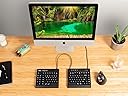
⌨️ Elevate your workflow with silent precision and ergonomic mastery
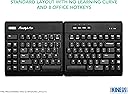
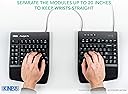
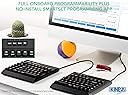
The KINESIS USB-A Freestyle Pro is a premium ergonomic split mechanical keyboard featuring Cherry MX Silent Red switches for quiet, smooth typing. Its award-winning adjustable split design supports personalized comfort, while onboard SmartSet programmability offers advanced customization without drivers. Compatible across major OS platforms and backed by a 2-year warranty, it’s engineered for professionals seeking durability, health-conscious typing, and productivity-enhancing features.


| ASIN | B07J1ZJ6XR |
| Antenna Location | Office |
| Best Sellers Rank | #2,481 in Computer Keyboards |
| Brand | KINESIS |
| Button Quantity | 104 |
| Color | Cherry Mx "Quiet" Red |
| Compatible Devices | Windows 7, 8 & 10 Mac OS X 10.4+ Linux Android Chrome |
| Compatible Operating System Family | Linux, MacOS, Windows |
| Connectivity Technology | USB, USB-A |
| Customer Reviews | 4.3 out of 5 stars 305 Reviews |
| EU Spare Part Availability Duration | 2 Years |
| Enclosure Material | Plastic |
| Global Trade Identification Number | 00607998890011 |
| Hand Orientation | Ambidextrous |
| Item Dimensions L x W x H | 7.25"L x 15.5"W x 1.25"H |
| Item Weight | 2.6 Pounds |
| Keyboard Description | Ergonomic |
| Keyboard Layout | QWERTY |
| Manufacturer | KINESIS |
| Mechanical Keyboard Switch Model | Cherry MX Quiet Red |
| Mfr Part Number | KB900-RDQ |
| Model Number | KB900-RDQ |
| Number of Keys | 20 |
| Number of Sections | 9 |
| Power Source | Corded Electric |
| Recommended Uses For Product | Office |
| Series Number | 900 |
| Switch Type | Linear |
| Theme | ergonomic keyboard |
| UPC | 607998890011 |
J**Z
Great keyboard
I love this keyboard. It helps my hand posture by being split allowing it to be ergonomic. It does take time to train your muscle memory. At the time of this review, im still learning it's layout. One thing I suggest to the developer, keep in mind the muscle memory that we are most of us used too. The "ESC" key is too far and it wants to be where the F1 key is. Additionally, the left side shortcut keys are useful but perhaps try to see how will it work out if those where on the right side of the left keyboard. I feel that location will make ot easier to train our muscle memory. Designing around muscle memory can be very challenging but not impossible.
J**.
Fantastic ergo keyboard, accessories are a must
Been using this keyboard for work and it has been very nice to use. The switches feel great and being able to space out my hands while typing feels so much better than having my hands all scrunched up on a regular keyboard. I do miss having a number pad, but that was much easier to adjust to than I thought. I will say, do get the accessories for this keyboard. The additional wrist pads and lift kit are a must in my opinion and worth the additional cost.
N**K
Good ergo keyboard, spendy for what you get
Moved to this keyboard off of a 10+ year-old MS Ergo 4000. Compared to the MS keyboard, it is obviously much more flexible to position (especially with the VIP3 Pro kit - don't buy this keyboard without it or you just get a two-piece keyboard with no tilt adjustment or wrist pads), but the keys themselves are all square and not sloped or differently-sized for better ergonomics. So focus on this if positioning is where you need ergonomic support, but not if you also need a high degree of ergonomic adjustment for your hand/fingers. On the other hand, the mechanical keys do, as I hoped, feel great. I am certain that the strong key feedback makes my typing "crisper" so I hold my hands more appropriately, and my fingers literally are less tired when typing for extended times. The Cherry Red Quiet keys are fine for typing while on Zoom meetings, and the people I'm talking to do not report keyboard noise. There is, as mentioned in other reviews, a little reverberation as the keys hit the metal baseplate, which would be nice to have silenced, but I don't find it especially bothersome. The feel is good with no tacticle "click," which I'd assume you'd get on the Brown keys. This is NOT a clicky keyboard and if you want one, look elsewhere. Programmability is amazing, and I'd point you do the documentation on how wide it is. You have 3 layouts to customize, each with their own second "layer" by pressing the fn key. This means that in total you have 6 full keyboard layouts to work the way you want. The software to edit layouts is easy enough to use, and once you set things up, the layouts and macros are saved on the keyboard. So if you're using this with ChromeOS or Linux without native support, you can personalize on another machine and then use the full customizations on other computers. The VIP3 Pro accessory which, again, you just should buy to get the most of our the ergonomics of this keyboard, is cleverly built and gives you three different angles to tent your keyboard. I found myself tenting the left more than the right, and it's nice to have that option. It only does horizontal angling though, so you cannot tilt the keyboard vertically forwards or backwards. On the downsides, the rubber feet to keep the keyboard stable are not very sticky, and as a result, the tenting accessory ended up sliding around and sometimes flipping position on my very slick keyboard tray. I put some microsuction tape on the rubber feet and that resolved it. Overall I'm happy and can type comfortable and quickly on the keyboard. Took some getting used to with typing with my hands far apart, but once I got a few days' use under my belt, I was back up to my typical 100wpm, and my hands and wrists feel great after a long day of typing. If you cannot touch type, however, avoid this keyboard. Using a broadly split keyboard like this along with hunting and pecking would be incredibly frustrating. I'd also have a hard time endorsing this as a gaming keyboard for the same reasons (the same would be true of Kinesis' gaming version of this, which is the same except with fancy lights). Between the un-padded metal backplate, the lack of forwards/backwards tilting on the VIP3, and the slippery keyboard feet, the keyboard falls short of being a true best-of-the-best option, at at a little above $200 for the whole kit, that's a disappointment. But the options for ergonomic mechanical keyboards are limited, and I cannot fault the feel of the keyboard once I got it "just so."
P**E
Comparing Freestyle Pro vs Freestyle 2
I bought two "Freestyle 2" keyboards right before this Freestyle Pro keyboard was released and couldn't bring myself to upgrade so shortly after buying two keyboards at the time. Now I have finally upgraded to the Pro version with MX Silent Red switches and overall I am very satisfied with the upgrade. The keys feel soooo good on the Pro. CONS (not huge things, but worth noting): -No USB inputs on the back of keyboard. The Pro version has no USB inputs on the back like the Freestyle 2 does (two USB-A ports). I didn't realize this until it arrived. I remedied the issue with a cheap USB hub, but I do miss being able to plug a mouse and foot pedal directly into the keyboard. -No connector piece for the keyboards on the Pro model. I really like how the Freestyle 2 has a little connector piece at the top of the keyboards that allows you to pivot the two keyboards at different angles while still keeping them attached. The Pro model doesn't have this and while I haven't missed the connector piece much in the short time I've owned this model, I do wish it were there. -Smaller Delete key (above Backspace) on the Pro model. On the Freestyle 2, the Delete key is a very wide key, the same width as the Backspace key, and it's placed directly above the Backspace key. For my needs as a typist, this was fantastic. On the Pro model, it's now just a little key on the top right of the keyboard, not one large key over the Backspace. I have somewhat remedied this by remapping the 2 keys to the left of the Delete key (ScrLk and Pause) so that they perform the same as the Delete key, giving me a wider area to hit when I'm typing fast, but it's just not as good as one big Delete key and I'm disappointed by Kinesis's decision to change this. PROS: -The keys feel great and the MX Silent Cherry switches are not too loud, which would be a problem for me hearing dictations in my earbuds. There is a comparison video on YouTube of the MX Brown vs the MX Silent Cherry switches and it was an obvious choice for me. The MX Brown are very, very loud and the MX Silent Cherry are quiet and still feel great. -Remapping and macro software (SmartSet App). I thiiiink this belongs in the Pros section. The ability to remap the keyboard is wonderful and in some cases a huge improvement over software remapping (more on that below). However, I did find that there was a learning curve with this software and installing the firmware update. To achieve what I wanted, I ultimately remapped directly using the keyboard and then double checked my changes using the software. Some people might think the software is great, but I just found it a little tricky setting up macros, while on the other hand doing simple remapping of keys from the app was really straightforward. I use remaps and macros directly on the keyboard in conjunction with the software for Windows 10 called "AutoHotkey" which is really powerful and can do some things that the Kinesis SmartSet App cannot do. (On Mac, BetterTouchTool is similar to AutoHotkey but even better with a much better interface.) -Ergonomics. I'm in love with the ergonomics of this keyboard. I won't gush over all the little reasons, but basically the lifters and all the other layout and design decisions made by Kinesis I largely agree with. I considered the Matias Ergo Pro, for example, but they have made some strange decisions with key size and layout. I wish the tilters (VIP3 Pro accessory) came with this already expensive Pro keyboard, but I kind of understand their decision to not include it. Some people are going to want the "wrist rest + lifters" model and some want the "lifters only" model, so it makes sense to let the customer decide what they prefer and buy it separately. I personally love the "lifters only" model because I can position the keyboard right at the front edge of my desk near my body, unlike the "lifters + wrist rest" model that causes the keys to be several inches away from the edge of the desk based on the location of the lifters underneath the wrist rest. -Includes a key removal tool and some Mac keys. I think this was a great decision by them, making the keyboard compatible with both Windows and macOS. -Longevity of mechanical key switches. I have been using the Freestyle and Freestyle 2 keyboards for approximately the last 7 years and it's my opinion that the keys tend to get slightly mushy and worn out over time. Some people may not experience this because they aren't typing 6+ hours a day and they won't wear out the keyboard, or perhaps they wouldn't even notice the slight squishiness or lack of crispness I'm describing at all, but I notice that those keyboards have tended to wear out in about 3 years. They are still fully functional and I still use it alongside this newer Pro model, but some keys just act a little weird and it's annoying. I'm hoping that these crisp feeling mechanical switches on the Pro model continue to perform the same for many years to come. It could be the case that popping off all the keys on the Freestyle 2 and cleaning under them would improve this somewhat mushy feeling, but I'm never going to find out :) OTHER: I mentioned earlier how remapping directly to the keyboard can be an improvement over remapping software in some circumstances. I now transcribe for a healthcare company that requires me to work inside a virtual machine running Windows 7 where everything is locked down and the key remapping software that I use on Windows 10 (AutoHotkey) does not work inside that virtual machine. Luckily, the macros and remaps saved to the software inside this keyboard DO work inside the virtual machine, meaning I can work more efficiently in my stupid locked down virtual machine. SUMMARY: I love this keyboard and would buy it again. I have also contacted support a few times over the years and they are always so prompt, polite and helpful. I fully believe it is a worthwhile upgrade over the Freestyle 2. EDIT (01/30/2020): Update! Still love the keyboard, but I was getting a little annoyed with the keyboards sliding around on my wood desk throughout the day as I was typing and frequently needing to be readjusted, so I made a little wood block and screwed the lifters into it so that the two keyboards don't float around on my desk. This has been a huge improvement for me. I would still highly recommend the keyboard even if you don't have the ability to do this. Perhaps a rubber mat instead of just a wood desk would keep the keyboards in place better. But if you're interested, I first cut a 1/2 inch thick piece of wood into the triangle shape I wanted (the block is 2 inches wide at the top, 3-1/2 inches wide at the bottom) to separate the bottom of the keyboards by about 2 inches and then angled it up so that the top of the keyboards touch slightly, and I then used a miter saw to cut a 30 degree angle on the sides of the block of wood and then placed this piece in between the lifters and drilled some holes and sent some screws through the lifters and into the wood to create one solid keyboard at the angle I prefer. Been so happy with this setup since doing this.
A**K
Very good ergonomic keyboard, still undecided on cherry red vs. brown
I have been using the kinesis maxim family of keyboards for over 2 decades, usually purchased by my employer and had to leave it behind when I changed jobs. However, I got to keep my last one and some of the membrane-style switches eventually gave out after about 7 years. The cherry mechanical switches should last much longer. I was hoping that my previous lifter from the standard Freestyle would fit the Pro, but they are different dimensions. I managed to make do for now but they don't fit very well. I am very good at adapting to different keyboard layouts, and the ability to separate my hands really decreases strain on my wrists compared to a flat keyboard. I wanted quiet, non-clicky, but tactile (office / WFH / speakerphone - touch typing and shortcut key navigating). After lots of analyzing I went ahead with the cherry red. Overall I like it. It does feel squishier than I expected, and at times I have held down a key without realizing it. So the feel is "linear" as advertised, in that you can't tell when a key has been actuated by feel. I wanted low actuation force but it is basically non-existent. It is so hard these days to find a place where you can actually test the different keyboard options before making a purchase, so hopefully my experience is helpful. Preference of switch type is very individualized, there is nothing wrong with the cherry red that I got, just that it is a different feel. The macro functionality is neat, though I haven't found much use for it yet. It's especially impressive that you can mount the drive on Linux and edit the configuration by hand, or you can program it on Windows using the GUI and bring it back to Linux. I kind of wish there was an extra key to run keyboard macros that didn't conflict with standard office shortcut keys (ctrl and alt key combos are already mostly taken). Maybe there is one and I just haven't found it yet.
R**N
Quality! Try it with a rollermouse too
If you're new to split keyboards as I am you'll be spending some time fixing your typing habits. This is a very, very nice keyboard; I got 'red' switches and they are silent (there is a little gentle clacking from the keys themselves but it's not annoying); the key action is gorgeous - you can tell straight away this thing will support some demon typing speeds. As a programmer I find the DEL key is a little far away for comfort (as is ESC) but it's more a muscle memory thing ; if I wanted to train myself further to a npnstandard layout there are other keys that could be redefined (the programming utility / virtual drive thing is well done). I am using in conjunction with a rollermouse (meaning I don't have to move my right hand at all to do mousing, which was causing me pain) which is a great combo so far - I may also put a touchpad in the middle between the two kb halves when I've grown comfortable using kb with a larger center gap. As mentioned elsewhere you do want a 'tenting' option (which is undeniably a gouge by the manufacturer for two bits of plastic); I got the "V3 Pro Tenting Accessory for Kinesis Freestyle Pro" which is the one without wrist rests - you certainly _do_ want rests but as you see from pic I use the rollermouse rests, which, while I'm still experimenting and adjusting, seems to work well. Pictured is a Rollermouse Pro (available on ebay from office liquidators cheaply); will also try with a Rollermouse Red (which has a longer bar, this may be better or worse TBD) You can get used Freestyle kb's on ebay for a lot less money than I paid for this "Pro" but after reading the reviews waxing lyrical about the pro's mechanical key action I decided to splurge, and it's head and shoulders above my other dome keyboards. I will persevere with adjusting my typing habit to this and I expect it will be a productivity and ergonomic delight. However.. I can see I'll become adjusted to it and have to take it with me everywhere I go UPDATE: ok it's great. I thought the reprogrammable thing was a gimmick but then I noticed how much I'm moving my right hand to reach the cursor keys and backspace and delete (i.e. constantly).. - lightbulb moment!! made the left windows key "FN Shift" (i.e. shift to the alternate keymap the thing supports; initially set up so JKL etc are a numeric keypad - and switch them to be a cursor cluster... I put DEL and Backspace in there too; upshot is that with my left ring finger I can instantly turn the keys under my right hand into a cursor/delete cluster.... (see image, it'll be more clear) Just learning this setup right now but it appears to be a big improvement. I also got a Rollermouse Red (as opposed to the 'Pro' in the photo above) and it's waaaay nice. LOVE THIS KEYBOARD; with a rollermouse I'm barely moving my arms at all to get everthing speedily done.
B**E
Not very quiet quiet, harder to press keys than older version, and harder to set up on a mac
I bought the quiet version because I thought it would be quiet. But it's louder than the kinesis freestyle 2 (which I also have, but two keys broke so I purchased this) and the keys take much more pressure to go down. Calling the keys silent is a bit odd. Tech support explained to me that this keyboard is a mechanical keyboard (louder), and kinesis freestyle 2 is a membrane keyboard (quieter but more prone to breaking), which explains the difference. That makes total sense after having done more research, but I do wish this was explained in the product description given that they advertise it as 'silent'. Furthermore, it's quite confusing and difficult to configure the keyboard for a mac. The package didn't include clear directions. Instead of just a 'mac configuration' type of button, you have to press certain keys, go into your Mac finder, click on a little FS PRO icon, then open up an app and then select a numbered layout that you have to know means MAC configuration, and even then I'm getting a warning about data corruption if I select that option: "FormLoad: TFFormLoad Can not focus. Press OK to ignore and risk data corruption". For a $169 keyboard, that's a bit disappointing. Unfortunately they're no longer taking tech support calls, though this is understandable. Overall I'm a bit disappointed. I purchased the kinesis freestyle 2 about a year and a half ago, and it worked great until a few buttons stopped working. So I bought this version because I wanted the keys to be quieter. But now the keys are louder (!), it takes more effort to press the keys down, the keyboard is thicker (albiet more programmable), it was much more expensive, and setting the thing up on a mac appears to be buggy. However, I now understand that the tradeoff is a more durable mechanical keyboard. Ergonomically, the keyboard is great.
C**A
Didn't last a full year.
While the ergonomic benefits of this keyboard are great, the keyboard quit working for me after less than a year. Random keys are non-responsive while others hold down and stick. I've cleaned it and even taken off keys to see why it would be sticking. There isn't anything causing the stick other than a keyboard malfunction. Also, the letters are all worn off already. This isn't an issue for me, but my husband can't use it anymore as he needs to look at the letters while typing. When I contacted customer care, I have to pay shipping to return the model that isn't working before a replacement is sent. I don't think I'd buy this again.
L**S
No confíen en este vendedor. Teclado usado e incompleto
El teclado estaba usado, me di cuenta porque traia una macro pregrabada que hablaba de una Janet, dos correos y algo de una visa DS160. Aparte de esto no traía las teclas de Mac ni la herramienta para reemplazarlas. Y venía "sellado".
A**N
Ergonomy and Flexibility at its Best
I really like the Kinesis brand. This keyboard has been an upgrade from Kinesis Freestyle2 Blue. I have been using the split keyboard(s) from this brand for 6+ years, and I am very much used to the split-keyboard concept. Complementing this with programmable and silent mechanical switches simply boosts the experience, especially in open-office workplace environments. Being able to choose among different pre-configured layouts and program useful macros for different computer settings is a bonus. The only downside I could see (compared to Freestyle Edge) is that the VIP3 kit is excluded. The kit should have been included already in the package.
M**P
Broke after one week
After one week of usage, one of the keys stopped working. I am very angry considering the cost of the keyboard.
M**R
good keyboard but poorly fitting tent accessory is annoying
This has a nice keys recoil and not too 'clicky' like the usual Cherry keys. However here is the fundamental problem: I was looking for a fully ergonomic keyboard solution to avoid wrist and hand strain. The cherry keys recoil solves one issue, but it's incomplete without the tenting to position the wrists in a more natural 'handshake' position. However, the tenting is not designed for this Kinesis Freestyle Pro model so it doesn't securely fit into the keyboard. It kind of does the job but the tenting falls off if you lift the keyboard off the desk, so you can't quickly move workstations or change the height of the tenting, etc.
S**L
Parfait
Très agréable d'utilisation quoiqu'il nécessite une courte période de familiarisation. A soulagé mes douleurs au poignet.
Trustpilot
1 month ago
2 weeks ago