Desertcart purchases this item on your behalf and handles shipping, customs, and support to Belgium.
๐ Unlock SSD freedom with Sintechโs sleek M.2 extenderโbecause your workflow deserves easy access!
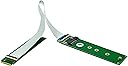
The Sintech M.2 NVMe Extender is a 20cm PCIe M-Key extension cable with anti-electromagnetic shielding, designed to relocate your M.2 NVMe SSD for easier access. Compatible with four common M.2 sizes (2230 to 2280) and optimized for Gen3 NVMe SSDs like Samsung 960 EVO and Intel 600P, it preserves data transfer speeds while simplifying SSD swaps. Ideal for professionals seeking efficient hardware management without sacrificing performance.


| ASIN | B07DZCCGJN |
| Best Sellers Rank | #339 in Internal Solid State Drives #4,194 in Computer Internal Components |
| Brand | Sintech |
| Color | Silver |
| Compatible Devices | Samsung 960 EVO, Toshiba XG3/XG4, Intel 600P |
| Connector Type | M.2 NGFF PCIe M-Key |
| Customer Reviews | 3.9 out of 5 stars 71 Reviews |
| Finish | Silver |
| Finish Type | Silver |
| Item Weight | 0.09 kg |
| Manufacturer | Sintech Electronic |
| Number of Items | 1 |
| Package Quantity | 1 |
| Power Plug Type | No Plug |
| UPC | 701017254133 |
| Unit Count | 1 Count |
| Warranty Description | 6 Months |
R**U
No issues seen, solved problem of swapping SSDs
I regularly swap SSDs depending on what I am doing. On my desktop the SSD is located behind the DVD burner, so each time I had to remove the DVD burner to get to the SSD. This extender solves that problem very well. The cable is long enough to attach the far end to the case in an easy to access spot. So far I have not seen any issues with the SSD being located on the end of the cable. The read/write speeds seem unchanged, I have not had any obvious data corruption issues. The socket for the SSD seems of reasonable quality. I have only had this for a short while so I cannot comment on its longevity. If you need to gain easier access to your SSD, this is a good solution.
C**8
Great for Gen3, not so great for Gen4
Using the extension on my Samsung 850 Pro (Gen3) the speed difference was pretty much non-existant. However using my Sabrent Rocket 4 Plus (Gen4) made the read go from 6k down to 2k, the write went down from 5k to 3k so not good. In short: Extension on NVMe 3.0 = Great! Extension on NVMe 4.0 = Performance Loss
C**R
A good problem solver.
This was just what I needed to make my motherboard's M.2 slot more accessible. I have to pull my graphics card, two more PCIe cards, and two covers off to get at any of my M.2 slots- I still have to pull out the bracket I mounted this to, but that is a MAJOR improvement. The connectors let me unplug the cable to fully remove it, and easily swap drives. This unit uses a thin cable with connectors, like you'd typically see inside a laptop. I was able to fold the cable on the male end, to exit perpendicular to the card and get out from behind the covers. I tested the sheilding on the cable, and it has an insulating layer, so it won't short anything out, but I'd still try to keep it from laying directly on boards. I superglued the female end to the back of the bracket my RAID card's battery is on. I didn't do a benchmark of the drive on it, but I was able to boot an OS on the card with no issues.
H**Y
DOES NOT WORK WITH LENOVO LEIGON GO
I bought this at the recommendation of some people on Reddit to help with heat and upgrades in my Lenovo Legion Go. I plugged it in with the original SSD and only got bluescreens on boot. I assume that my item is defective and get a replacement. Same results with the new product and multiple drives tested (the stock SSD and a Samsung 980 PRO). But upon reinstalling the SSD like it was from the factory (with no modifications) it works just fine. I will be returning both of my m.2 nvme extenders.
D**S
Perfect! No Speed Drop At All!
I use it in my Intel NUC 12 Extreme (Dragon Canyon) + Hynix Gold P31 for the rear NVME SSD because it gets very hot even while idle if CPU or GPU-intensive work. I used the adapter to move the NVME SSD to the bottom, and now it idles at around 40C. But before, the SSD idled at 60-70C. It's an excellent device for money. I recommend! However, the Samsung 980 Pro does not work with this adapter. It seems that only low-power SSDs work, like Hynix P31/P41
H**R
I was wrong, it works!!
I got this adapter (the one with silver cable) to extend the location of an M.2 port on several pc's. I bought one extension cable to test, with the intention to buy others. First, I tested on a an HP ProDesk 600 G3 Desktop Mini. The idea was to extend the port and add an adapter, so I can add an external gpu. I wanted an extension cable to allow for me to use the same occulink external gpu to be used on different devices (each with their own extension cable). I purchased two m.2 to occulink adapters. They both failed with this extension, but worked without it. I was ready to ship this back!! Then, i rembered... i have a Corsair One i160 PC. The issue with this pc is that you have to remove the graphics card in order to get to the m.2 slot. It only has one m.2 slot. If i ever want to change out my nvme ssd, it is doable but a bit troublesome. With this extension cable, I was able to fix that issue. Tested it, and it works!! Now, I can access the port, I'm SO happy. I never tested the speed before I installed and haven't tested it yet! I may update this in the future. I'm sad it didn't work for extending and adding an occulink port, but so happy it works for my nvme ssd.
B**D
6 inches is indeed enough
My m.2 slot is on the bottom of my board and this lets me get to it without having to take it all apart.
N**N
Not detected by PC
While plugging in my drive directly, the PC boots every time. When using this adapter, the boot device is not detected, and Windows explicitly throws an inaccessible boot device error. Either DOA or a useless product.
Trustpilot
3 weeks ago
1 month ago