

Desertcart purchases this item on your behalf and handles shipping, customs, and support to Belgium.
🖱️ Elevate your workspace: comfort, precision, and power in one sleek trackball.
The Logitech MX Ergo Wireless Trackball Mouse combines ergonomic innovation with advanced precision controls, featuring an adjustable tilt (0-20°) to reduce muscle strain by 20%, a precision mode button for fine cursor control, and Logitech FLOW™ for seamless multi-device use. Its rechargeable battery lasts up to 4 months, with fast charging capabilities, all housed in a stable, professional graphite design favored by productivity pros and creatives alike.
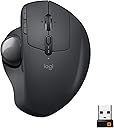


| Additional Features | Ergonomic Design |
| Antenna Location | Office |
| Asin | B0753P1GTS |
| Battery Average Life | 4 months |
| Best Sellers Rank | #999 in Computer Mice |
| Brand | Logitech |
| Button Quantity | 8 |
| Color | Graphite |
| Compatible Devices | Desktop |
| Connectivity Technology | Bluetooth |
| Customer Reviews | 4.5 4.5 out of 5 stars (12,379) 4.5 out of 5 stars |
| Enclosure Material | Graphite |
| Global Trade Identification Number | 00097855132666 |
| Hand Orientation | Right |
| Hardware Platform | Laptop, PC |
| Included Components | MX ERGO Advanced Wireless Trackball, Micro-USB cable for recharging, Quick Start Guide, Unifying USB Receiver |
| Item Dimensions L X W | 5.7"L x 3.7"W |
| Item Type Name | Logitech 910-005177 MX ERGO Advanced Wireless Trackball for Windows PC and Mac |
| Item Weight | 5.76 ounces |
| Manufacturer | Logitech |
| Mfr Part Number | 910-005177 |
| Minimum Required Operating System Version | Windows 10 |
| Model Name | Logitech MX ERGO |
| Model Number | 910-005177 |
| Movement Detection | Trackball |
| Number Of Batteries | 1 Lithium Metal batteries required. (included) |
| Operating System | Windows 10,11 or later,Mac OS X 10.8 or later,iPadOS 13.4 or later |
| Pattern | Geometric |
| Power Source | Battery Powered |
| Range | 10.0 meters |
| Style Name | Mouse |
| Theme | Computer Accessories |
| Unit Count | 35.2 Ounce |
| Upc | 097855132666 |
| Warranty Description | 1 year limited |
User
The best general-purpose trackball is now even better.
This is about the sixth Logitech trackball I've bought, along with half a dozen keyboards, and it's among the best of their products. The M570 has been my favorite pointing device for years, and I've worn out a couple of them -- the L and R button switches take a lot of beating, L especially, and after a couple years the button becomes erratic. This, of course, is a terrible flaw, since it means you may accidentally DROP something that you're dragging across the desktop -- occasionally into some folder you didn't notice -- and then it's a challenge to find the file (or 100 files) you dropped.Logitech replaces these worn out trackballs for free, unless they last too long, and then I'm stuck buying a replacement. But they last for years, and the M570 is now less than $25, so it's not even $1/month "maintenance" cost.I mention the M570 reliability mainly because the new MX ERGO is reported to use button switches that are 10X longer-lived, or more. Since that was the only defect in the M570, that should mean the ERGO is pretty close to perfect. If it wears out in 20 years, I probably won't be around to care.Compared to the M570, the ERGO is heavier and I find it easier to keep in place on my desk. I love the sideways tilt feature, since I can use it lying flat for several hours, and then give my wrist some relief by switching to the more upright position, which allows the side of my hand to rest lightly on the desktop. It's also much easier to relax my fingers without inadvertently clicking L or R.I suppose if I were using this as a portable controller I might not like the extra weight, and I did often carry the M570 with me on trips. If I were doing that on a daily basis, in a briefcase or backpack, the added ounces and volume (the ERGO is about 20% larger) might be a problem. But the trade-off is that it stays put more easily, on a much larger and tackier rubber base layer, and it's more restful to use.I do miss the acceleration feature, long a standard among mice and trackballs, but the one-touch Hi-Res button somewhat makes up for it. I would prefer both, and I hope Logitech will reinstate acceleration in the next update of the new configuration utility.The little nubs that the ball rides on are seemingly indestructible. Some reviewers complain that they're plastic, but I believe they're actually a kind of ceramic or glass. Considering that my oldest M570 (5 years?) still runs smoothly and the little nubs are still round with no visible flat spots, I'd say they're considerably harder than most plastics, and I doubt they are plastic at all. Viewed at 30X they look like ceramic to me -- glossy and absolutely smooth and spherical. In any case, they afford very light, smooth rotation in all directions, and they don't wear out. Like any small mechanism in a hands-on application, they do collect dust and other debris from one's hands, but that accumulation of dust and furch just makes the ball movement gradually increase in friction. Pop out the ball, flick of the little dust donuts with your fingernail, and the thing is super smooth and free-wheeling again.If I could take off half a star for the lack of acceleration, I might do so, but in all honesty, I've been switching back and forth between an M570 and an ERGO for days now, and I can't say I notice any significant difference in pointer movement. On my 50" UHD monitor, it's a long way from one side to the other, but that's why I use a trackball in the first place -- I can just swipe it a few times at the medium-high speed setting, and I've traversed 3,840 horizontal pixels with barely any effort at all. In the end, if I had to trade the Hi-Res button for acceleration, I'd go with the button, and of course that's what you get with the ERGO.But all this is really nit-picking. The biggest bonus after comfort is the improved scroll wheel, which now has L and R tilt, in addition to downward clicking, and I've missed that for years using the M570. I do wish it had a few more buttons for less-frequent uses, but there's something to be said for simplicity -- I have a few other pointing devices with lots of buttons, and I was never able to make them indispensable.The biggest downside is the price. I'm not sure why this costs 4X the price of an M570. Clearly it's more expensive to manufacture, but not by that much, but then it's new, and the development costs haven't been amortized yet. If in a year or so it comes down to $39.95, I'd call it a bargain.
User
I miss thumb buttons :(
After quite a few years since having the Logi T-RA18 cordless trackball, I wanted once again to go back to just lazy thumbing around on the pc. I'd been staying with the Logi brand since that old trackball, but in traditional corded or cordless mice. Figured it'd been about 10yrs since then, maybe they made improvements on the trackball scene? Yep, they did.Enter this guy. First off, its nice. Very ergonomic. Then add in that tilt feature and it gets better. If you don't like the tilt, just firmly rotate it to the left and it'll plop down flat. By the way, that tilt plate is removable if you want just a flat trackball. I left it on, because I can simply add a bit of pressure and it just flops over flat.Battery life is really good. My old one took batteries, this one has power built in. Probably lithium, can't say for sure. What I can say, is that it lasts quite a long time. Plus, if it DOES start to die, you can simply just plug it in and keep on thumbing around. It charges while you use it.The ball portion is just like it used to be. Nice smooth ball to thumb with. Mine however has a ever so slight divot in it. I can feel it, but can't find it. I also can't be bothered to really look for it as well lol.And just like previous trackballs, there's a hole under it so you can pop it out to clean under the ball. The difference between then and now, is that this ball is in there quite snugly. Took a fair amount of force to pop it out so I could inspect the innards. Keep this in mind and don't use anything that might mar the surface.A new feature I haven't seen yet, is by the ball, there's a button. This button by default evidently will reduce the mouse speed super slow. Great if you want to move the mouse .5mm at a swipe of the thumb I suppose. Me personally, i've no use for it. And, its not in a convenient place to use. You have to stop, and find it in order to push the button. But it might be useful to someone out there. After all, its there right?Aside from that, it's got the typical mouse buttons and wheel along with mouse speed buttons next to the left mouse button.Gaming? Well, that's going to be user preference. And there's a learning curve to it if you've been using traditional mice for awhile, like me. So, I've got both this mouse and the G604 sitting next to it so I can have all my bases covered.By the way, this mouse does not use the g hub software that is found on alot of mice. It uses logi bolt and logi options. So far there's been no conflict between those and ghub.In the end, its a nice addition to my arsenal of gadgetry. I'd say give it a whirl. Keep in mind, there's a learning curve to it!Buy with confidence!
User
BUY THIS NOW… UPDATED Sep 2023
Don’t even bother shopping for cheaper trackballs or knock-offs, just get this one and save your time and money. If your reading this review and debating on this or a cheaper off-brand trackball, stop right here. I tried others that seemed like they'd be as good or better for less money, but ended up paying top dollar for this name brand one in the end anyway. I spent more money trying to save money, which is the definition of counterproductive. You get what you pay for once again bites me.This trackball is smoother, better quality, and more reliable than anything else out there. The tilt is amazing and has really saved my wrist. This is my everyday mouse. I also use this for music production, and graphic design and it’s been amazing. I don’t use a trackball for gaming, but if you game with a trackball, I’m sure this will be great for that too.A couple features I LOVE about this mouse:1. The precision button is great! I use it so much that I’m afraid I will wear it out. I bought another mouse that was basically a rip off of this one, it did not have this feature and was not smooth at all. It made it a nightmare to use for selecting text, let alone trying to draw or click on a smaller button. It also works like a “sniper” button on a gaming mouse.2. The weight of the base. Cheaper ones and rip offs are too light and either move and/or tilt too easy or they feel like they are going to fly of the desk if you scroll fast or flick the trackball.3. Lastly, the fact that it has no RGB is a plus in my book. Especially random, Uncustomizable RGB. Can’t we have peripherals without RGB anymore anyway? Don’t get me wrong, I like some RGB LEDs when appropriate, but at least make it customizable. You don’t have to have it cycle through every color in the spectrum in 5 different ways. Let us at least color it to match our rig. I know that this is usually a bad sign and that they are adding RGB to try and make it more appealing, but I bought it anyway.Like I said in the beginning, JUST BUY THIS ALREADY! Your research end here. I made the mistakes, so you don’t have to.*Update Sep 2023*I wanted to share my thought after over a year of use. I use this every day and it still works like it's brand new. I use it to switch between a Mac and Windows machine without any issues. I do maintain it pretty well. I clean the rollers inside and clean the ball with a microfiber cloth. I also do something that makes this mouse even smother, but it's kind of gross. I wipe my fingers on an oily part of my face and lubricate the ball. I can't even tell if i've got oil on my hands or the ball, but it makes a BIG difference. I know, it's gross, but it's my mouse and no one else uses it. There is a trade off though. The roller will collect dust faster, but I just pop out the ball with a cotton swab/Q-tip and clean the roller with it.
User
it's all about configuration!
This review is intentionally being copied to both of my recent Logitech purchases to better highlight the distinct personalities of the equipment described. First of all... I use a trackball because of loss of manual dexterity. Long ago, I replaced my first trackball (Kensington) with the old Logitech model with the ball in the palm position as at the time that was a pretty good arrangement for me. The larger ball of the Kensington had become unmanageable for me, and I still had enough use of my hands that the configuration with the smaller ball was all the adjustment Ic required... It was back in the days when people still looked at you funny and asked what a trackball was... Anyway, I think Logitech still makes them, but it's no longer the correct solution for me... The squeezing or grasping action required for that configuration now irritated my muscles causing bad spasms... But I will mention that those trackballs worked pretty well. I did have three or four and came to notice that they weren't really made to last forever... Not that anything is... Sooner or later the sensors fail and that's that. Anyway, moving forward... My health has become more dicey. I now have considerably less control of, and sensation in my hands, so I was attracted to the M570 because of the finger grooves. They certainly do help me keep my hand where it needs to be. But the angle does not work and its tiresome for my failing muscles... and that ball is extremely difficult to control. Not a defect of the equipment, but a malfunction of my hand, and more precisely in this case, my thumb... The trackball is delightfully very responsive. But for me it's too fast and slick (!), even when adjusted by software. I did not return that trackball. It was not very cost effective to do so. It was not a free return... And who knows... Maybe a miracle will happen and I'll get stem cell therapy and get to use my body normally again. Ok. Maybe not. There was some reason I liked it... There was something v about it I wanted to keep... But it took awhile to figure it out... In the meantime, I upgraded to the Ergo... It's got a throttle (precision mode) that's good for keeping my tremors from destroying my hard work. And... It's highly programmable... I love that part... Now, normally (once upon a time in some other life I had) a trackball with this much initial resistance would have been of no interest to me. But that's a feature for me now... and it works to solve my accessibility issues just in its normal mode... And if I'm having a super tremendous awful day with bad tremors, I can turn on precision mode instead of getting extremely frustrated that I have to stop what I'm doing. Also... I love the ability to change the angle of rotation of my arm so that it's actually comfortable. This trackball was engineered with those types of issues in mind. But... They forgot the wonderful finger grooves that are on the much cheaper M570 model. For the price... I would have been very happy if that feature was also part of the Ergo. Like I said... I actually couldn't decide for quite some time why I wasn't sure which trackball to go with. I finally realized that those grooves were a really important feature that I didn't want to give up, as they help keep my fingers securely in place... Unfortunately, I do have to reposition my hand on the Ergo rather frequently because my hand doesn't know where it is, like it does on the M570... In the end, I had to keep the Ergo, because it's so controllable _for me_. I just wish it had the added benefit of helping me keep my fingers placed properly. The repositioning makes me concerned that It will get dropped or be the accidentally casualty of a bad tremor day. But, if so, I have the less sedate M570 to get me through until repair or replacement happens, right? So, the Ergo might not be your cup of tea if you don't need equipment you can really throttle down. It's not going to be about speed with this device, but that resistance is what I need. And to say that is not to say it isn't smooth in its operation. This is a turtle, not a hare! The turtle is what's going to win the race for me... I really wish Logitech would marry the best features of these two devices and send me one as soon as they do!!!
User
Nice little step up from the 570 with a few added perks.
I saw this in Best Buy, but wasn't too impressed with their asking price. No hate for BB, but they offer a slightly different variant with a riser. Several weeks passed, new computer, new keyboard, why not a new replacement for pointing device? N'uff said, I'd been using the 570 off and on since it came out. The downside to trackballs, in my case, is work. The abrasive material that is inescapable in the air at my work gets embedded in my fingers and in time little micro-abrasions form on the ball and cause it to get hung up in spite of multiple hand-washings.Fortunately, they sell balls here on good'ole Amazon, which I purchased along with this model because I like a black-on-red combination. Good purchase on both parts. Upon unboxing, the gray ball that is standard is scratchy and has more "scuff" as most people have mentioned in other reviews. The red aftermarket ball is slick and rolls freely with precision.I let it charge and put it to work. I'm only on day-3, but so far I'm liking it. The adjustable angle pretty much set itself the first time I rested my hand on it. Placed palm down, let the weight of my relaxed hand on it and *thunk*, tilted to it's offset position.My new computer has Bluetooth and enough USB ports for the unifier without making any sacrifice for ports. I use both connections back and forth when transferring large files from an external drive and the USB starts to give me choppy cursor movements. That's when I switch to Bluetooth. The new "Options" software has a much nicer program designation feature than that of their "SetPoint" software.Only problem I have so far is the "Forward" and "Back" buttons. Having a microstroke back in '11 which caused a loss of sensation on the left side of my right hand. So feeling the buttons is difficult and I have to look at what I'm pressing. That doesn't cost a star since it's my problem and not with the unit itself.A toggle for a freewheeling option would have been nice. But the scroll wheel has a very smooth, tactile cogging and a smooth acceleration on certain web browsers with or without the Smooth Scrolling extension app.Like some people have posted, it does make a very high-frequency pitch when it's linking up. It doesn't bother me because it only lasts for a second or two. A pointing devices that doubles as a dog whistle, now that's just genius.I am curious to see how long that matte silicone skin is going to last before the higher PH in my palm sweat causes it to bubble and peel like the coating on my steering wheel, silicone mod sleeve, the coating on my cellphone, etc....The bottom line is a good line with only three days into it's usage. I see future purchases of the aftermarket 37mm ball due to the thumb abrasions. But we'll see how this one holds up. Just keep it's contact points inside the sockets cleaned.Update: Two weeks into it's usage, still no regrets. Unless my senses have softened in the last fourteen days, the high-pitched whining when linking up has diminished. My palm does get sweaty because it's non-breathable coating, but since the side of my hand rests on the table, I'm able to keep my hand off the devices unless using. Perfecting "the hover" using.
User
M570 Upgrade
I've used the Logitech M570 for many years. Mice always cramped my hand and I have never had the trackball give me ergo issues. I wore out the first 570 after many years and moved to the second. I used that for a number of years and then recently started to have an issue on my work computer where the left button seemed to be working like a right button on occasion, along with some other glitchy performance. This got me doing trackball research. Meanwhile, it turns out my company's computer help desk just had to upgrade my mouse driver and it was back to working perfectly. But now I had the bug in my head that after many years it was time for an upgrade.For me, the MX Ergo has been a step up in 5 ways: 1) I like the heavier unit that keeps it nice and planted on my XL mousepad 2) I really like the cursor slow-mo button for more precise work when needed 3) the overall grip seems wider and more ergonomic for my hands and I particularly note the ball or meaty part at the base of my thumb now has a resting area, so even more relaxing for my hand. 4) Between the rubbery hand rest and rubber bottomed metal base plate the whole unit just feels more high quality and solid than the plasticky M570 and 5) Because this unit has both the Logitech Unifying USB and Bluetooth and can easily toggle between the two when set up properly from the button at the base of the wheel, I no longer am transferring the Unifying USB from my company computer to work computer, a move I've done thousands of times previously... now I keep the Unifying USB in my work computer and easily toggle to Bluetooth for my home computer work on this MX Ergo as well as my recently acquired K780 keyboard that has similar functionality. Awesome! I find keeping the unit at the 20 degree tilt via the magnetic plate on the bottom is more comfortable for me than the flat position... but the metal plate approach is pretty nifty and one can easily hop between one position and the other on the fly, no formal "adjustment" necessary. The jury is still out on the rechargeable battery that is supposed to go 4 months between charges. With my M570 it always felt I went well over a year before the battery started to give up the ghost. This rechargeable device theoretically ensures one is not caught without AA or AAA batteries. I just hope it is not a planned obsolescence device where energy retention degrades after a few years to the point recharging the trackball becomes annoying, like the crappy degrading battery life on phones we've all experienced. Finally, It is kind of cool that the new silver ball and old blue trackball are the same size... I could swap out the balls and now my new MX ergo has a Blue Ball to show I'm a legacy M570 user.
User
Never going back to a normal mouse
At first I didn't think this really could be used to game. So I bought it to see how well you were able to use this for gaming. And oh boy, lemme to you, I am 100% impressed!When first started using this ball mouse a few months ago, I'm not gonna even front, I was straight up hot garbage. I mean in most games my KDR was worse than it had ever been, like I was lucky if I could even get a kill or hit someone.By the time the first two weeks were up, I was getting way better with it. Now, I still wasn't doing as well as I wanted to do but I was making progress.Now by the time the first month was over, it was like I never even changed to a ball mouse at all. Almost 90% of the time I forgot I was even using a ball mouse at all! And to top it off, my performance in game returned to normal and in most cases even significantly improved!Over all I really like the mouse, it's battery lasts for a very long time and it's very comfortable compared to my last mouse. Now when I mention battery life and comfort , I'd like to note that I play games for very long sessions and I have no problems with this mouse at all. My hand doesn't cramp since the mouse isn't small, the battery doesn't drain really fast(in fact I rarely find myself charging it at all) and when it's charging, it's still easy to use.Now to close this review off, there is something important that I would like to mention if you plan on using this for gaming. You will want to get a program called Raw Accel when you are running this mouse in your setup. I contribute most of my success in games to Raw Accel, as I feel that using mouse acceleration with this ball mouse is a complete game changer.I have had this mouse since the end of mayand I can really say it's a solid 5/5.Quick note: If you are going to use mouse acceleration, I really don't recommend using the "Pointer Acceleration" built into windows as it's complete trash. Its also important to note that not all mouse acceleration is made equally. In most cases a mouse acceleration programs base on the Quake mouse acceleration are the best. One program that is base on the quake mouse acceleration is Raw Accel which you can find tutorials for on YouTube.Also be sure to take out the ball and clean underneath it every once in a while!
User
Works Great Under Windows, Mac and Linux; Fast Switching Between Two Systems
I have worked with a number of trackballs, my most successful being a Logitech M570 which served me well for years. I finally wore it out and after some research I purchased the Logitech MX Ergo to replace it. I have had it about three days, and it has already proven to be exactly what I had hoped and more. It’s not perfect but it’s close.I was attracted to the fact that it works both as a wireless mouse with a USB receiver as well as a Bluetooth mouse. I have two computers on my desk, one being a Windows 10 system and the other being a Linux (Arch-based) system. My old trackball worked with both though I had to move the receiver between the systems, so I went with the assumption that this one would also work with both.I connected the trackball to my Windows system via Bluetooth and it has been flawless in operation. It connects without intervention and it works exactly as expected - all buttons work as they should and the operation is very smooth and predictable.I plugged the USB receiver into the Linux machine, pushed the channel button on the trackball and it immediately started working on the Linux machine, even though it was still paired to the Windows system via Bluetooth. It works exactly as it should and I have had absolutely no issues with the trackball on my Linux installation. So now, I can switch back and forth between the two systems with the push of the channel button and without having to connect or disconnect anything. It simply works, and the switch-over is fast. The take-away for me is that I no longer need two mice on the desk.I friend came over with his MacBook and there was no issue at all with connecting the trackball via USB. We did not try connecting via Bluetooth.The trackball has a metal plate on the bottom that is held in place with magnets, and depending on how the plate is attached the trackball can be tilted to ease wrist strain. The plate serves another purpose too - it adds a lot of weight to the trackball. Even without the plate, the trackball is hefty and has some mass to it, but the plate just makes it even more so. For me that’s a positive; others may dislike the added weight.One of the things I have missed has been a tilting scroll wheel. This trackball has one and I have been enjoying getting used to that feature again.One thing I did notice is that there is no CD/DVD in the package for loading drivers. This isn’t a big deal, and it’s easy enough to get the drivers from the net. That said, the trackball just seems to work when you attach it, without any issue. For me it has absolutely been plug-and-play, on every system I have tried.If I could change one thing - I would have made this trackball a little bigger. I have big hands and I struggle to find a trackball that’s an absolute perfect fit. This one is close. For the large majority of people it’s going to be spot on.I am very happy with this trackball and have no issue with recommending it. It works great, connects easily, when connected to two different systems it switches at the press of a button, it has a bit of heft to it and the tilt is adjustable for wrist comfort. It’s really all I could ask for.
User
Relato de 4 anos de uso:
As críticas mais frequentes ao MX Ergo, são relativas á sujeira no trackball e a degradação da borracha do revestimento (onde se apoia a mão). E é basicamente disso que se pode reclamar.Com mais de 4 anos de uso, o meu MX Ergo não tem defeito funcional algum e é absurdamente confortável de usar. Não houve desgaste de cliques, ou mal desempenho do leitor óptico, nem mal contato em carregamento, ou travamento da rolagem do scroll.Apesar de ter sofrido 4 ou 5 quedas feias, ainda se mantém 100% funcional e 90% confortável (devido a degradação da borracha).Além disso, tenho monitorado a vida útil da bateria, que tem se mostrado respeitável, como mostra o gráfico da imagem anexada que produzi, e os dados que descrevo ao fim dessa avaliação.Para quem está transicionando de um mouse convencional para este, a curva de aprendizagem é pequena, o que significa que em poucos dias se torna intuitiva a utilização do polegar para mover o cursor (ao ponto de causar estranheza ao voltar para mouses convencionais).Adoro o produto, e pretendo fazer o upgrade para a versão S quando o meu morrer._Em 1.590 dias de uso:Total de recargas: 27 (aprox. 7 por ano); Duração média da bateria: 61,2 dias; Tempo médio de carga: 2h30. Maior autonomia de bateria: 99 dias; Menor autonomia: 31 dias.
User
楽な体制で作業できます
マウスを傾けることができるのですごく楽な体制で作業できます。玉の中のゴミ掃除がM570よりもしにくいのが難点ですがこちらの方が使いやすいです。
User
Tres bonne souris
Initialement je ne cherchais de souris ergonomique, je cherchais une souris que je pouvais utiliser dans un espace réduit.C'est quelque chose qui n'est pas mis en avant et je trouve cela dommage.Dans mon cas d'utilisation par exemple il me suffit de prendre ou de poser la souris n'importe ou pour pouvoir l'utiliser comme une souris normale sans avoir a bouger le bras.Et ça me change la vie!Mis a part cet avantage qui m'a fait acheté cette souris je dois dire que l'utilisation en generale est très confortable. L'utilisation du trackball est un peu déroutante au début, mais il suffit de quelques minutes pour que ça devienne presque naturel et au bout de quelques heures je regrettais de ne pas l'avoir achetée avant...J'aime également beaucoup la plaque en métal en dessous, celle qui permet de modifier l’angle de la souris. Au début je pensais que c’était une feature un peu gadget et que je ne m'en servirai pas, et bien non, en fait c'est parfait!Quand je sens que mon poignée ou mon bras commence a ne plus être trop confortable, je change l'inclinaison de la souris. Tout au long de la journée, régulièrement je change de position et a la fin de la journée, pas de fatigue dans le bras.La plaque est également recouverte d'un patin antidérapant qui recouvre tout sa surface, une fois posée, la souris ne bouge plus.Point de vue qualité c'est du logitech donc rien a redire, logitech a fait ses preuves depuis longtemps, inutile de revenir dessus.La seule chose que je regrette c'est l'utilisation de micro USB pour la recharge. Je sais que c'est un produit qui commence a date dans le catalogue de logitech, mais un petit upgrade avec de l'USB C serait le bienvenue.Si vous cherchez une souris a utiliser dans des endroits confinée et peu pratique pour l'utilisation d'une souris traditionnelle et/ou que vous cherchez une souris confortable car vous avez des douleurs dans le poignée, le bras, l’épaule... etc... Vous pouvez l'acheter, vous ne le regretterez pas.
User
Great mouse with a catch
Probably one of the best mice I've ever owned and it was really easy to begin using it, feels high quality and haven't had any problems using it, it's great for people who have difficulty using their wrist and its usable from almost any position and doesn't take up much space on my crowded desk although it is larger than a typical mouse.It's also great for people who are (or work in environments) sensitive to noise with no sounds from dragging or placing it on the desk from use.If you aren't moving your cursor across the screen a lot and you're constantly making small movements (especially detailed movements) this mouse works excellent but large sweeps across the screen and you'll have to use two swipes with your thumb, another drawback is that for people who have difficulty using their thumb the task of rolling the ball may become strenuous to use for long periods.For various work situations it performs exceptionally but for gaming it may be worthwhile to stay with something familiar.
User
Best Mouse I have ever used
Heavy and high quality. Perfect angle when you use the tilt mechanism....it sits in a position that is natural to your hand. Other nice features.....a button for fine tune movement of your pointer, programable keys to move forward and back on web pages etc. Has another button on top to switch between two different machines. I use it to change control of my work computer (windows) and my mac on the fly. Also works with an IPAD as well. Great mouse and if you have never used a trackball mouse, try this one.
Trustpilot
2 months ago
1 month ago