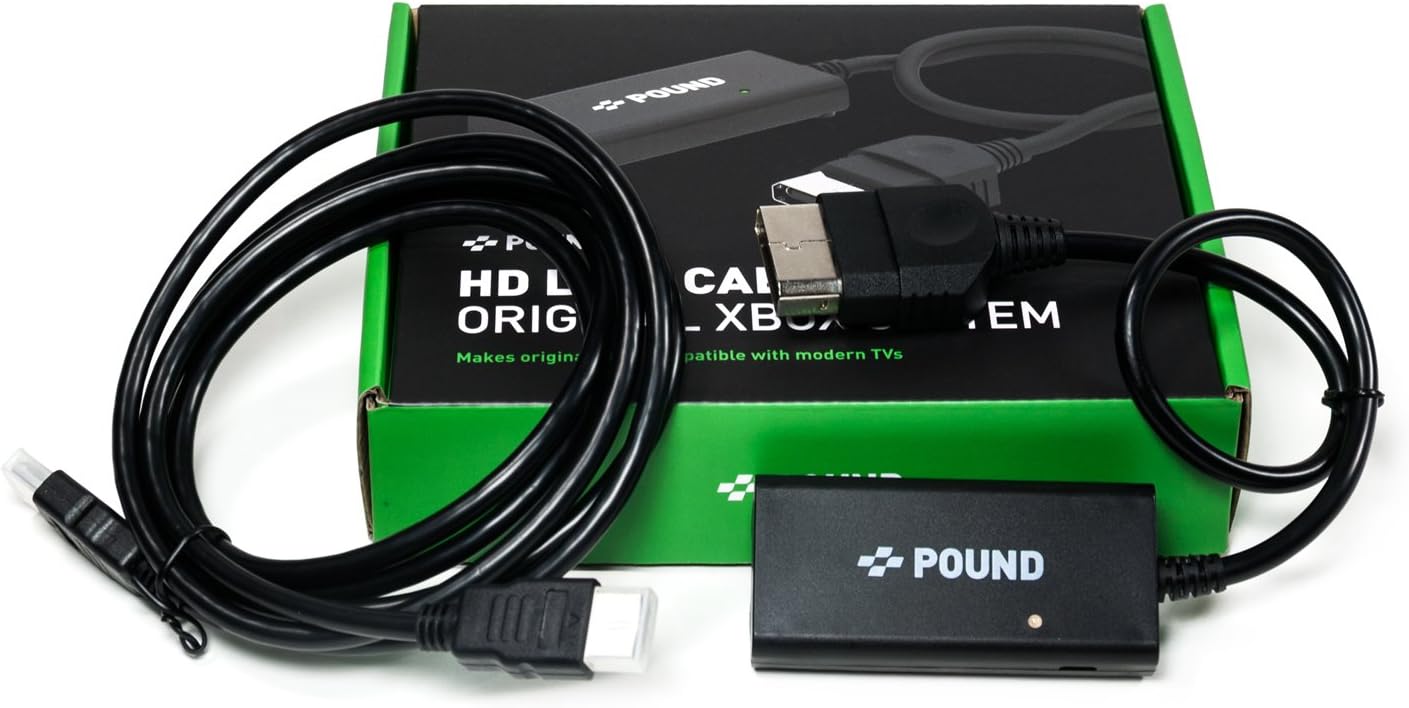
- POUND HD Link Cable for Original Xbox - Compatible with All Modern TVs, HDMI Cable for HD Video Quality and 480i/720p Resolution On Xbox Classic
Product ID: 66721329
🌈Color Accuracy
🎮HDMI Connectivity
📺4K Ready
Desertcart purchases this item on your behalf and handles shipping, customs, and support to Belgium.
🎉 Level Up Your Nostalgia!
The POUND HD Link Cable for the Original Xbox allows gamers to connect their classic console to modern TVs, delivering high-definition video quality and supporting resolutions of 480i and 720p. With a simple plug-and-play design, this cable enhances your gaming experience with sharper images, accurate colors, and no additional adapters needed.


| Number of Items | 1 |
| Unit Count | 1 Count |
| Shape | Flat |
| Color | Black |
| Indoor Outdoor Usage | Indoor |
| Recommended Uses For Product | Connecting the original Xbox to modern televisions for enhanced visuals and easy installation |
| Number of Pins | 19 |
| Connectivity Technology | HDMI |
| Additional Features | Integrated HDMI Solution |
| Connector Gender | Male-to-Male |
| Connector Type Used on Cable | HDMI |
| Cable Type | HDMI |
| Compatible Devices | Original Xbox |
S**X
Crisp Text - Vivid Colors
I previously used the composite hookups through a cheap ONN Walmart converter at first. The text was horribly blurry and the colors/images were so cloudy, it was like a fog was over everything that made edges blurred and colors dulled. Dark rooms were impossible to see in, I had to turn my TV brightness to max. The OG cable was extremely thick and clunky, this is so much neater and compact, 1/3 of the size. This worked immediately out of box, even before I followed the instructions to adjust my XBOX video settings, which I did do eventually. Now the title screen for Prince of Persia is so CRISP and the borders of the text are SOLID! Improved colors on the temple loading screen also, I can actually see details I didn't know were there before! The game is so much more playable as bars and footholds used to be so blurry they blended into everything - parkour was a nightmare guessing game. I can actually see where I'm going now, everything is much more defined. I'm going to go for the PS2 version of this cable now since I can't read any text on the signs in those games.
S**E
Works as intended...much clearer than analog composite video
Works as designed with no issues. I used the power supply for my Firestick to power the adapter, as it does not come with one. I had used an XBOX to HDMI adapter from another manufacturer that did not have the external power option, and it was problematic. Not so with this one. Picture is clear, no blackouts, no loss of synch, no rainbows or wavy lines, etc. As such, I would recommend that you use the microUSB jack to give it a power boost, though I did not try it without. Some (if not all) games have a setting for brightness that you may wish to change, as they were originally designed for analog connections with analog TV's and may be too bright or too dark otherwise so adjust accordingly; this is not a fault of the adapter. The cable came in the green and black box shown in the product description. The game picture is significantly clearer using HDMI with greater sharpness, color, and contrast. It's easier to read smaller print in menus and title screens. The difference is similar to going from interlaced VHS to progressive scan DVD in the titles I've played. I originally played these games on a 27" CRT analog TV in standard definition. Now I'm playing them on a 43" LED digital UHD TV at 480p (maximum resolution on most games); the difference is well worth it to me. The included instructions explain how to set it up on an unmodded Original XBOX. This cable does work with a soft-modded XBOX, as that is what I am using. If using a soft-modded XBOX, you can enable the correct video settings in the soft-mod or load the Microsoft Dashboard and follow the included instructions. Easy to recommend this cable.
M**A
Power to the adapter
For those of you who don't know there's a little USB port on the adapter to give it power, I almost returned but once I figured it out and hooked that up the adapter works perfectly without that part I was getting purple lines and poor image. Great adapter.
N**Y
Good product but NEEDS MICROUSB POWERSOURCE
Like: While not the most conveniently thought out set up (and aiming at an HDMI market you think it would), it does do the job once set up properly. Dislike: This thing AC requires power, from a microUSB cable at that. Without it, signal is weak, picture is weak and has lines. It’s never mentioned as even a possibility, let alone that it’s mandatory, unit needs AC power. In short this thing is close to perfection if not for a few glaring flaws. First, thumbs up for including an actual HDMI cord that plugs into this “converter”. Most other HDMI conversions (PS2HDMI, Wii2HDMI) do not. But massive criticism must be placed on the fact nowhere in the instructions (that i could see) does it states AC power supply is recommended. While a microUSB port is very evident on the device, no cord was included. I initially thought it was simply a service port ala the kind you see on HDMI switch boxes and other small electronics. And thats probably because if you need one you’ll need at least 6 - 10ft length. There’s the glaring oversight that OGXB never had USB ports to siphon power from like the PS2 did, or later PS3, PS4, XB360, XB1, etc. So you’re looking at either a wall outlet or your tv if your tv even has that capability. And that port, the unit general, is inches away from the console...not a cord of length and then located at that end that would go into the tv or male HDMI. In theory it’s nice that it should sit snug behind your OGXB. But instead it’s in a tug of war with the hdmi cord, especially if planing to siphon power from your tv. Which is what I eventually did...by buying a 10ft (!) microUSB cord meant as a PS4 charging cable to make the reach fit for both it and HDMI cable into the device so my console doesn’t live on the floor. In short i almost returned this. It was only after sitting down and remember similar issues when i first received my PS2HDMI that i finally gave it another shot, but had to purchase another cable to do so. On the PS2, phat or slim, you have a USB port to siphon power. OGXB you don’t and more thought, especially in instructions or swapping HDMI out for a long USB cord and ac adapter like smartphones do would be the better option if considering keeping price low. So buyer beware. Otherwise good product. Dig thru your old phone hardware cords and ac plugs and maybe that can be your solution if you have an outlet close enough.
A**N
READ THIS and ignore other reviews
Before I got this, I bought the Retrotink 2x pro multi format instead because I needed something to hook my xbox component cable in (it is microsoft official) since my new tv lacked the input. Looking back, buying the retrotink was a big mistake. It was 130 dollars, which is a lot more than 29.99 and the pound cable offered the same if anything better results. I bought the Retrotink because they were so heavily regarded for their vintage game console upscalers, but I should have bought this one first. The retrotink was great and made my games look just like how they did with my component cable, and there was no input lag, but the design felt extremely cheap, and everytime I tried taking the cables out, it felt like I was going to break the retrotink because they were stuck in there so tight. Also, there are a good deal of games that are 720p compatible, so I was limited to 480p with RT. With the pound cable, there was no input lag even with the hdmi cable it came with, the design felt a little more sturdy than the retrotink, I was able to enjoy my games in 720p, the ports felt secure yet didn't eat my cables. Win win. I will say that the contrast is SLIGHTLY better on the retrotink, but that is a non issue. Turn up the contrast on your TV if you really want to. The pound cable does say that a power supply is not required, which is right because you can use it without but I highly recommend getting a micro usb cable with it. Without the power supply via micro usb, you can use it but you will get a weird waviness in the background. Other than that, no issues whatsoever and I'm glad there's a simple fix to it. Look no further than the pound cable. I will be selling my overpriced retrojunk.
E**N
CONNECT IT TO AN OUTSIDE POWER SOURCE
This works very well, The people saying it’s fuzzy or blurry didn’t read directions and did not connect it to its own power source. Once you do that (a usb c connector that is not provided I believe, I can’t remember exactly what connector is used it’s been a minute since I looked at it lol) But once that’s done this thing works incredibly well on my 65 inch screen
C**G
The cable stopped working entirely
This is no longer working at all with my xbox after a few years. I didn't use it all that much and from what i understand the components have just degraded. The light still shows as on but the xbox will show no signal. I have tried a lot of different work arounds and messed with settings on my xbox but nothing will get this to work. I cannot reccomend this
A**R
If you only have HDMI you can use this
I'm a BIG fan of the original and appreciate the heck out of that console. It's the best console out of the best console generation (IMO). I still have 2 original Xbox consoles hooked up (via component cables) to 2 TVs in my house (a 42" 720p plasma Samsung & a 55" Samsung HDR 4K). I've used the following cables with my OG Xboxes (ranked best to worst): 1. Microsoft HD component cables 2. Monster component cables (really a tie with the MS cables, but these have a 'death grip' on your TV connectors) 3. ~$5 Xbox component cables from eBay (I've gotten 6 cheap cables from eBay; 2 didn't work, 4 worked great). 4. Pound HDMI Cable. 5. Generic HD Video Converter (component to HDMI). 6. Composite cable I've never seen the original Xbox look better than on my 42" 720p Samsung Plasma TV; I highly recommend using a 42" 720p Samsung Plasma for 480p & 720p content. The image produced by the Pound cable is darker than the Xbox component cables. The video quality is pretty sharp, but the quality is not as good as using component cables. If you only have HDMI input on your TV, I'd recommend just using the Xbox 360 to play your original Xbox games (the 360 will play many of the OG Xbox games, but not all). If you do use this cable you'll want to adjust the brightness on your TV.
K**U
やっと満足できるケーブルを買えた
使用テレビはハイセンスのA6800です。 このケーブルで初代XBOX用は3本目です。 最初に買ったSRPJのケーブルは補助電源が付いていないのでまともに映らず。 2番目に買ったLiNKFORは使えましたが最終的に720pや1080p出力になるだけでハード側の認識ではAVケーブル扱いです、画面も滲んだりジャギが目立ちはっきり言って汚いですアスペクト比も変えられません。 値段的に中間の本ケーブルですが出力解像度はゲームに依存します480pでも前述のなんちゃって1080p出力より遙かに綺麗です。 テレビ側で4:3に変更できるので正確なアスペクト比でゲームがしたい自分にはベストなケーブルでした。
F**E
Alles Bestens, Super schnell in der Lieferung. Wie Beschrieben. Ich kaufe wieder.
Alles bestens, Ich kaufe wieder!
C**N
Saca muy buena calidad en XBOX 720p .
Calidad excelente para Xbox, en ps2 como la nativa es diferente optaría por un upscaler tipo Ossc, pero este producto saca una calidad parecida como cuando en un Xbox One juegas a juegos soportados de XBOX.
A**R
Great for connecting XBox Original to a modern TV
Fantastic item for those wishing to do a bit of retro gaming but struggling to connect an Xbox to a modern TV. No issues experienced by myself.
L**M
Parfait mais avec l'ajout d'un câble micro usb /usb tv
Fonctionne parfaitement, mais important : si vous avez un écran noir ou l'image qui saute(soucis que j'ai eu),il vous faut en + du branchement hdmi , le brancher en micro usb(il y a une entrée sur l'adaptateur) et usb sur la tv , et la ça fonctionne sans problème.
Trustpilot
3 weeks ago
2 days ago