🛡️ Elevate your home network: Secure, fast, and effortlessly global.
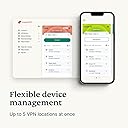
The Aircove Wi-Fi 6 VPN Router by ExpressVPN combines cutting-edge dual-band Wi-Fi 6 technology with built-in, always-on VPN protection for unlimited devices. Covering up to 1600 sq. ft. with speeds up to 1200 Mbps, it offers customizable VPN locations per device group, advanced privacy controls, and a 30-day free ExpressVPN trial. Designed for UK, EU, Australia, and New Zealand users, Aircove delivers seamless, high-speed security for the modern connected home.


| ASIN | B0BV39GR2S |
| Antenna Location | Home, Professional |
| Antenna Type | Retractable |
| Best Sellers Rank | 62,977 in Computers & Accessories ( See Top 100 in Computers & Accessories ) 516 in Routers |
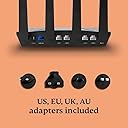
| Box Contents | Ethernet Cable, Power Adapter with US, EU, UK, and AU power heads, Router |
| Brand | ExpressVPN |
| Brand Name | ExpressVPN |
| Colour | ['Black'] |
| Compatible Devices | Gaming Console, Personal Computer, Smart Television, Smartphone, Tablet |
| Compatible devices | Gaming Console, Personal Computer, Smart Television, Smartphone, Tablet |
| Connectivity Protocol | Wi-Fi |
| Connectivity Range | 1600 Square Feet |
| Connectivity Technology | Ethernet, Wi-Fi |
| Control Method | App |
| Controller Type | App Control |
| Coverage | 1600 square feet |
| Customer Reviews | 4.1 out of 5 stars 315 Reviews |
| Data Transfer Rate | 1200 Megabits Per Second |
| Frequency | 5 GHz |
| Frequency Band Class | Dual-Band |
| Frequency band class | Dual-Band |
| Has Internet Connectivity | Yes |
| Has Security Updates | Yes |
| Is Electric | Yes |
| Is Modem Compatible | No |
| Item Dimensions L x W x H | 24.7L x 20.7W x 5.8H centimetres |
| Item Weight | 0.88 Kilograms |
| LAN Port Bandwidth | 1 Gbps o superior |
| Manufacturer | ExpressVPN |
| Maximum Upstream Data Transfer Rate | 1200 Megabits Per Second |
| Model Name | Aircove (International) |
| Model Number | Aircove-AX1800 |
| Model name | Aircove (International) |
| Number of Antennas | 1 |
| Number of Ports | 5 |
| Operating System | ExpressVPN Custom Firmware |
| Other Special Features of the Product | Built-in VPN protection |
| Product Warranty | 1 year manufacturer |
| RAM Memory Installed | 512 MB |
| Router Firewall Security Level | True |
| Router Network Type | True |
| Security Protocol | WPS |
| Smart Home Compatibility | Smart Home Compatible |
| Special feature | Built-in VPN protection |
| UPC | 196852781621 |
| Voltage | 12 Volts (DC) |
| Wi-Fi Generation | Wi-Fi 6 |
| Wireless Compability | 802.11ac, 802.11ax, 802.11g, 802.11n |
| Wireless communication standard | 802.11ac, 802.11ax, 802.11g, 802.11n |
J**L
Excellent
Absolutely brilliant been faultless since I got it. Love it.
K**N
Aircove
Brilliant piece of kit, would highly recommend, so easy to set up.
M**E
Brilliant Concept, but weak Wifi signal
I love the concept of a VPN built into the router, and the installation was amazingly simple. However, the Wi-Fi signal is feeble. My house runs primarily on Wi-Fi due to a disability. The Wi-Fi wasn't connecting and when it was it appeared to be kicking me off. Initially, I thought the router was the issue. Speaking with Tech Support (Aaron) was brilliant. He talked me through the entire process. When I was next to the Wi-Fi it was working brilliantly, but in the afternoon it started to get really flaky again. So I was advised to install a beta upgrade. It seemed to resolve the problem again until evening when it went bad once more. Almost 3 hrs on a web chat with Gizelle couldn't resolve the issue. We agreed to continue today. Meanwhile, I thought about changing the Wi-Fi channel on both 2.4g and 5g bandwidths. Hey Presto! It has been working properly since. Any time there is an issue, I scan for the best channel. Change over and it runs perfectly again. A new generation would definitely benefit from a stronger signal. I also found out that a local neighbour now has a 10GB connection. That, I am sure, is affecting the other wifi signals in the area. (Evn though Wifi cannot achieve 10gb on a 10GB throughput.
M**N
Great product
Thank you for a great item and a very happy customer
R**O
Complicated and doesn't work in all scenario's
Very dissapointed with this product - was not easy to install - in fact forget about it if you are not technically minded - I am in the industry and I struggled. Then came the cracker - it doesn't work with all services. I have a service obtained legally in my home country I wanted to use while travelling and they were able to immediately pick up I was using a VPN - when I complained the ExpressVPN agent said tough luck you should have read the small print on our site...
5**R
Very hard to set up
Could not get it to work
M**7
Limited Customisation
Probably ok for nearly all users wanting a VPN router (subscription required), bur has very limited customisation options for anyone who wants any ‘tweaking’ abilities. ExpressVPN software installed on PCs, Apple, Android does the same job without the hardware cost. Only if you have devices (smart TVs) that can’t run ExpressVPN that you want to VPN is this the route to go.
A**S
Misleading speed advertised - it’s much slower!
Not as advertised. Broadband speeds crashed when using VPN. I contacted ExpressVPN for support, tried various options, only to eventually be told that the very maximum speed this Aircove could support is 330mbps, NOT the advertised 1,200mbps! They are selling based upon misleading information aka lying! AVOID THIS - unless you want to stay in the broadband slow lane!
C**M
Tres facile a installer
Impeccable. Facile a installer. J'ai deja un abo chez express vpn, donc incrire le numéro de code, et c'est parti. RAS Fait tres bien le travail
B**E
Comes from US supplier - watch out!!
Probably a decent wifi router but even after more than an hour on line with express VPN tech support, impossible to configure and get working. They recommended returning to the supplier BUT the actual supplier in the USA - lots of admin and cost to send to the US. Still waiting for my money back.
A**U
Easy to Instal, works well with other routers, comes with plug for US, EU and UK
I'm using it in Europe to change connection location and keep using my subscriptions from before moving country. My set up is: 1) fibre 2) router from service provider 3) Aircove 4) Mesh WiFi Installation is simple: 1) plug in Aircove - it comes with an electric socket for US, UK and EU 2) connect to it via wifi or cable on your computer/phone/tablet 3) visit its short URL to customise what you want, like: · the wifi name and password · the name of your devices connected to it · which connected devices will connect to VPN when you turn it on and which won't be affected by it Interface If you're using a smartphone or tablet, there is no app to access the router, but if you add the web page to your home screen (share button), it will feel like an app. As your connected devices appear on the list, you might not recognise their names so I recommend connecting them one by one and renaming them as they appear, so that you know which is which between, say, the TV, the game console, your work laptop, the tablet or the phone. To move them from a category (say, "connect to VPN") to another (say, "never on VPN"), just press/click and hold on the device name on the list, and drag it left or right. Connection Speed Because connecting to a different location literally means your internet signal going to THAT location and back to your place, you WILL lose speed, but it's not bad, but even before we switched to 900 Mbps fibre, when we were on a 76 Mbps connection and the VPN cut it in half, we could still stream in 4K 🙂 If you're testing the speed, I recommend trying different locations, as some could be closer to you and maintain greater speed. WiFi If you just use the WiFi from your Aircove, then it will recognise each device individually and for each you can select if you want it to connect to VPN or not. However, as I use Mesh WiFi, the Aircove only sees the Mesh WiFi connected to it, it does not see the devices connected to the Mesh WiFi. Therefore if you want to choose what to connect to VPN and what not to, with Mesh WFi this will happen at the WiFi level. So on the ExpressVPN menu, I have 1 device for the whole Mesh WiFi network, it's all or nothing in that case. What's Mesh WiFi, you may ask. If you struggle with WiFi signal in certain places in your home, I recommend it if you can afford it (great Christmas present!), you have one pod per location where you want to expand the signal, it broadcasts its own WiFi signal and each pod you buy will expand that same signal further, meaning that, contrary to WiFi extenders where if you're talking on WhatsApp it will cut and connect you to the extender, the Mesh Wifi is the same signal everywhere. Separate Router I have a separate router connected to the Aircove, for the TV and the 2 game consoles because I couldn't figure out how else to connect 3 devices on the 1 network cable running from the Aircove in the house entrance to the TV unit in the living room, but the Aircove still recognises each device individually through that other router which is great. If you're "upgrading" with Aircove from an older router where you had custom-installed ExpressVPN, and want to use both on the same network, then I recommend looking for the original firmware of your older router and bringing it back to its original set up. Else the two ExpressVPN routers won't work well together, you'll never know which the "app" is accessing and it's a nightmare.
L**O
Unico
Perfetto funziona ottima velocità e Amazon sempre unico nella spedizione
J**A
it is working very well
very good product
Trustpilot
2 months ago
3 weeks ago