


🎨 Elevate your digital canvas—create, connect, and captivate with Intuos Small Bluetooth!
The Wacom Intuos Small Bluetooth Graphics Drawing Tablet offers a portable, wireless creative experience with 4096 pressure sensitivity levels and battery-free EMR pen technology. Compatible across Mac, Windows, Chromebook, and select Android devices, it features 4 customizable ExpressKeys and includes exclusive creative software and training, making it the perfect tool for students, teachers, and creators seeking precision and flexibility.
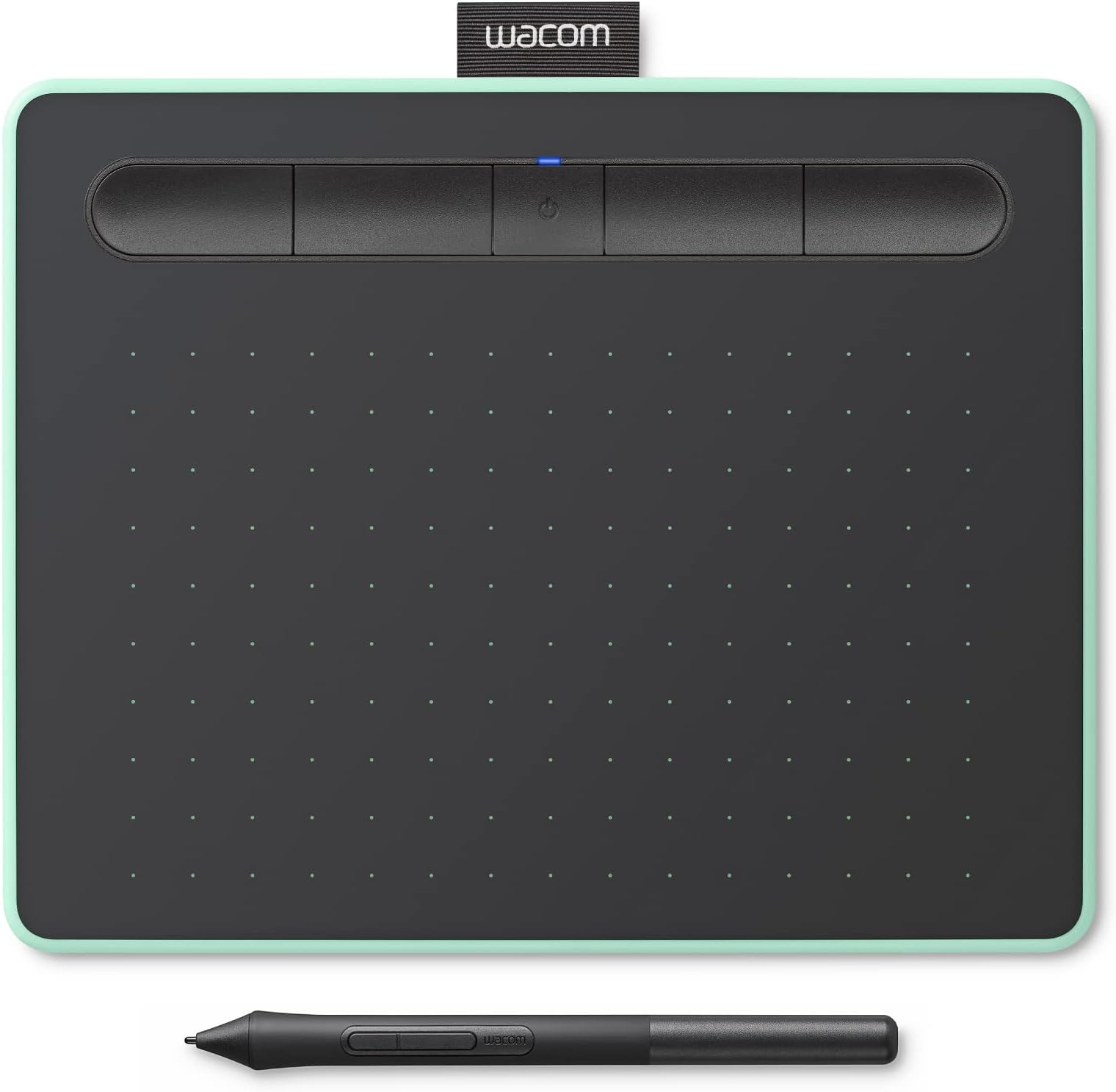


| ASIN | B079J7DCXN |
| Active Surface Area | 5.98" x 3.74" |
| Additional Features | bluetooth |
| Best Sellers Rank | #115 in Computer Graphics Tablets |
| Brand | Wacom |
| Built-In Media | Pen tablet Small w/ BT Pressure-sensitive, battery-free Wacom Pen 4K PVC-free USB-A cable w ith cable tidy and L-shaped connector 3 extra standard nibs (located inside pen) nib removal tool on end of pen Quick start guide Regulation sheet Online User Guide and Important product information found in Wacom Desktop Center. |
| Color | Pistachio |
| Compatible Devices | Laptop |
| Connectivity Technology | Bluetooth, USB-A |
| Customer Reviews | 4.5 out of 5 stars 2,836 Reviews |
| External Testing Certification | ID 00529-18-01796, ID 00529-18-01796 |
| Global Trade Identification Number | 00753218986856 |
| Item Dimensions L x W | 7.9"L x 6.3"W |
| Item Type Name | Wacom CTL4100WLE0 Intuos Small Bluetooth, Pistachio |
| Item Weight | 8.8 ounces |
| Manufacturer | Wacom Technology Corporation |
| Mfr Part Number | CTL4100WLE0 |
| Model Name | Intuos S |
| Model Number | CTL4100WLE0 |
| Native Resolution | 4096 levels |
| Number of Items | 1 |
| Operating System | Compatible with OS X 10.10 and above, Windows 7 and above, Chrome OS |
| Pressure Sensitivity | 4096 levels |
| Screen Size | 7 inches |
| Special Feature | bluetooth |
| Specific Uses For Product | business, personal |
| Target Audience | Student, Teacher |
| UPC | 753218986856 |
| Unit Count | 1 Count |
| Warranty Description | 1 year |
M**L
Amazing budget tablet
I've used this tablet for a year now after my old one had broke, and I'm absolutely in love with this tablet. I've used Huion and Wacom tablets over the years and I still consistently prefer Wacom for the ease of installation and updating software, though Huion is still a fantastic budget choice. My old tablet was a medium Intuos Pro so while it took a little bit to adjust to the smaller drawing area, it is still perfectly responsive, takes pen pressure well, and it doesn't feel uncomfortable to draw with. It is also WAY lighter than the Pro model, It's a perfect balance between function and convenience if you're the type to carry your tablet with you. I also learned not too long ago if you twist the pen, you have three extra pen nibs included! It makes it much easier to keep track of extra pen nibs before you have to buy replacements, but you can keep them right with you. I feel like I have better control of my art when I use this tablet compared to the Pro, and I still prefer to use this tablet over my Cintiq screen tablet because of how comfortable it is to draw with it. I also appreciate that the buttons never get in the way when I draw unlike some other tablets I've used in my past. My *one* critique is that it is rather laggy when you connect it through Bluetooth, it is very smooth while plugged in but I get more errors and issues when it's not physically plugged into my device.
L**✿
THE BEST!
Wacom is always my go to. My first tablet (I think it is Pen & Touch) is still working great after using it for 6 years. I decided to update my work tools since the wacom intuous takes less space than my previous one and it also has the bluetooth feature. Sometimes I experience lags while going for bluetooth instead of using the usb cable, but I think it might be because my computer is old and the bluetooth adapter is also not the newest out there. Features: ✿This model in particular comes with buttons you can customize. Buttons are not really my thing since I prefer using the keyboard and mouse when I'm working, but you can try and see if that's something you might like. ✿Additionally, the tablet also came with 3 softwares for creatives you can choose from a list (one of them is CSP). ✿Finally, the intuous series are available in 2 colors (black and mint green) and that's a plus for me since i love green and specially mint green. Overall I really enjoy using wacom tablets, even if they don't have a screen display. I'm already used to not looking at my hand while drawing and that's something that I learn after a lot of practice. So if you're thinking about starting out with art, I'd definitely recommend you getting one of these or even a previous model if you're on budget. They might not be super fancy, but they're reliable and sturdy! and the tecnology is great.
A**E
That convenient portability though :))
I previously bought the older version of this tablet, the Intuos Pen & Touch Comic (no Bluetooth & specific software packages). I love it still, but I'm on the go a lot and the Bluetooth version seriously saves my butt sometimes. When I'm stuck in lounges, I really don't want to have so many cords, you know? It's convenient and I heavily appreciate it. I haven't gotten used to the dip-in button system (kinda miss the old version) but I will admit that it's nice to rest my pen in it. The pistachio color changed a bit but I'm not complaining, it's still looks darn good. It's not much different from the old models, but I am rather sad that there's no removable pack panel anymore, it was convenient to have nib storage space back there rather than the pen itself. I know, I know, why don't I prefer the storage in the pen? Well, to put it simply: I usually place the pen in the Wacom logo's pocket slot (top of the tablet, like the tag on a t-shirt), or in my pencil case, which, too, has a similar grip-function. I don't like that I have to constantly worry about removing the end of the pen when I pull it out of the grip. Really, it's just a personal annoyance. Other than all of that, the drivers were easy to set up since I've done it before with my previous tablet, but Wacom really should have kept their old direction booklet. I suppose they changed it to a picture-explained set-up process to save money & effort to make a multiple-languages booklet? Probably. Also, Wacom really needs to make their nibs cheaper... Ouch. I will persevere! I will use my nibs until their absolutely unusable! ... I might watch those YouTube videos on how to make my own nibs, eventually. BUT! Other than those nit-picks there's nothing really wrong with the tablet. I would 10/10 recommend this one! Bluetooth? You got it. Portability? Pssshh, you can slip it into any decent-sized bag no-problem. Reliable? Absolutely. It may not be metal but don't expect for it to break on you any time soon. Wacom is also a widely-known brand so they WILL make sure that their products work for you. They've got a reputation to uphold, you know? ALSO: ... I don't see this is any of the reviews and this specific feature may be heavily annoying to some, but I actually really like it: When the tablet is not being used for a specific amount of time (a little while, don't worry), the Bluetooth feature disables. It's most likely to save battery life (the main reason why I like it). Long story short, if you find your tablet unresponsive while it's Bluetooth-enabled, don't freak out. Either the battery is drained or it just shut off to save battery life since you weren't using it for a while.
S**_
Nearly perfect but bluetooth doesn't work at all </3
As much as I want to highlight all the good about this drawing tablet, I cannot give it more than three stars because of the bluetooth connectivity issues I am experiencing. I have tried everything from redownloading the wacom drivers, to troubleshooting and messing with bluetooth settings on my computer, but the tablet has never even shown up as registerable to connect for me. Using the USB cable to charge and plug it into the computer has worked perfectly, but this tablet is supposed to also work with bluetooth and I have had pretty bad luck in that aspect; which is a shame because I was very excited for it. Despite these issues, everything else is honestly perfect, specially since I'm a beginner using drawing tablets. The pressure sensitivity of the tablet is really nice, the feel of the pencil is lightweight and comfortable, and I personally love the small and compact size of it which also makes it very portable. The included software packs such as the free two-year Clip Studio Paint (and other bonuses) are amazing for beginners like me and a really good way to begin with digital art. As much as I really like this tablet and would've given it 5 stars, the main selling point of this tablet is the fact that it's wireless through bluetooth and I haven't been able to connect it even once as of yet unfortunately. I'll continue to experiment with somethings, but for now I'll just use it as if it never had bluetooth. Update! The bluetooth randomly worked and was able to be registerable to my laptop!
B**O
Since 2018 Still Love It and Working Great
Been using editors for 20 some years with a mouse because I was not sure, I could handle a tablet due to working an editor & computer with one hand and arm, so glad I got s gift card for a present. I still do everything slower than others, but the job gets done I love it So this i my first Wacom got in 2018 got the green one ...love the color very pretty for a tablet glad I got the small size then the medium size, the small fits good where eve it is used ... I like it because I can use wireless or corded and can still use it while plug in I try to take care of it and not drop or bang. It has survived 4 years, Covid, and using every time I edit I have had to replace 2- 3 packs ribs in the pen 4 years but use it allot for and. And the tablet is scratched but still working, and I have the original pen bedsides replacing the ribs in the pen. It works better and does not lag if you keep and Windows it updated with all the new updates & drivers though I use it most on a board across my lap with a keyboard. And mouse I only use it for all 3 editors for Photoshop and Photoshop Elements & Corel Paint Shop Pro, and it works well with all 3 editors I prefer the mouse in the other programs and internet and the tablets to edit. . I program the tablet and pen with the shortcuts I have the hardest doing the editors now I just click, instead of fighting my hand & keyboard I love it with the paint brush tool and while I photo repair I do photo repair for people It does help me with the editors allot Only had trouble with it once when I was setting up by the Customer Service was nice, and sent me a replacement I forget and forgetting to plug in (that my fault). I am so glad I went to this model instead of the other I think since I am a small person the others would be too big I just wished it would have more room on the tablet for more commands for disabled person I am planning to replace this tablet with the same one when this one goes dead
C**I
Great for beginners and has free CSP
Great! I didn’t know it came with free CSP (2 years) so that was a nice bonus. However the few buttons limit it severely, I have a bigger tablet but I had trouble moving my hand over a large area so this was much better, the small size is great so i can just stash it on top of my laptop keyboard when I’m taking a break or procrastinating. The tablet battery lasts a long while unplugged, it lasted like half a day uncharged. The tablet drawing area is pretty good too, the pen grip is great and it doesn’t slip when I draw. One major problem is the pen nib, the textured surface although great and heavenly to draw on destroyed my nib in like, a week.
T**Y
Perfect notetaking tablet for laptop
I’ve been using my drawing tablet for over six months now it has been reliable and replaces my iPad for taking notes. Honestly, it replaces my mouse as well a very economic one. When using a wireless mode, there’s a slight delay, but that’s to be expected and whenever I pull it out during class people ask what it is.
V**A
Compact and reliable drawing tablet with smooth Bluetooth connectivity
If you’re an artist or creative professional looking for a portable and reliable tablet, the Intuos Small is a fantastic choice — excellent value for the price and great for beginners and pros alike.
H**A
Great quality
Best of the best as entry level
M**L
Perfeito, mesmo usando Linux
Mesa digitalizadora perfeita mesmo não tendo suporte oficial no Linux. Não precisa baixar nada, o kernel Linux automaticamente já identifica o driver a mesa digitalizadora como no comando lsusb (print), e o bluetooth também já identifica a mesa Wacom nativamente. Os 3 softwares que são inclusos só estão disponíveis para Windows, macOS, ChromeOS, no Linux utilizo outros softwares como Xournal++ (print) e as configurações dos botões da mesa digitalizadora e da caneta faço no próprio SO (print). Caso a pessoa utilize o Debian GNU Linux com interface GNOME 50 pode confiar que é tudo compatível.
X**R
easy to pick up and precise
new user to writing pad. i had an iPad air and I am not really accustom to writing on the smooth glass surface. writing on this pad is better but still far from normal writing on paper. still trying to get used to this but the experience has been good so far.
M**S
Excelente!!
Vem bem embalada. Ela é levinha. Funciona muito, principalmente, para quem dá aula online. A instalação é fácil, a mesa é compacta. Otimiza o trabalho!! Recomendo o uso para quem precisa escrever/desenhar digitalmente, mas não para utiliza-la como mouse.
A**Y
ممتاز
مهم جدا وممتاز
Trustpilot
4 days ago
2 weeks ago