⌨️ Power your productivity anywhere with style and stamina!
The Qulose Bluetooth Wireless Mini Keyboard combines ultra-slim ergonomic design with universal Bluetooth 5.0 compatibility across iOS, Android, and Windows devices. Featuring a long-lasting 50-day battery life, fast USB-C charging, and media hotkeys, it’s engineered for professionals who demand portability, comfort, and seamless multi-device connectivity in a compact UK layout.
| ASIN | B0CC8B3JCT |
| Antenna Location | Business, Education, Multimedia |
| Best Sellers Rank | 26,653 in Computers & Accessories ( See Top 100 in Computers & Accessories ) 571 in Tablet Keyboards |
| Box Contents | USB Cable |
| Brand | Qulose |
| Brand Name | Qulose |
| Button Quantity | 19 |
| Colour | Black |
| Compatible Amazon Tablet Models | Amazon Fire 5th Generation, Amazon Fire 7 5th Generation, Amazon Fire 7 7th Generation, Amazon Fire 7 9th Generation, Amazon Fire 7 Kids 5th Generation, Amazon Fire 7 Kids 7th Generation, Amazon Fire 7 Kids 9th Generation, Amazon Fire HD 10 5th Generation, Amazon Fire HD 10 7th Generation, Amazon Fire HD 10 9th Generation, Amazon Fire HD 6 4th Generation, Amazon Fire HD 7 4th Generation, Amazon Fi… |
| Compatible Devices | Laptop, PC, Smart TV, Smartphone, Tablet |
| Compatible Operating System Family | Windows |
| Compatible Tablet Computer Models | Samsung Galaxy Tab S7 FE 12.4" |
| Compatible devices | Laptop, PC, Smart TV, Smartphone, Tablet |
| Connectivity Technology | Bluetooth |
| Connectivity technology | Bluetooth |
| Customer Reviews | 4.3 out of 5 stars 1,897 Reviews |
| Enclosure Material | Acrylonitrile Butadiene Styrene |
| Hand Orientation | Ambidextrous |
| Keyboard Description | Multimedia |
| Keyboard Layout | QWERTY |
| Keyboard description | Multimedia |
| Manufacturer | Qulose |
| Minimum Required Operating System Version | Android 5.0 Lollipop, Windows 10 |
| Model Name | Mini Keyboard |
| Number of Items | 1 |
| Number of Keys | 78 |
| Number of Packs | 1 |
| Power Source | Battery Powered |
| Product Features | Media Hotkeys |
| Product Warranty | 2 years |
| Recommended uses for product | Business, Education, Multimedia |
| Special feature | Media Hotkeys |
| Style Name | Modern |
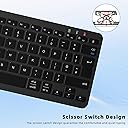
| Switch Type | Scissor-Switch |
| Theme | Productivity & Multimedia |
| Unit Count | 1.0 count |
| Water Resistance Level | Not Water Resistant |
L**S
A Tardis keyboard
I just picked up a second Qulose keyboard (for my desktop, the first lives with my tablet for remote working) because I was so impressed with the typing experience. I have a mechanical Bluetooth gaming keyboard, which is lovely but the keys are a little small and the RGB eats its battery life. Since I do a *lot* of writing, I wanted something of a similar overall size but less cramped for day-to-day use. I have no idea HOW, but the Qulose manages to pack most of a full-size keyboard layout into the same footprint as my Thor gaming keyboard. This includes dedicated F keys and even individual cursor keys instead of needing to access these via an additional Function key combo. If I have one tiny complaint it's that Left Control is one key in, rather than being bottom left, which just took a bit of getting used to for things like copy and paste. Not a dealbreaker and certainly not enough to knock a point off for. Pairing was an absolute doddle, helped by it identifying itself by name instead of a product code (which can be an adventure if you have neighbours close enough with open BT devices). It goes to sleep after 30 minutes but has reconnected instantly as soon as you tap a key. The typing experience is akin to a laptop keyboard, and the keys feel positive, without the longer track of a mechanical set. Bonus, it's a LOT quieter than a mechanical keyboard, perfect if you're on comms with someone and don't want to have to keep muting your mic. Aesthetically, the keyboard is quite smart and looks more expensive than it is. It has a full spread of multimedia keys, which is useful and welcome, especially when using it with a tablet. There's no backlight, but I've found even the black version doesn't need it, and the white certainly doesn't, even in poor lighting. The rake is low-ish, but fine, and if you need it higher, a tablet stand gives a good angle. Overall it's tiny, light, has a ludicrously long battery life and is a pleasure to type on. I've even used it for some gaming, which has been nicely responsive. With no additional dongle needed, unlike most wireless keyboards, it's convenient too.
A**R
Cheap, reliable, portable, and connects to any computer.
I bought this for my sister. She has been using it for almost a year. And despite the cheap price it's actually a pretty good quality key board. It's not a full size keyboard. But, I didn't want a full-size one. So I like the small size and portability. It connects to both my sister's Macbook and her PC. For the price this keyboard is great. Oh and the charge lasts a really long time. You don't have to recharge it very often at all, which is great.
S**S
Good value / Weight could better
Works well, quality and weight not as good as it could be, but for the price it's a good keyboard. Battery life seems to be holding up well and the keys feels reactive . Connected to my iMac in seconds
M**A
Great keyboard with all the important UK keys present
Small, compact, feels quite good and with rechargeable batteries in this Bluetooth keyboard. Great for using on my part-time Raspberry Pi 5 desktop, I use it with a wireless mouse but that one I use with a dongle even though it has dual-wireless with Bluetooth as well, but only because the Pi 5 after switching back on (from the standby button) doesn't seem to automatically reconnect with Bluetooth devices (like this keyboard) so I use the mouse to click the Bluetooth connect to get it back on. Not the fault of this keyboard which does everything asked of it. My only gripe is the position of the Bluetooth Pair button, this should really have exchanged places with the DELETE function which requires a CTRL + BACKSPACE to work. I would have preferred to CTRL + BACKSPACE to initiate Bluetooth pairing (which is not something you would do often) and have DELETE given its own dedicated key. Also the position of the CTRL is to the right of the bottom most left key (where it should be) and I find myself pressing there whilst trying to use cut and paste shortcuts!
R**N
Excellent portable keyboard
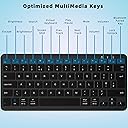
I purchased this keyboard to test the water of using my iPad with a keyboard before committing to one of the expensive keyboard/trackpad combos from either Logitech or Apple themselves. I’m not sure I’ll need to bother now, I’m extremely happy with this one! I can’t review this from a standpoint of using the keyboard with Windows, Android or MacOS. I am purely using this with iPad OS. The pairing process was painless, I simply plugged the keyboard in to charge (This took around an hour before the LED indicated it was full), turned the keyboard on with the switch on the under side, went into Bluetooth settings on the iPad and paired it. Following connections have been seamless. The keyboard comes with an instruction leaflet to switch input modes (iOS: CTRL + Space, Windows: Start + Space, Android: Shift + Space). The keyboard doesn’t give any feedback when pressing these combinations doesn’t give any feedback but remaps the OS specific keys. CMD and option are in the correct places, and I can use all of the shortcuts I’ve become accustomed to in MacOS. There are a row of F keys at the top which are primarily for the shortcuts the images show, I was very impressed that every single one worked flawlessly on the iPad. Brightness, search, screenshot, display/hide on screen keyboard, media controls and the lock button all work without any configuration! The physical construction of the keyboard is very impressive too, especially at the price point. Whilst being very light and portable, the keyboard layout is excellent. The keys are spaced better than that on my 16” Thinkbook, and the typing experience is fairly decent. I’m generally not a fan of typing on low travel keys but I’d quite happily and comfortably type for a long period of time on this. The keys provide a tactile experience and have good feedback, they do produce a little bit of noise but it’s not clattery or unpleasant. There is no adjustable tilt level on this keyboard, but I’ve not found that to be an issue. The keyboard is slightly raised at an angle anyway, raised by a bump which I assume is the internal battery. It has rubber feet on all 4 corners so it grips to a surface nicely. The only con which I can think of is that your only connectivity option with this is Bluetooth. You cannot use the USB-C port (Great that it’s not Micro USB!) for typing, this port is only a charge port, there is also no 2.4Ghz option, so if you do not have Bluetooth on a device, this keyboard cannot be used for it. Not an issue for me, and probably won’t be for many people but worth mentioning! Highly recommended buy!
A**W
Absolutely fab so far.
Addition to review: It's 29 December and I received this keyboard on 26 September. It didn't need charging when I got it, I've used it quite a bit in the three months I've had it and still haven't taken the charging cable out of the wrapper. It still hasn't run out of charge after 3 months use. Amazing I've only had this keyboard a couple of days and hopefully it will continue to give good service but these are my first impressions. I spent ages looking for a keyboard for my Galaxy Tab. I have a journal app on there and as I have a lot to say, I got fed up of using an on screen keyboard. I must admit I am very impressed at how well it types. I'm a touch typist (60wpm) and didn't hold out much hope for being able to type fast on a flimsy keyboard perched on my knee. But........I don't find it flimsy at all and I can type just as fast and accurately on this keyboard as I can on a full size keyboard so I am more than happy with my purchase. It connected to my tablet first time very easily. Another big plus. I hate Bluetooth, always have problems with it and think it's the most unreliable thing ever invented but I have to say this keyboard connects with absolutely no problem every time I've used it. So, yes. I'm very pleased. Just wish I'd thought to get one 12 months ago when I decided to keep up a journal for a whole 12 months. I did it but swyping and tapping on an onscreen keyboard was painful, this is a walk in the park.
M**S
Not bad for the price but not quite UK layout and occasional BT glitches
Perfectly functional bluetooth keyboard. Easy to pair and power on/off. Decent battery life. Easy to charge. However some annoyances. 1. Function keys always do extra fuctions like vol control you have to press fn to make it send actual function keys and there's no way to lock it on. This is the opposite to most keyboards and makes the F keys useless in games. 2. Fn key is in the position Ctrl should be, making it hard for a UK touch typer (or game player) On the plus side \| is in the right place for UK layout as is the return key. It sometimes loses bluetooth association and has to be re-paired by turning it off and then on again.
S**H
Lacks functionality
While it does seem great at first, the idiotic choice not to include a function lock key means all the F keys are functionally worthless, why would that ever be a requested feature? I would rather it was assumed I didn't want to alter my brightness, not that I should have to hold down the FN key whenever I want to use any of them. Comically irritating.
A**U
Solid though imperfect replacement for laptop keyboard
I bought this keyboard as a temporary replacement while waiting for the replacement part for my Lenovo laptop. Specifically, I needed something in this form factor for travel (my spare full-size keyboard just isn't practical for that). This review is based on this use case. Overall, I strongly recommend the keyboard as evidenced by the 5-stars. I cannot speak to long-term reliability, but I've used it heavily the last few days to make sure I'm used to it when I travel over the holidays. I was surprised that the keyboard felt as good to type on as it does for its cost. The battery exceeded my expectations. I used it through a full day of work coding, emails, etc. I purposely didn't turn it off on breaks and such. It needed charging part way into the 2nd day which I did while I worked. The fact it made it the entire work day is all I needed. The keyboard didn't get automatically recognized when I awoke my laptop in the morning. It went into a pairing mode and I had to connect it on my laptop. I had initially pushed a letter habitually on the keyboard to initiate the awake (not going to work on a Bluetooth device) and once pairing finished that key repeated continuously until I pressed another key. A small bug in an otherwise solid keyboard. There are also a few keying anomalies that you should be aware of: 1. The Delete key is awkward. You need to use the Fn+Backspace. For most people this is not going to be a problem, but in my case it has been a speed bump. 2. Speaking of speed bumps, the F12 key by default locks Windows. I've hit it often instead of Backspace due to muscle memory on a keyboard that has a larger Backspace key. I realize that key is useful when used on some devices, but I would've preferred it to go unset for Windows. 3. CTRL+END and CTRL+HOME don't work. End, Home, PgUp, and PgDown are all alternates on the arrow keys when you use the Fn key. The Fn key doesn't appear to support key modifiers like Ctrl. Therefore, you should expect that any keyboard shortcuts in any application that need that aren't going to work. For example, CTRL+Fn+Right Arrow (End) doesn't move to the end of the document. Finally, it's worth noting that the package came in the manufacturer packaging. That's not terribly uncommon, but the packaging is not appropriate for shipping. I'm lucky that the keyboard was in one piece let alone functional!
A**N
Excelente
Lo uso para ep pc y también para el smart tv. Bateria de larga duración y buena conectividad
H**E
Très bien, tient ses promesses
Léger, compact, s'appaire en deux temps trois mouvements et aucune latence. Autonomie plutôt longue (je ne l'ai chargé qu'une fois depuis que je l'ai, ça fait deux mois, et je l'utilise régulièrement, pas de manière intensive mais quasi quotidiennement). Remplit parfaitement ses fonctions ! Il apporte beaucoup de confort lorsque je travaille sur téléphone.
P**H
Zuverlässig!
Funktioniert zuverlässig, angenehme leise Tastenfunktion und spart Platz am Schreibtisch! Alles wie erhofft!
V**O
Opción altamente recomendable
El Qulose Teclado Bluetooth Español se presenta como una opción altamente recomendable para aquellos que buscan un teclado inalámbrico versátil, ergonómico y de buena calidad a un precio asequible. Su compatibilidad con múltiples sistemas operativos, diseño portátil y batería de larga duración lo convierten en una herramienta útil tanto para el trabajo como para el uso personal.
Trustpilot
5 days ago
1 week ago