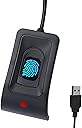
Desertcart purchases this item on your behalf and handles shipping, customs, and support to Belgium.
🔐 Unlock your productivity with a touch—security meets speed!
The JIAN BOLAND WA28 USB Fingerprint Reader offers ultra-fast (<0.5s) and highly secure (0.001% FAR) biometric authentication for Windows 10 and 11. Supporting up to 10 fingerprints, it’s ideal for multi-user environments. Plug & Play with automatic driver setup and a 1.5m cable ensures flexible, hassle-free desktop use.


| Asin | B0CGCYVGYW |
| Best Sellers Rank | 10,216 in Computers & Accessories (See Top 100 in Computers & Accessories) 4 in Security Locks |
| Brand Name | JIAN BOLAND |
| Colour | Black |
| Compatible Devices | Personal Computer |
| Country Of Origin | China |
| Customer Reviews | 3.5 3.5 out of 5 stars (302) 3.5 out of 5 stars |
| Data Transfer Rate | 5000 Megabits Per Second |
| Global Trade Identification Number | 00717664826555 |
| Hardware Interface | USB |
| Item Dimensions L X W X H | 6.6L x 3.8W x 2.5H centimetres |
| Manufacturer | JIAN BOLAND |
| Manufacturer Part Number | WA28 |
| Model Number | WA28 |
| Network Connectivity Technology | USB Type A |
| Number Of Items | 1 |
| Operating System | Windows 10 |
| Product Features | Plug & Play |
| Slot Count | 10 |
| Upc | 717664826555 717664826586 |
User
Fingerprint recognition
The instructions were so small I couldn't even read some bits with a magnifying glass. Luckily I didn't need them and setup was very easy.Initially I couldn't get it to recognise the fingers I had set up but I was doing a couple of things wrong. With this reader (others are different) you should not swipe the finger - just press lightly and do not move. Secondly it is important to ensure that you are actually placing the correct bit of your finger on the reading bit. That meant not going too far forward.Once I had sorted those things (perhaps they should be in the instructions!) it works fine.
User
Confusing setup
Have just received this fingerprint reader. The instructions say to plug in and Windows will find the driver. It then goes on to say 'if it doesn't (?) then run windows update.' Neither of these work and the device manager shows no driver present and can't update driver; i.e there isn't one! HOWEVER I then went into Windows Hello/Sign in Options/fingerprint recognition and followed the setup instructions. Device manager still showing as 'no compatible drivers for this device' BUT all is working fine regarding using fingerprint to open Windows. I have also used the reader to sign in to Paypal. It remains to be seen if any glitches are yet to occur.Note; I am using Windows 11.ADDENDUM. Day 3; The glitches soon started. This is rarely recognised by windows. I am having to restart Windows to pick it up but even then it's only occasionally that it can be used. Have concluded that it's a wast of money and will be returning it.
User
Works on a Windows 11 mini dsktop
The instructions say it is for Windows 10. I installed on a Windows 11 system without any problems.
User
Does not work with "Enhanced Windows Biometric Security"
Does not work with "Enhanced Windows Biometric Security". This feature is enabled by default in the BIOS of most modern laptops within the "visualization" settings. By disabling it, I've manage to get it working.
User
Press, don't swipe!
I followed the Windows Hello prompt that tells you to swipe your finger over the reader. Don't do that! In the past, I had a laptop reader that was designed to be swiped, but this one is not like that. I was initially getting very frustrated with this reader's unreliability and thinking of returning it, but then I noticed another review that says you should press your finger on the reader and not swipe it. That sorted it out. It works reliably for me now.
User
LIGHT TOUCH
Nice and compact, easy to set up, and does the job its intended to do. Like most fingerprint electronics, even on phones, a light touch is needed,so don`t press down hard. pleased with my purchase.
User
Unreliable
Installs easily.Difficult to register fingerprint and almost never recognises that or any other installed print. Back to the PIN!I wish I had stuck with the one used for my laptop. Works every time.
User
Doesn't work with Windows 11
I couldn't get this to work with windows 11. Windows drivers gave an error message saying it couldn't initialise. An on-line search did not reveal any drivers which would work. Tried with linux and after a lot of effort got it to recognize the reader but most times it failed to read the fingerprint. Avoid. Not fit for purpose and no support
User
Muy correcto
Cumple perfectamente. Sencillo y adecudo.
User
Erfüllt seinen Zweck ist meiner Meinung zu teuer für die gebotene Qualtiät
Funktioniert fehlerfrei. Jedoch billigstes Plastik in der Verarbeitung. Bei den Preis hätte ich eine bessere, hochwertigere Qualität erwartet. Herstellungkosten unter 5,- würde ich mal schätzen.Aber was solls, wurde von Windows 11 sofort erkannt (ohne Treiberinstallation) und funktioniert einwandfrei.
User
Works ok
It was a little fussy setting it up
User
Cheap but functional
Wanted to try out Windows Hello on my Windows 11 for Workstation and it was just to go into the computer configuration and choose the reader and get the driver. After that just follow the instruction for Windows Hello. Now I’m thinking of getting a Windows Hello camera since the one I got isn’t IR and that’s what Windows Hello wants. O boy, I wish I knew about this fingerprint reader when I had a 12 character password that I had to change every month… Everything is so much easier with “gadgets” that simplify the everyday usage. There are probably much better readers out there, but this one was enough for me.
User
Genial
Génial vraiment super facile à installer je n'ai rien eu à faire, reconnu très facilement sur W11 deux personnes configuré d'un seul coup bravo et merci Amazon.
Trustpilot
4 days ago
1 week ago