


๐ฅ Power Your Play, Own the Future ๐ฎ
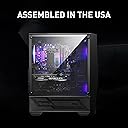
The MSI Codex R Gaming Desktop is a powerhouse built for professionals and gamers alike, featuring a 13th Gen Intel Core i7-13700F processor, NVIDIA GeForce RTX 4060 GPU with ray tracing, 32GB DDR5 RAM, and a 1TB M.2 NVMe SSD. Its RGB cooling system and 650W 80+ Gold power supply ensure optimal performance and style, while Windows 11 Pro and a DIY-friendly design make it perfect for both work and play.







| ASIN | B0C9KTF2K1 |
| Additional Features | Microphone |
| Aspect Ratio | 16:9 |
| Best Sellers Rank | #27,434 in Computers & Accessories ( See Top 100 in Computers & Accessories ) #915 in Tower Computers |
| Brand | msi |
| Built-In Media | Keyboard, Mouse |
| CPU Model | Core i7 |
| CPU Model Number | i7-13700F |
| CPU Model Speed Maximum | 5.2 GHz |
| CPU Speed | 1.5 GHz |
| Color | Black |
| Compatible Devices | Keyboards, Mice, Monitors, Printers, Headphones, Speakers, Wireless Networks |
| Connectivity Technology | Ethernet |
| Cooling Method | fan,fan cooling |
| Customer Reviews | 4.2 out of 5 stars 11 Reviews |
| Display Resolution Maximum | 1920x1080 |
| Display Type | LED" or "LCD |
| Graphics Card Description | RTX 4060 |
| Graphics Card Interface | PCI Express |
| Graphics Card Ram | 8 GB |
| Graphics Coprocessor | NVIDIA GeForce RTX 4060 |
| Graphics Description | RTX 4060 |
| Graphics Ram Type | GDDR6 |
| Hard Disk Description | SSD |
| Hard Disk Interface | Solid State |
| Hardware Interface | HDMI, USB 3.0, VGA |
| Human-Interface Input | Buttons |
| Item Dimensions | 23.4 x 20.9 x 12.2 inches |
| Item Weight | 26.5 Pounds |
| Keyboard Description | Gaming |
| Keyboard Layout | QWERTY |
| Manufacturer | MSI |
| Memory Slots Available | 4 |
| Memory Storage Capacity | 1 TB |
| Model Name | Codex R 13NUC7-069US |
| Model Number | CodR13NUC069 |
| Model Year | 2023 |
| Native Resolution | 1920 x 1080 |
| Number of Component Outputs | 2 |
| Operating System | Windows 11 Pro |
| Personal Computer Design Type | Computer Tower |
| Power Consumption | 650 Watts |
| Power Plug Type | Type A - 2 pin (North American) |
| Processor Brand | Intel |
| Processor Count | 8 |
| Processor Series | Core i7 |
| Processor Socket | 16 |
| Processor Speed | 1.5 GHz |
| RAM Memory Installed | 32 GB |
| RAM Memory Technology | DDR5 |
| RAM Type | DDR5 RAM |
| Ram Memory Maximum Size | 128 GB |
| Resolution | 1920 x 1080 |
| Security Features | Windows Defender, Windows Firewall, Windows Hello, BitLocker |
| Specific Uses For Product | Everyday Use, Gaming, Multimedia |
| Style Name | Codex R |
| Total Expansion Slots Quantity | 6 |
| Total Number of HDMI Ports | 1 |
| Total Usb Ports | 3 |
| UPC | 824142330821 |
| Video Output | HDMI, VGA |
| Video Output Interface | HDMI |
| Video Processor | NVIDIA |
| Warranty Description | 1 Year |
| Wireless Compability | 802.11ax |
| Wireless Network Technology | Wi-Fi |
| Wireless Technology | Bluetooth |
B**R
Good system with some tinkering needed.
Overall the system is decent. Replaced my 10 year old gaming PC (Haswell era i7, and a mid-life upgrade to a GTX1060 GPU). It's decently put together, and they made sure to not choke the ram to a single channel by using 2 sticks of 16 gig to make the 32 gig total. As someone who's about 20 years past wanting to spend the time fiddling around with parts to build my own system I'm quite happy with the value proposition here, it's a reasonable price for someone else to handle the headache of assembly and part selection. The one thing that I would say that wasn't so great, proper XMP profiles for the ram were not set in the bios so the ram was running substantially slower then what it is rated for. Selecting the proper speeds and timing was easy enough but you do have to know to go in and do it. Edit to add: to the person saying the SSD is attached to the motherboard, it's an NVME stick. There's a little screaming that holds it down. Once you undo it you can swap it out with another NVME stick. 2.5 inch drives do t plug into that port, they use SATA. There's two empty drive bays in the bottom of the case you can install a 2.5 inch drive in and plug in the SATA and power cables
R**R
Warranty is a joke
While the computer has been great, the lights stopped working. Be aware that MSI requires you to pay to ship it. The shipping for this thing to CA would be insane. So while you think you are covered, plan on paying the cost of shipping a very large and heavy item...
C**T
MSI games computers have extremely low quality
I own two MSI games computers. The second computer, purchased at the end of July, experienced difficulties with rebooting for approximately three weeks, leading me to suspect a potential failure of the M371 NVMe M.2 1TB drive and/or the GPU. In contrast, the first computer encountered a power supply issue within six months of purchase. When you send the computer for fixing, you have to pay off all the shipping costs. Don't buy any production from the brand.
Trustpilot
3 days ago
3 weeks ago