Desertcart purchases this item on your behalf and handles shipping, customs, and support to Belgium.
🚀 Stay connected, secure, and ahead of the curve with D-Link Eagle Pro!
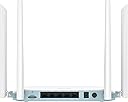
The D-Link G403/B Eagle Pro N300 is a versatile 4G LTE smart router delivering up to 150 Mbps download speeds with seamless plug-and-play SIM support. Featuring advanced WPA3 security, dual-active firewalls, and automatic 4G/WAN failover, it ensures reliable, secure internet for multiple devices via Wi-Fi or Ethernet—perfect for professionals craving uninterrupted connectivity anywhere.


| ASIN | B00PS0R6L8 |
| Antenna Location | Business, Gaming, Home |
| Antenna Type | Internal |
| Best Sellers Rank | 15,565 in Computers & Accessories ( See Top 100 in Computers & Accessories ) 144 in Routers |
| Box Contents | Ethernet cable, N300 4G Smart Router (G403/B), Power adapter, Quick Start Guide and Warranty Information |
| Brand | D-Link |
| Brand Name | D-Link |
| Colour | White |
| Compatible Devices | Laptop, Personal Computer, Smartphone, Tablet |
| Compatible devices | Laptop, Personal Computer, Smartphone, Tablet |
| Connectivity Protocol | Wi-Fi, Ethernet |
| Connectivity Technology | Ethernet, Wi-Fi |
| Control Method | Voice |
| Controller Type | Voice Control |
| Country of Origin | Taiwan |
| Coverage | Wi-Fi N300 + 4G LTE up to 150 Mbps |
| Customer Reviews | 3.7 out of 5 stars 20 Reviews |
| Data Transfer Rate | 150 Megabits Per Second |
| Frequency | 2.4 Hz |
| Frequency Band Class | Single-Band |
| Frequency band class | Single-Band |
| Global Trade Identification Number | 00790069466007 |
| Has Internet Connectivity | Yes |
| Has Security Updates | Yes |
| Is Modem Compatible | Yes |
| Item Highlight | Download Speed Up to 150Mbps, Wi-Fi Optimiser, Fast Ethernet LAN Ports, LTE/WAN Failover, WPA3, Unlocked for All Networks. |
| Item Weight | 290 Grams |
| LAN Port Bandwidth | 300 Mbps |
| Manufacturer | D-Link |
| Manufacturer Part Number | G403/B |
| Maximum Upstream Data Transfer Rate | 150 Megabits Per Second |
| Model Name | G403 |
| Model Number | G403/B |
| Model name | G403 |
| Number of Antennas | 2 |
| Number of Items | 1 |
| Number of Packs | 1 |
| Number of Ports | 5 |
| Operating System | RouterOS |
| Other Special Features of the Product | WPS |
| Router Firewall Security Level | Advanced |
| Router Network Type | hybrid |
| Security Protocol | WPA2, WPA3 |
| Special feature | WPS |
| UPC | 790069466007 |
| Unit Count | 1.0 count |
| Wi-Fi Generation | Wi-Fi 4 (802.11n) |
| Wireless Compability | 802.11b, 802.11g, 802.11n |
| Wireless communication standard | 802.11b, 802.11g, 802.11n |
T**6
Great Value 4G Router!
Managed to snag this for a bargain price of only £27.99. A great little 4G router that will serve as a handy backup if the Wi-Fi goes down or if i'm away travelling. Setup was a breeze aswell. I simply plugged the device into power and popped in a sim and i was away!
T**Y
Ongoing Technical Issues and Poor Signal Performance
The device is very unstable. It constantly shows errors and restarts itself every day at exactly 5:00 PM, which causes the connection to drop. Each time this happens, I have to set it up again using my phone connection. I regret my decision to purchase this product. The signal quality is also very poor, and overall I am extremely disappointed with its performance.
A**R
Interfacing and network selection
Nice router but no ability to switch manually the LTE network provider. I managed to figure out the HNAP SOAP messaging to pull signal quality stats into Home assistant and that's working nicely, but gave up trying to force operator selection in the OS. Just noting that along the way I did use a Three SIM initially and that worked straight away picking up the APN automatically, and then I also tried a multi network SIM which locked onto EE and worked without issue (Note that filling in the APN profile does not mean you can force operator selection). However EE is the worse signal in my area hence the attempt to hack the network selection. Eventually I ended up with a dedicated Vodafone SIM but I also echo the comments from another reviewer that a voda SIM was not initially recognised. In fact it did recognise the APN setting advised by Vodafone and came up on the radio side but would not register to return IP settings. I had to put the SIM into my phone in the end and it registered correctly and then when putting back in the G403 it worked and I ran OOKLA at 90Mbps. Anyhow, I bought the G403 it as it was on offer at 29.99 but maybe next time I might avoid the engineering project and get something with known HA integration. Overall it seems a decent router though, it is working as a secondary WAN backup into an ASUS with virgin primary WAN and I am monitoring through regular pings and so far it's been quite stable, but still gathering longer term data.
K**N
Brilliant for remote areas with no fast fibre
We live in a very remote area with no fast fibre. On the old home broadband the download speed at best was 1.5 and it is now around 8 so am really impressed! Also a lot cheaper. Very pleased with it!
C**R
Didn’t work in Vodafone
In this day and age, why would I have to phone the manufacturer to get this working. Anyway I persisted, to my regret of not returning this the very same day it arrived not working. Would not recognise Vodafone APN settings (yes I was messing with APN settings). Anyway ‘product support’ could not figure it out and said I need to contact Vodafone. Needless to say the thing went back. Wasted afternoon and still no internet. AVOID
R**X
Good device, very useful
The D-Link G403 4G Router is a reliable choice. It offers steady 4G LTE speeds up to 150 Mbps for smooth browsing and streaming. The AI Wi-Fi Optimiser ensures a stable connection, and setup is simple with the SIM card slot. With four Ethernet ports and WPA3 security, it’s versatile and secure. Ideal for home or small office use.
T**U
Waste of money
Had 2 units sent to me as both won’t read the SIM card, now stuck with a £100 piece of rubber that don’t work
D**S
waste of money
absolutely a waste of money
D**E
Unreliable – Constant Disconnects
Unreliable router. Keeps disconnecting from the network and requires frequent manual restarts to work again.Not suitable for stable 4G use. Would not recommend.
Trustpilot
2 weeks ago
2 months ago