Desertcart purchases this item on your behalf and handles shipping, customs, and support to Belgium.
📸 Capture the moment, even from a distance—remote control redefined.
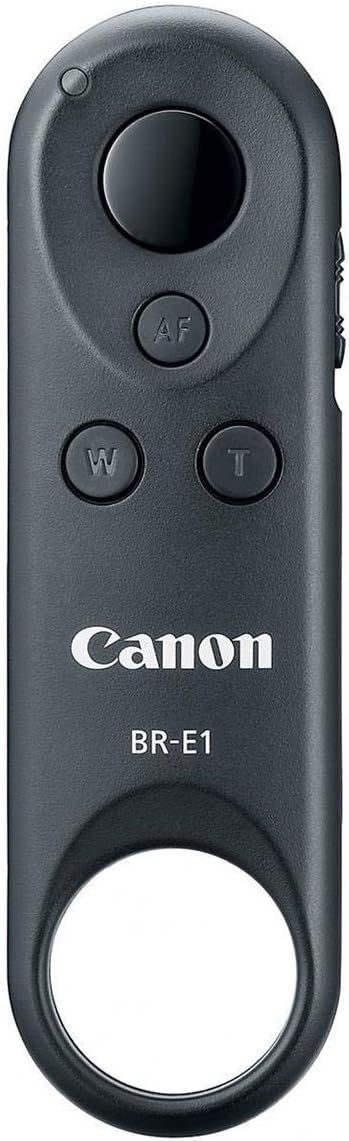
The Canon 2140C001 Wireless Remote Control BR-E1 is a sleek, Bluetooth-enabled device designed for professional and enthusiast photographers. It offers wireless focusing, still shooting, and video recording up to 16 feet away, with added zoom control via the Power Zoom Adapter PZ-E1. Compatible with a broad range of Canon cameras, it combines portability with powerful remote functionality to elevate your creative workflow.


| ASIN | B06WGM914S |
| Battery Types | Lithium |
| Best Sellers Rank | 568 in Camera Remote Controls |
| Box Contents | Wireless Remote Control BR-E1,Printed Matter Unit |
| Brand | Canon |
| Brand Name | Canon |
| Button Quantity | 3 |
| Colour | Black |
| Compatible Devices | Camera |
| Compatible devices | Camera |
| Connectivity technology | Bluetooth, wireless |
| Controller Type | Button Control |
| Customer Reviews | 4.5 out of 5 stars 1,639 Reviews |
| Global Trade Identification Number | 00013803288254 |
| Item Dimensions L x W x H | 9.1L x 2.8W x 1.3H centimetres |
| Item Type Name | Canon Cameras US Wireless Remote Control Br-E1 Wireless Camera Remote Control, Black (2140C001) |
| Item Weight | 0.03 Pounds |
| Manufacturer | Canon |
| Manufacturer Part Number | 2140C001 |
| Max number of supported devices | 1 |
| Maximum Number of Supported Devices | 1 |
| Maximum Range | 16 Feet |
| Model Name | Wireless Remote Control BR-E1 |
| Model Number | 2140C001 |
| Network Connectivity Technology | Bluetooth, wireless |
| Number of Batteries | 1 Lithium Ion batteries required. (included) |
| Number of Items | 1 |
| Product Features | Wireless |
| Special feature | Wireless |
| UPC | 013803288254 |
J**4
Really good remote shutter release
Had this a couple of months now no issues whatsoever works perfectly with my canon 77D
V**N
It works perfectly for EOS M50 Mark 2
The product works pretty well with Canon EOS M50 Mark 2, The delivery took 12 days to complete from the Ordering date for international shipping which can be improved.
M**N
Télécommande de caméra.
Produit canon de qualité, fonctionne très bien, bon achat.
C**N
Funziona bene
Perfetto
W**R
Sehr leicht.
Gute Qualität und Funktion.
P**Y
Great for video bloggers and as a sub for a cable release
I wanted a Bluetooth remote for my EOS 6D MKII so I bought the Canon Wireless Remote Control BR-E1. The BR-E1 is functionally similar to the RC-1 and RC-6 remotes but uses Bluetooth instead of IR to trigger the camera. Why Use the BR-E1? The BR-E1 helps eliminates camera shake in photos using slow shutter speeds by remotely triggering the shutter and/or AF. Plus, the BR-E1 can trip the shutter from 16.4 feet above, below, behind or to the side of the camera so it makes a great substitute for a cable release. The BR-E1 also allows video start/stop and focus without touching the camera. In the past I used the RC-1 and RC-6 IR remotes to record most of the videos on my YouTube channel: sit in chair with guitar, press remote button and rock! Unfortunately, video lights are extremely bright and overwhelm the IR signal if not pointed exactly at the camera’s IR sensor. With the BR-E1, the radio signal over Bluetooth means I don’t have to maintain line of sight or worry about bright lights: press and it triggers no matter what. It’s also able to control the zoom function for the Canon Power Zoom Adapter PZ-E1, a function I couldn’t test since I don’t own a PZ-E1. Pairing the BR-E1 For triggering stills and video with Bluetooth equipped EOS cameras, you need to pair the BR-E1 with your camera. Each EOS model is a little different but this is the basic procedure for the 6D MK II: • Enable Bluetooth in camera menus • Select “pairing” • Hold down both zoom buttons on the remote • When the camera asks if you’d like to pair with the BR-E1, tap "yes" Once paired, put the camera in self-timer/remote mode and press the big round button on the BR-E1 to take a picture. That's it. There's a three-way switch on the side to toggle between immediate release, 2-second delay and video release. If you disable Bluetooth and enable Bluetooth at a later date, the camera remembers the paired BR-E1. In other words, pairing is a one time only operation for each device. Bulb Use For bulb exposures, fire the BR-E1 once to open the shutter and again to close it. If the BR-E1 is set to 2-second delay, there will be a 2-second delay before the shutter first opens. MLU The BR-E1 can be used with mirror lockup (MLU): enable MLU in camera menu, enable self-timer/remote mode, set 2-second delay on the BR-E1 and, finally, press the big button on the BR-E1. The mirror will swing up and the shutter opens two seconds later. Sleep Mode The default sleep mode setting for most EOS cameras is 60 seconds. With the RC-1/RC-6 that meant you had to trigger within 60 seconds or the camera timed out. However, with the BR-E1, if the camera sleeps, you can wake it with a single press and trigger with a second press. Good show Canon! Gotchas Not many gotchas other than a steep price and incompatibility with older EOS. The BR-E1 Wireless Remote Controller only works with recent Bluetooth equipped EOS such as the 6D MKII, SL2, T7i, 77D, etc. So no support for a M3 or 80D from only a couple years back. Last Blurb The BR-E1 is a easy to use and somewhat pricey accessory but has proven to be an essential tool in my studio, making my one man production solo guitar and duet video shoots easier. It's also ideal to control vibration during long exposures and, of course, to trigger selfies and group photos.
Trustpilot
1 month ago
1 week ago