Buy anything from 5,000+ international stores. One checkout price. No surprise fees. Join 2M+ shoppers on Desertcart.
Desertcart purchases this item on your behalf and handles shipping, customs, and support to Belgium.
๐ Elevate your workflow with precision, power, and silent style!
The TECKNET Wireless Bluetooth Mouse offers versatile connectivity with support for up to 3 devices, a high-precision 4800 DPI sensor adjustable across 6 levels, and an ergonomic design featuring silent clicks. Its energy-efficient system delivers an impressive 24-month battery life powered by 2 AA batteries, making it a reliable companion for professionals seeking seamless performance across Windows and Mac platforms.


| ASIN | B000Q7V0W4 |
| Antenna Location | Office |
| Are Batteries Included? | No |
| Are Batteries Required | Yes |
| Battery Average Life | 24 months |
| Best Sellers Rank | 1,018 in Computers & Accessories ( See Top 100 in Computers & Accessories ) 48 in Mice |
| Box Contents | TeckNet BM308 Mouse+Manual |
| Brand | TECKNET |
| Brand Name | TECKNET |
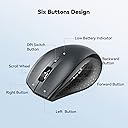
| Button Quantity | 6 |
| Colour | Grey |
| Compatible Devices | Windows 2000, 2003, XP, Vista, Win7, Win8, Win10, Win11, Mac, etc. (Note: side buttons cannot be used in Mac OS) |
| Connectivity technology | Bluetooth |
| Country of Origin | China |
| Customer Reviews | 4.4 out of 5 stars 10,499 Reviews |
| EU Spare Part Availability Duration | 3 Years |
| Embellishment Feature | LED |
| Enclosure Material | Metal, Plastic |
| Hand Orientation | Ambidextrous |
| Hardware Platform | PC |
| Item Dimensions L x W | 10.5L x 6.5W centimetres |
| Item Weight | 75 Grams |
| Manufacturer | TECKNET |
| Manufacturer Part Number | FBA_BM308 |
| Model Name | BM308 |
| Model Number | EWM01308 |
| Mouse Maximum Sensitivity | 3200 Dots per Inch |
| Movement Detection | Optical |
| Movement detection technology | Optical |
| Network Connectivity Technology | Bluetooth |
| Number of Batteries | 2 AA batteries required. |
| Number of buttons | 6 |
| Operating System | Windows 2000, XP, VISTA, 7, 8, 10 |
| Power Source | Battery Powered |
| Product Features | 2 Additional keys, 24 months battery life, Bluetooth, Connect Up to 3 Devices, TeckNet TrueWave Tracking |
| Product Finish Type | Glossy |
| Product Warranty | 1 |
| Range | 15 meters |
| Special feature | 2 Additional keys, 24 months battery life, Bluetooth, Connect Up to 3 Devices, TeckNet TrueWave Tracking Special feature 2 Additional keys, 24 months battery life, Bluetooth, Connect Up to 3 Devices, TeckNet TrueWave Tracking See more |
| Style Name | Modern |
| Theme | Bluetooth/Wireless Mouse |
| Unit Count | 1.0 count |
S**.
Great mouse
Beautiful and comfy medium sized mouse. Works very well after almost 1.5 years. Very good value for money.
J**Z
One little mouse with cheap price tag and hefty quality
Hello fellow tech lover, if you are about to purchase this item and are a bit dubious as to why it's so cheap, I hope I will put your doubts at rest. After all, I was in your shoes as well. After buying an expensive bluetooth Logitech for over ยฃ50 which caused me enormous amount of headaches and frustration with Logitech Support I threw it in a drawer and started looking again. After a few considerations between Microsoft and other makes I came across this product and I have to say I was very surprised by it's reviews. Considering the price tag I thought I'll give it a go and have not been disappointed. As soon as I got the product, it synced beautifully with both my Macbook Pro and my Surface 3 (Windows). Mind you, I could only sync it with one device at any given time, i.e. if I sync it with Macbook, I have to re-sync it with Surface 3 and vice versa. It doesn't remember more than one device - but that's not a problem. I use it mainly at work anyway. The feel of the mouse is amazing, it's not too small, it's not too big, perfect for carrying around and saving that one extra USB port as it's Bluetooth. I use it every day for 9 hours and the battery has lasted so far without changing - bought it beginning of August. Once I disabled in the Bluetooth settings that annoying feature where the laptop cuts of power for the bluetooth device to conserve power, the mouse works flawlessly. I'm well please with this little and cheap product, if only everything was as good and cheap.
N**N
Great mouse, cannot fault it.
TECKNET Bluetooth Mouse, 3200DPI Wireless Mouse, Cordless Mice Ergonomic Portable Mouse for Laptop PC Computer 24 Month Battery Life With Battery Indicator, 3200/2400/2000/1600/1200/800 DPI,Grey Item model number : 74940 (on the box it says model EWM01308, as does the sticker on the mouse) Amazon has a habit of combining different items into one review stream, so this is for the model above. It is the one without separate USB receiver. I chose this model as it connects directly to the computer's built in bluetooth and does not require a separate rx to be plugged into the USB port. For some reason more expensive than the units that come with a rx. Mouse comes in a nice simple cardboard box with a printed instruction sheet, detailing the buttons and how to pair it with the computer. Pairing was really easy, it took longer to find the on/off switch on the mouse :o) I was confused by all these DPI numbers. These are the resolution, or how accurately you can move the mouse pointer to a specific point on the screen. It also determines how far you physically need to move the mouse for the pointer to move. My mouse is either used on the chair arm or my knee, so setting it to a low value allows the mouse to physically move a little and get big movement on the screen. I can set it so the chair arm (or my knee) is the same size required to move the mouse anywhere on the screen. The resolution is easily changed by pressing a button, located just below the scroll wheel (for when I get old and fat & get bigger knees :o) Left/right and scroll wheel buttons all have nice positive click feelings. side buttons are located above the thumb rest, so you have to lift your thumb up to use them. My old Microsoft mouse had a button under the thumb, which I thought was better, as one does not have to move ones thumb. The clicks are quite loud & could annoy somebody watching the telly in the same room. The mouse has a number of battery saving modes, these are automatic (as far as I know) and cannot be adjusted. so sometimes a button has to be pressed to bring it into life (after a tea break). There is also an on/off button, so this will save even more battery power and also useful when storing in a bag, to stop the buttons being pressed and keep waking the mouse up. The mouse runs on two AA batteries. The device warns of low battery by a flashing LED and also power remaining in % can be viewed on the PC. Battery life is said to be two years. AA batteries can be bought anywhere, so probably less faff than having a lipo battery & USB charging. Like most peeps, I cannot compare this to other models or brands, but for me, despite the higher than average price, it feels and looks of good quality, fits the hand comfortably and nothing can be faulted with the product.
M**J
Excellent mouse with no setup or dongle required!
Highly portable but not on the small side, which is exactly what I wanted! The main reason I bought it was because you don't have to plug anything in to the USB to make it work. It connects via bluetooth 3.0 or 5.0 and as long as your device has bluetooth 3 or 5 then it should be detected easily. I have tested and used this mouse on my Android phone, Fire Stick, Steam Deck, Laptop and my main PC with no issues whatsoever! You get 2 side buttons, which are a great addition for gaming or even just for extra handy hotkeys in photoshop or other programs. The buttons and mouse-wheel are solid and not flimsy/loose like a lot of cheap mice are. It also has a decent weight to it, which is due to the thickness and high quality of plastic used. I like that and hate to feel cheap thin flimsy rubbish which is what most bluetooth mice are made of. So I feel you get the best of all worlds with this mouse as it's more than good enough to be a permanent fixture either as a desktop mouse or just leave it on your armchair and use it to control your Smart TV/Fire Stick etc. The things you can use it for are limitless. The switch underneath turns it off and conserves the batteries while you store or transfer it. The batteries will last you an awful long time too, which I was quite surprised by as bluetooth devices usually drain quite a lot of power. But as long as it's in close range to your device, you'll get a lot of time from your batteries. In my experience if you're more than a couple of feet or so away then you may see them drain quicker. Which goes for all BT devices. I only have one slight criticism and that is that the side grip isn't rubber, it's just hard plastic with a matte texture. But for the price of it you can't really complain, and it feels comfortable enough for me for even long gaming sessions! As a PC gamer of nearly 30 years I've had loads of mice, but I think you could easily spend a lot more than this and get a lot less in return. So I'd say it's quite a bargain! I'm very happy with mine and even bought 2 more as gifts for family members.
M**N
Wireless Mouse
Good product, performs as advertised.
M**D
Reliable and Comfortable Mouse for Work and Home Use
Iโve been using the TECKNET Bluetooth Mouse for both my work and home office setup, and itโs been excellent so far. The connection is stable, the mouse feels comfortable in hand even after hours of use, and the build quality is solid. The adjustable DPI is a nice touch for switching between tasks, and I appreciate the long battery life โ I havenโt had to change the battery yet. Setup was quick and hassle-free, and Iโve had zero issues with it. If you're looking for a dependable and affordable wireless mouse for everyday productivity, this one is a great choice.
P**Y
Good mouse - sadly with issues
Good mouse, works great with my MBP, Bluetooth pairing done without any issue. Mouse on its own is a little bit heavier than I expected but thats good, feels massive after cheap ones which I used before. Keys are good and it looks durable. We will see if it keeps that way. A+ for the price and satisfaction. EDIT 1: Lowering to 1 star rating after 10 days use. Don't know if it's defective or what, there seems to be some issues with Bluetooth interference, tried with both my MBP Late 2011 and Dell e7470, OSX and Windows 10, had issues with mouse skipping and moving rapidly although it doesn't happen so often with Dell like it does with my Mac. Happens randomly every hour os so for a 10-20 seconds period. Cannot use the mouse when it happens so I need to like wait until it passes. It looks like it has mind on his own. Tried changing batteries, disconnecting but no avail. Shame, it was really good mouse for the money. EDIT 2: Changing to 3 star rating. managed to get decent results by connecting to 5Gz WiFi. there seems to be an issue with interference while connected to normal WiFi. There are still issues with connection lost for second or two but due to fact that this is Bluetooth mouse and doesn't need dongle it's usable for me as it is. You should be better with USB dongle version.
M**.
Another great mouse from Tecknet
I bought this mouse (BM308) to use with my Dell Latitude 5290 and I must say it works a treat. I chose the grey colour and it matches perfectly with the laptop. The mouse is a decent full size unit designed for a right handed user so sorry to the lefties out there (see photos - and size compared with an iPhone 6 and a credit card). And I like the fact that it is Bluetooth enabled as it means I can free up a USB socket on my laptop which was previously used to house the receiver for a 2.4 GHz wireless mouse (which used to be a very good yet smaller Tecknet portable mouse). I like the fact that there are 5 different DPI settings available is an added bonus and I think most will use the 1200 or 1600 DPI settings unless working with a large screen estate and desk which allows for a bit more wider movements when using the mouse. And given that the button is high up and away from the scroll when fingers; you are unlikely going to be pressing that button accidentally. I also like the fact that there is a forward and back button on the left side of the mouse. Gosh, I havenโt used extra buttons on a mouse in a long time but I they are useful for sure. The on/off button is a bonus as sometimes I donโt use the mouse and just popping it into my bag can mean the mouse is accidentally left on and moving/clicking away. So a quick slide of the button and itโs all off which is just simple but highly effective. The sleep feature works quite well and it wakes easily with movement or a simple click. Battery life is great too and 2xAA batteries should last a good while (I am using rechargeable batteries). . And with a good Bluetooth range, it has saved my bacon a few times when I have forgotten to pack my presentation pointer when presenting to an audience. Overall a cheap and cheerful mice which will serve me well in the office like it has done already. And just as good, if not better than the Logitech/Microsoft equivalent. Grab yourself one of these mouse as you wonโt be disappointed.
A**R
Wanted to Turn my Note Pro (12.2") into a little more than a toy
The price is what sold me on it, but it was the size I was worried about. I don't have big hands, but I don't have small hands either (they're in that annoying in between stage of bigger than average, but smaller than large for an adult male). This mouse is great, though was a pain to pair with android, and I thought it was busted. I ended up testing it on my Windows 8 PC and it worked just fine, then I later figured out how to get it to work on my Android Tablet without any issue. I'll go into that a little later. Pros: -Not that small, just slightly smaller than my favorite M510 Logitech mouse. It's the large hump near it's rear that makes it decent fit for my hands without having to change my grip to something uncomfortable and unusable. -On windows, all the buttons work and did something, again I'll go into that later. Cons: -None really, the android connection issue is an Android issue that I solved. If I had to pick one, it would be that the printed manual says it has an 8 month battery life as to the 18 that this page claims, kind of a huge difference in time. Android Connection Fix: 1st: Connect the device like you would any other. Go into Settings > Bluetooth > Turn it on > Scan. On initial turn on of the mouse it should go into search mode where it should then be discovered by your tablet/phone. If not press the connect button (top middle) on the underside of the device. 2nd: Notice how janky the cursor is, that seems to happen every time you pair this mouse for the first time. Turn off your bluetooth, and then on again to kill the connection with the mouse. 3rd: When bluetooth is back on, press "Bluetooth 3.0 Mouse" to initiate re-pairing, and on the bottom of the mouse press the connect button to re-establish a link to the tablet. You should notice now that the cursor is smooth and working as it should. Mouse Buttons Functions (Windows): -Orange side buttons = back and forth (top = forward, bottom = back) -Everything else works like it should, right click, scroll wheel/middle click, left click. Works just fine and is very responsive. Mouse Buttons (Android): -Orange (top): seems to not do anything for me -Orange (bottom) and Left Click: acts as an Android "back" button -Right Click: acts like a one finger touch -Scroll Wheel: scrolls between home screens and drawers in launcher, and then normally in apps like Photo Gallery, and Browser -Middle Button: acts like "home" takes you to your launcher, you can also activate the long press "home" feature (which on my Note Pro launches Google Now) Since I'm writing this on my Tablet using/testing a keyboard I don't know if I can upload pictures from Amazon's Android App. I'll do that when I reconnect with my PC and maybe correct any spelling mistakes I might have made but using an external keyboard doesn't pick up. With that said, I can't be more pleased with my purchase, after solving that Android Mouse issue. It's one of those purchases that luckily doesn't cost much and for me is worth the risk. The manual was in proper English and was rather informative.
Z**E
Per il momento, direi perfetto
Il mouse si connette immediatamente. Non dร alcun tipo di problema. E' comodo e facile da utilizzare. Funziona anche su superfici "difficili" - io lo uso direttamente su un tavolo in legno, senza tappetino, e va alla grande. E' dotato di pulsanti "indietro" e "avanti", comodissimi in numerose situazioni, soprattutto durante la navigazione sul web. Tasti che rispondono bene, rotellina che funziona perfettamente, leggero, ergonomico e affidabile. Al momento, nessun difetto da segnalare.
T**D
overall works nicely
The back and forward button only work while browsing internet. These two buttons do not work in Microsoft apps such as word
J**S
Great deal for the price!
Works like it should for a decent price! Have had no issues whatsoever ๐
A**R
Good design
Rests the wrist
Trustpilot
4 days ago
2 months ago