

Desertcart purchases this item on your behalf and handles shipping, customs, and support to Belgium.
⚡ Power, Connect, Create — All in One Hub!
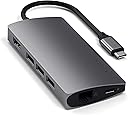
The Satechi 8-in-1 USB-C Hub V2 is a premium, space-gray aluminum adapter designed for professionals who demand reliable, high-speed connectivity. It features 115W USB-C pass-through charging, 4K/60Hz HDMI output, Gigabit Ethernet, and multiple USB and card reader ports, compatible with the latest MacBooks, iPads, and Windows laptops. Its compact, durable design ensures seamless workflow whether at home, office, or on the move, backed by a 2-year warranty.


| ASIN | B075FW7H5J |
| Additional Features | Portable |
| Best Sellers Rank | #128 in USB Hubs |
| Brand | Satechi |
| Built-In Media | Item |
| Color | Space Gray |
| Compatible Devices | MacBook Pro 14/16-inch (2026 M5/M4/M3/M2/M1), MacBook Air 13/15-inch (2026 M5/M4/M3/M2/M1), MacBook Neo 13-inch (2026), iPad Pro 11/13-inch (2025 M5/M4/M3/M2/M1), iPad Air 11/13-inch (2026 M4/M3/M2/M1), iPad Mini (A17 Pro/6), iPad (A16/10th Gen), iPad Pro 12.9-inch (6th/5th/4th/3rd/2nd/1st gen), Mac Mini (2024 M4/M2/M1), iMac (2024 M4/M3/M1), Mac Studio (2025 M4/M3/M2/M1), Lenovo ThinkPad, Microsoft Surface, Google Pixelbook Compatible Devices MacBook Pro 14/16-inch (2026 M5/M4/M3/M2/M1), MacBook Air 13/15-inch (2026 M5/M4/M3/M2/M1), MacBook Neo 13-inch (2026), iPad Pro 11/13-inch (2025 M5/M4/M3/M2/M1), iPad Air 11/13-inch (2026 M4/M3/M2/M1), iPad Mini (A17 Pro/6), iPad (A16/10th Gen), iPad Pro 12.9-inch (6th/5th/4th/3rd/2nd/1st gen), Mac Mini (2024 M4/M2/M1), iMac (2024 M4/M3/M1), Mac Studio (2025 M4/M3/M2/M1), Lenovo ThinkPad, Microsoft Surface, Google Pixelbook See more |
| Customer Reviews | 4.3 out of 5 stars 4,894 Reviews |
| Data Transfer Rate | 10 gigabits_per_second |
| Enclosure Material | Aluminum |
| Global Trade Identification Number | 00879961007140 |
| Hardware Interface | Ethernet , HDMI , MicroSD, USB 3.0 |
| Item Dimensions L x W x H | 7.09"L x 3.94"W x 0.98"H |
| Item Weight | 78 g |
| Manufacturer | Satechi |
| Mfr Part Number | Label-Gray |
| Minimum Required Operating System Version | Mac OS 10.15 Catalina |
| Model Number | ST-TCMA2M |
| Number of Items | 1 |
| Number of Ports | 8 |
| Operating System | Windows, Mac |
| Special Feature | Portable |
| Total USB Ports | 3 |
| Total Usb Ports | 3 |
| UPC | 879961007140 |
| Warranty Description | 2-year limited warranty |
C**R
Superior Quality, NO Drops or disconnections. WORTH EVERY PENNY!
-Satechi products can't be beat in build and stability for my work environment going forward. -The connection is faster and superior than my last hub. -A plus is the mini HC slot -Super STABLE. No drops when adding or removing externals/SD drives. My last hub would kick off everything, every time I tried to plug in or remove an accessory or SD disk. I don't know if it was the connection to the mac or something in the physical build of that hub but this no longer happens with the Satechi. - Stable connection when MacBook sleeps. My externals rarely disconnect when I put my machine to sleep. I understand it is a Macbook Pro issue but it is down to about 2% whereas everytime I put my machine to sleep with my old hub, it would kick off my externals. - Direct connection for charging works. I can connect the Satechi and my external directly to my MAC with complete confidence while working. Something that the last hub would not do. The constant disconnecting of the externals disrupted my work flow, one was a scratch disk for Photoshop and when it disconnected, Photoshop would crash. It messed up my time machine backups that were in progress whereas I do not ever experience this with the Satechi while working. -Not a complaint of my Satechi but I purchased a new SeaGate drive that is ONLY recognized when it is directly connected to the Mac. It was not recognized by the old hub either. I was about to return the SeaGate when I realized I could charge my Macbook through the Satechi. My last hub could not be trusted to maintain a superior connection so I had software crashes often. I didn't buy a cheap hub last time but I wish I saw the Satechi hub in my search. I was new to needing a hub with my Macbook Pro's lack of connectivity and the unstable hub. This hub by Satechi is WORTH EVERY PENNY. I only wish they made a 4 USB slotted hub.
M**Y
Now working as advertised
After a scare with the hub seeming to brick the tablet. I got some professional help trouble shooting and got the tablet functioning again. USB and HDMI connections are working as advertised the USB-C PD port works but the charging speed varies between fast and slow. The hub gets quite hot, but the aluminum case seems to be working to dissipate the heat. The big issue comes when you try to use the ethernet port. It works briefly then ceases and then the settings app crashes and you will need to reboot the tablet. However once you shut it down it wont boot back up and you need to force start the tablet.
O**S
Great Product Great Price
Great product
C**S
The Best USB-C Hub Available
UPDATE: August 31, 2022 I have now owned the Satechi MultiPort Hub for over 5 years and it has worked flawlessly. I have it plugged into my 2017 MacBook Pro and use the HDMI port to power my Acer 24" monitor, run wired Ethernet, and use two Logitech Bluetooth USB Type 2 ports for my wireless mouse and keyboard. The only thing I don't like is the mini sd card reader which is a pain in the ass to insert a card. It can be equally as difficult if not worse trying to eject it. I have never used the power delivery feature, nor would I ever. I would not want such a small device passing power through to an expensive laptop. The USB-C is too short IMO and it doesn't provide the tightest fit into my MacBook Pro. Finally, I would not recommend running an external drive continually off this hub because it can generate a lot of heat. Aside from these gripes, this hub has lasted a LOT longer than I ever hoped it would. ORIGINAL REVIEW: I just received my new Satechi Aluminum Multi-Port Adapter V2 today and I LOVE it! I have been researching USB-C hubs for over a month, watched and read hundreds of reviews, and finally decided on the Satechi because of the features and price. Other hubs with all of these options are easily twice as much, larger in size and require a battery brick which was a dealbreaker for me. The Satechi Adapter has a very sleek and minimal design and the space gray color matches my 2017 MacBook Pro perfectly. I am using it to connect an Apple USB Keyboard, LaCie Rugged USB External Drive, Wacom Intuos Pro Tablet, 23.5-inch ASUS (1920 x 1080) 60Hz Display, and Ethernet Cable for internet. All of these stay connected throughout the day, and have been working flawlessly. Also, as an important note, the Satechi gets warm and not hot most of the day. However, the only time it does get a little hot is when I run hourly backups through my LaCie Rugged External Drive. I have not tried the Power Delivery since I don't need it, so maybe that is why it gets hot for others. My only ding is that the USB-A ports are upside down and they can be difficult to plug a USB device into. You can hear metal grinding when you plug into the USB-A ports, but maybe it's a good thing to have such a tight fit. I plan on updating my review after 2-4 weeks to confirm the reliability and quality of the awesome (so far) Satechi Aluminum Multi-Port Adapter V2. UPDATE: June 16, 2018 I have used the Satechi Adapter every day for three months and it is doing great. My only real complaint so far is that the HDMI can be a little flaky. If you accidentally move the Satechi too much or bump it, then the HDMI connection goes out and then you have to unplug and replug the adapter back into your computer. Kind of annoying but not too bad. Also, it took me some time to figure out how to get the HDMI to consistently work with my external monitor. I am using a 2017 MacBook Pro and you have to open the lid and wait until the login screen appears before turning on the monitor. For some reason the Satechi HDMI port does not immediately recognize my MacBook Pro and monitor upon boot. I would prefer just turning on my monitor and MacBook Pro and not having to wait to turn on my monitor.
J**.
It works
It works as advertised. Not much more that you can say.
E**N
It's so good and practical.
B**A
Buyer Be Aware!!
The adapter works great but the USB ports are so tight that it’s extremely hard to remove the dongles. I broke two dongles trying to remove them because the metal piece got stuck inside. Now I have an expensive keyboard and mouse that don’t have a dongle and two ports that cannot be used. Extremely disappointing!!
P**R
Works Great
Purchased hub for new Macbook air. Hub works really well with no need to have external power source (an option). Very please with the stability of performance so far.
D**R
By far the best adaptor I've seen
Pro: -sleek design -has a cord. I don't like the ones that dock directly to a Macbook - it looks like one wrong move would bend or break the connectors and damage the adaptor or laptop -has all the connectors I need. Con: -Expensive -Gets rather hot Overall, it is excellent.
A**R
Can "pack" power, HDMI, ethernet and type A USBs in one USB type C wire
It works just fine connecting a Dell monitor's HDMI and USB downstream hub, Ethernet, power from a USB type C adaptor and a USB type A keyboard connected to SATECHI adaptor itself, to a laptop via Stouchi USB C extension cable. Also works fine with an older laptop without USB type C -- power and HDMI are ignored as expected, and delivered separately. So SATECHI adaptor was instrumental for removing wires from the desk. And actually explains the promise of USB type C ;-)
H**G
Le meilleur pour Mac
J’ai utilisé des Hub USB-C de différentes marques et c’est le modèle de satechi qui fonctionne le mieux. En HDMI 4K 60Hz l’image est stable durant de longues sessions de travail. Et je peux même utiliser une rallonge usb-c pour un rangement des cables à la péripherie de l’espace de travail.
S**S
Nice product to Accompany the Macbook Pro
The product was shipped quickly and the overall product is Very Good . Works very good wit the Mac. I feel the price is a little bit High.
M**X
Super Qualität zu fairem Preis
Nachdem ich einige Konkurrenzprodukte gekauft hatte und diese alle qualitativ nicht zufriedenstellend waren (Verarbeitung, Funktionalität des HDMI-Ports), habe ich mir nun dieses vergleichsweise doch etwas teurere Produkt gekauft und bin absolut zufrieden. Die Verarbeitung ist sehr gut, der Farbton passt zum MacBook, die Ports sind gut (nicht zu streng und nicht zu lose), sogar neben dem MacBook macht es einen einigermaßen wertigen Eindruck und zu nicht zuletzt ist es voll funktionsfähig. Ich benutze den Adapter für meinen gesamten Schreibtisch, unter anderem ein externer Monitor (full hd) und eine externe Festplatte (HDD). Selbst bei größeren Kopiervorgängen hat der Adapter kein Problem die Festplatte mit Strom zu versorgen, während auch die anderen Geräte ohne Einschränkungen nutzbar bleiben. Hier noch ein Tipp für alle, die laufend einen externen Monitor über diesen Adapter verwenden: In osX ist der "Clamshell Mode" standardmäßig aktiviert, d.h. dass, wenn ein externer Monitor angeschlossen ist (was bei mir laufend der Fall ist) und man das Macbook zuklappt, der Standby-Modus nicht aktiviert wird, sondern das Gerät eingeschaltet bleibt und über den externen Monitor, sowie evtl. externe Eingabegeräte, weiterhin bedient werden kann. Um dies zu deaktivieren ist folgendes zu tun: - in den Recovery-Modus booten (Neustart und währenddessen command-r) - Terminal öffnen (über den Menüeintrag utilities (Dienstprogramme o.ä.) erreichbar) - folgenden Befehl eintippen: nvram boot-args="iog0x0" (dann Eingabetaste drücken) - Neustart (zurück in normalen Modus) und dann nochmal neustarten Nun sollte der "Clamshell Mode" deaktiviert sein und das Macbook nach dem zuklappen in den Standby-Modus gehen. Diese Einstellung wird aber gelöscht wenn der sog. "PRAM" zurückgesetzt wird, also muss die obige Prozedur falls dies mal nötig sein sollte wiederholt werden.
Trustpilot
1 day ago
1 month ago