Desertcart purchases this item on your behalf and handles shipping, customs, and support to Belgium.
🖱️ Elevate your left-hand game with ergonomic precision and silent power!
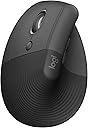
The Logitech Lift Left Vertical Ergonomic Mouse is a wireless, laser-tracking device designed specifically for small to medium left hands. Featuring a 57-degree vertical angle, it promotes natural wrist posture to reduce strain during long work sessions. It offers dual connectivity via Bluetooth Low Energy and Logi Bolt USB, compatible with Windows, macOS, iPadOS, Chrome OS, and Linux. With whisper-quiet clicks, customizable buttons, and up to 2 years of battery life, it blends productivity with comfort. Its eco-friendly design includes 70% post-consumer recycled plastic, making it a smart, sustainable choice for left-handed professionals.


| ASIN | B07W8P4PDD |
| Antenna Location | Office |
| Are Batteries Included? | Yes |
| Are Batteries Required | Yes |
| Battery Average Life | 24 months |
| Best Sellers Rank | 148 in Computers & Accessories ( See Top 100 in Computers & Accessories ) 11 in Mice |
| Brand | Logitech |
| Brand Name | Logitech |
| Button Quantity | 4 |
| Colour | Grey |
| Compatible Devices | Android devices on Android 8.0 or later, Chromebook, Mac, Personal Computer, iPad on iPadOS 14 or later |
| Connectivity technology | Bluetooth, Logi Bolt , USB |
| Country of Origin | China |
| Customer Reviews | 4.2 out of 5 stars 1,065 Reviews |
| EU Spare Part Availability Duration | 2 Years |
| Enclosure Material | Graphite, plastic |
| Global Trade Identification Number | 05099206099807 |
| Hand Orientation | Left |
| Hardware Platform | Mac, PC |
| Included Components | Wireless receiver, AA battery |
| Item Dimensions L x W | 10.8L x 7.1W centimetres |
| Item Type Name | Wireless Ergonomical Mouse - Left Handed |
| Item Weight | 220 Grams |
| Manufacturer | Syktcjgs |
| Manufacturer Part Number | 910-006474 |
| Model Name | Lift Ergonomical Vertical Mouse - Left Handed |
| Model Number | 910-006474 |
| Movement Detection | Laser |
| Movement detection technology | Laser |
| Network Connectivity Technology | Bluetooth, Logi Bolt, USB |
| Number of Batteries | 1 AA batteries required. (included) |
| Number of buttons | 4 |
| Operating System | Chrome OS, Linux, Windows® 10, Windows® 11 or later, iPadOS 14 or later, macOS 10.15 or later |
| Pattern | Left-Handed |
| Power Source | Battery Powered |
| Product Features | Ergonomic Design, Lightweight, Wireless |
| Product Finish Type | Plain |
| Product Warranty | 2 year manufacturer |
| Range | hasta 10 metros |
| Special feature | Ergonomic Design, Lightweight, Wireless |
| Style Name | Mouse |
| Theme | Ergonomics |
G**F
For small to medium sized Left-handers
I researched for an upright mouse for left-hand use for many months. I watched many reviews and finally plumped for this mouse. And I think I chose well. Apart from the fact that one of the first things I read when I unpacked the thing was that it said it was for small or medium sized hands! and mine are like ... not small or medium. I couldn't believe I could have missed that important piece of information. I am still using it. It works well, but I have marked it down one star on comfort as a result, because the scroll wheel, and the buttons are in the wrong place, so I have to bend my fingers back to reach them. Not the biggest trial in the world, but it takes away from the ergonomic comfort goal of the design.
P**D
A little expensive, but perfect for us lefties
Although an unorthodox-looking device, Logi's Lift Left Vertical (great name) is the mouse you never knew you needed. It relieves virtually all of the strain that you normally experience with a traditional mouse by allowing your hand to sit in its natural position, without the need for wrist rotation. It does take some getting used to. Although clearly visible, the buttons are not where you expect them to be and therefore it takes time to rework your muscle memory. But after this initial process it's hard to go back. The function buttons all work as expected and can be configured globally as well as to individual apps. The 'centre' button is a little far back from the scroll wheel for my liking, so you do need to get used to a more relaxed grip so that you can slide your hand back to press it. I love the silent clicks too. I think 'quiet clicks' would be more accurate as they're clearly never going to be completely silent, but again compared to non-silent models the difference is night and day. They even feel better because of the sound dampening. All in all, perfect mouse for lefties!
A**R
Slim but excellent mouse
I really love this mouse. Connectivity is swift, either via Bluetooth or the supplied USB stick. The buttons and wheel are responsive and super quiet. I've docked one star only because the mouse could be slightly bigger in hand, but that wouldn't warrant me returning it.
M**S
Recommended for left handers
Perfect, very comfortable to use
A**R
Easy setup
Game changer for those spending hours at the computer. Takes about 3 mins to get used to and easy to link to pc. My wrist and shoulder are thanking me !
A**R
Buttons are misconfigured
Having bought this mouse, I found that the left and right click buttons were the wrong way around (i.e. when left-clicking, it displays a menu of options, when right-clicking it selects an item). Now there is a setting in Windows to swap these, the only problem is; this then also swaps the buttons under the tracking pad on my laptop which were originally correct (so when left-clicking, it now starts incorrectly displaying a menu of options, and when right-clicking, it selects an item). This means when using the Logitech mouse, I was having to set the windows configuration to flip the buttons, and whenever I was just using my laptop directly, I would have to change this configuration back to get the laptop buttons to perform correctly. After speaking to Logitech support, they told me the issue could be resolved by simply installing their application that allows you personalize/configure the buttons on the mouse. After installing it, I selected the option to flip the buttons via the Logitech app only to find it worked the exact same way as the windows option I had on my laptop! That is, it doesn't just change the configuration of your Logitech mouse, but it makes a global change that impacts the buttons on the laptop too. So, there was literally no point in installing the software. As a result, the mouse is completely unfit for purpose. As I left getting to the bottom of all this on my To-Do list too long (I always assumed there MUST be SOME way of configuring it to behave correctly without impacting my laptop), I let the return period expire, so now I'm lumbered with this expensive mistake which, in fairness, really is no one's fault but my own. Still annoying though.
D**N
Amazing
Amazing! I had one and my dad liked it so much that he ordered one for himself.
J**5
(Left hand version) Good with two oversights
The first annoyance out the box is that the left and right click are inverted compared to flat mice for the left-hand version (Can't say for the right-hand version). The only way to change this is setting the primary mouse button in Windows or Logitech bloated software. The config software that asks to install when connected is ok. But with the second oversight of not storing any settings on the mouse. The software has to be installed and running at all times on all devices used. It will ask for an account but it's not need with a out of the way button in the top right corner which is good. it supports remapping all buttons on the device and per program presets. It has support for horizontal scrolling by holding the back or forward buttons which is a good feature to have compared to other mice I have used. The easily changeable AA battery is great and the design is nice. Reparability is quite good with the dumb follow all other companies' decision of hiding screws under the feet pad, there no reason for this and could have had holes premade where they are.
K**J
Super mysz
Wygodna
T***
The most comfortable left hand mouse
Although delivery took 3 weeks, it was worth the wait. I have small hands with long fingers so it fits my hand nicely. The only problem is my thumb is slightly shorter so it takes a bit of stretching to reach the furthest side button. I think after getting used to it, it will not be too big of a problem anymore. The angle of the mouse is just right and very comfortable.
S**L
Useful but expensive than it should be.
Once used to, it is very comfortable. The software should have left/right configuration per mouse. It just replicates OS mouse configuration.
O**.
Do not buy if you're planning to switch mice often
Logitech in their infinite "wisdom" decided to swap the left & right buttons at a hardware level, and there's no option to swap it back for this mouse only. Logitech's app lets you swap the buttons in Windows settings, but that applies globally. So if you switch between Logi Lift and any other mouse, you'll need to change the settings every time. Save yourself the trouble if this won't be your only mouse.
R**E
Pensato per i mancini.. Lo adoro!
Ho recentemente acquistato il mouse Logitech "Lift Left" e sono rimasto positivamente sorpreso dalla sua ergonomicità e design pensato per i mancini. La qualità delle plastiche utilizzate è notevole, offrendo una sensazione morbida e piacevole al tatto. Questo mouse verticali mantiene la mano in una posizione naturale, riducendo notevolmente lo stress e l'affaticamento durante l'uso prolungato. L'impugnatura del "Lift Left" è estremamente comoda, e il suo design verticale permette una postura più naturale e meno affaticante per il polso e l'avambraccio. La disposizione dei pulsanti è intuitiva e la rotellina di scorrimento è precisa e reattiva. Lo consiglio vivamente a tutti i mancini che cercano un mouse ergonomico di alta qualità che possa migliorare notevolmente l'esperienza di utilizzo. È un investimento che vale sicuramente la pena per chi trascorre molte ore al computer.
Trustpilot
2 months ago
2 weeks ago