Desertcart purchases this item on your behalf and handles shipping, customs, and support to Belgium.
๐ Upgrade your 3D printing game with silent power and smart touch control!
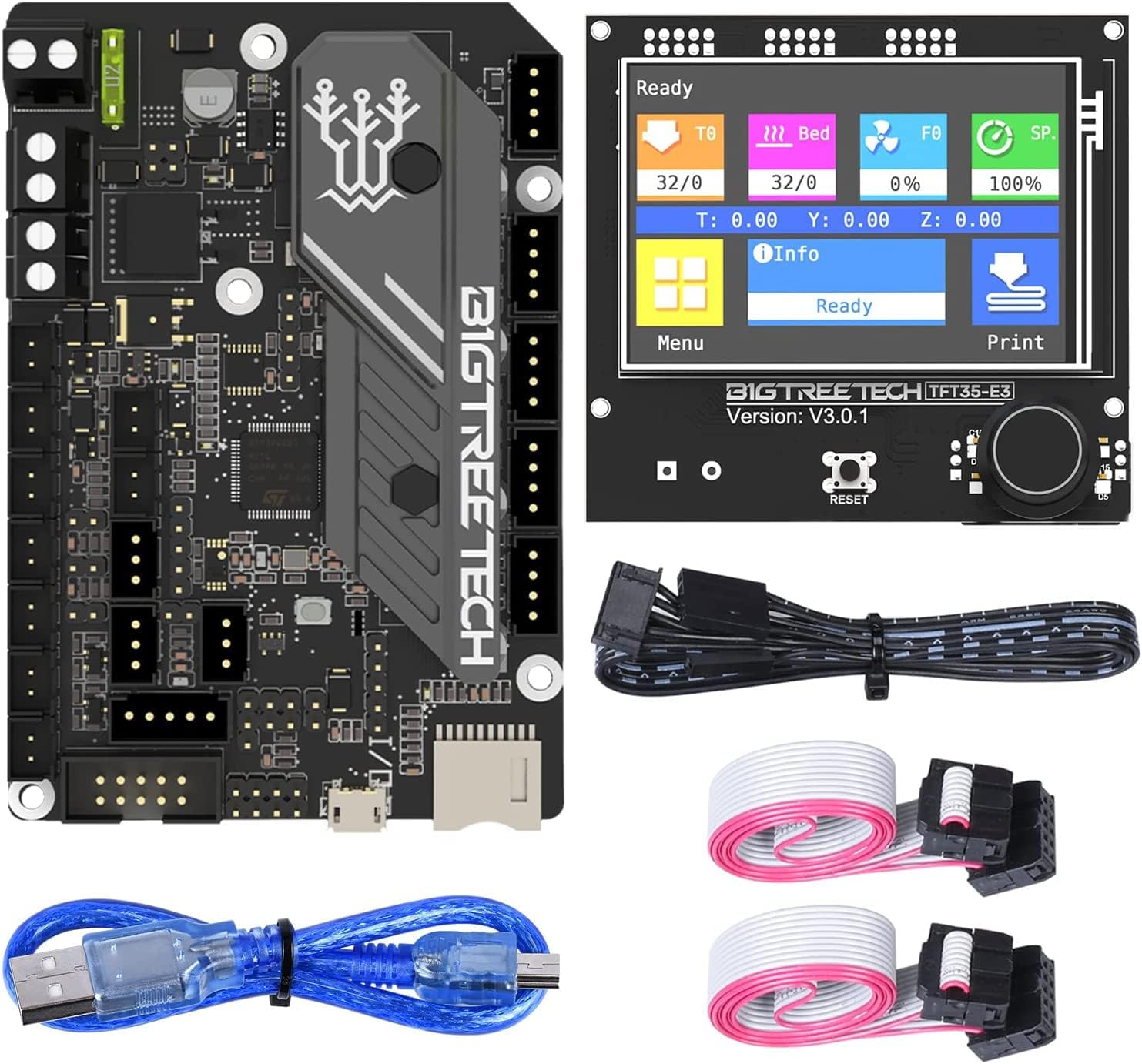
The BIGTREETECH SKR Mini E3 V3.0 + TFT35 E3 V3.0.1 combo is a high-performance 32-bit control board and touchscreen set designed for Ender 3/5 series printers. Featuring the STM32G0 MCU and silent TMC2209 stepper drivers, it offers quiet, precise printing with advanced features like dual Z support, filament runout detection, and power-off resume. The versatile TFT35 display supports both touch and classic LCD modes, making it a plug-and-play upgrade that enhances both functionality and user experience.


| ASIN | B09MYT45BQ |
| Best Sellers Rank | #35,691 in Industrial & Scientific ( See Top 100 in Industrial & Scientific ) #2 in 3D Printer Controllers |
| Brand | BIGTREETECH |
| Built-In Media | SKR MINI E3 V3.0 Motherboard & TFT35 E3 V3.0.1 Touchscreen |
| Chipset Family | STM32G0 |
| Chipset Type | STM32G0B0RET6 |
| Compatible Devices | Printer |
| Compatible Processors | STM32G0 series |
| Customer Reviews | 4.2 out of 5 stars 199 Reviews |
| Graphics Card Interface | Integrated |
| Item Dimensions L x W x H | 4.08"L x 2.77"W x 2.77"H |
| Item Highlight | Display 32Bit Silent Board Integrated with TMC2209 UART Stepper Driver Compatible with Ender 3/5 Ender 3 Pro/V2 3D Printer |
| Main Power Connector Type | 2.1mm DC barrel jack |
| Manufacturer | BIGTREETECH Direct |
| Memory Clock Speed | 12864 MHz |
| Memory Slots Available | 2 |
| Memory Storage Capacity | 8 GB |
| Mfr Part Number | 1060000518 |
| Model Name | BIGTREETECH SKR MINI E3 V3.0+TFT35 E3 V3.0.1 |
| Model Number | SKR MINI E3 V3.0+TFT35 E3 V3.0.1 |
| Number of Items | 1 |
| Number of Packs | 1 |
| Number of Ports | 2 |
| Platform | Windows XP |
| RAM Memory Technology | DDR4 |
| System Bus Standard Supported | SATA 3 |
| Total Usb Ports | 2 |
| USB 2.0 | 2 |
| Unit Count | 1 Count |
M**J
Way better than my stock board!
Installed on an Ender 5 Plus. This little kit was just what I was looking for. It's a fun DYI upgrade project. Just go online to figure out the pinouts of all the wires for your specific printer if you don't know them. Also, there is tons of ready to use firmware you can find for just about every printer as well. If I ever have an issue with this board I'm going to upgrade it to the bigger SKR 3 board but I think this thing will work just fine for a long time, Happy with the purchase!
W**5
Good option to upgraded a creality printer
Used this to upgrade my CR-10s printer and opted to get this version that comes with the touchscreen. I should have researched more into the touchscreen, it worked fine with regular firmware, but i knew i was going to install klipper....well it does not work with klipper outside of just an info screen. Could of opted not to get screen and purchased a regular 7" hdmi touchscreen to use with klipper....not a huge deal as i really dont use the screen and run off the web interface. ๐ค No issues with the board, flashed firmware and it was ready to go. Not a heavy lift to install, documentation on line is good and it is a widely supported board.
R**D
Great upgrade for Monoprice Select 3D
Fantastic little combo. Targeted for the Ender 3, I used it for a Monoprice Select 3D to replace a fried main board. Getting Marlin configured took some time, but the SKR mini e3 v3 perfectly matched the Monoprice interface requirements.
S**N
Impossible to get up and running
I have an Ender 5 Pro and purchased this to replace a failed stock motherboard and touchscreen. I wired it up without much issue and confirmed all of the steppers, heaters, and fans work. The BLTouch is completely worthless - I get error after error for seemingly no reason. After hours of searching, I found several people saying the prebuilt firmware is garbage. OK, no problem. I compiled my own based on settings in the Marlin config files. That seemed to fix some of the BL Touch issues, and I was eventually able to get through a bed leveling. Then the other problems started to come. First, I can't connect this to my PC via USB. It's an unsigned driver, which is against the law for WIndows 11. I can go through the process of restarting my PC into recovery mode and stop enforcing driver signatures, but that only works for one power cycle of the printer. If I reboot the printer, I have to reboot my PC. Unacceptable. I figured I would at least get through a test print and worry about the USB issues later - nope. I sliced a test cube in Cura, which estimates the print to take 30 minutes. I load up the SD card, walk back to my printer, and start the print. 3 seconds. The printer homes and then calls the print finished. If you're going to stay with Marlin, don't waste your time on this piece of trash. Buy a Creality board and save yourself the headache.
V**S
My old 3D printer became Brand New!
Worked really well. My old printer got a new life and became superbly quite with all the upgrades using this hardware.
E**G
Overheating Issue?
My screen heats up to pretty dangerous temperatures when at full brightness and starts warping the image in the lcd. I had to turn it down to 50% to make it useable. Otherwise as advertised. More documentation would have been nice but works as it should. The silent stepper drivers are amazing and loads up firmware just fine.
L**X
If you want plug & play go Creality, otherwise this is great
While this board is compatible with the CR10 S5, there are a number of things you should know before buying * If you plan to run klipper, the TFT display is not compatible without a decent amount of additional wiring to your raspberry Pi * When running a BLTouch, the instructions are WRONG. You must attach the "sense" wire to the Z endstop plug (PC2 in Klipper). It will not work in the main IO pins. The rest of the BLTouch wires to connect to the IO slot as the instructions indicate. * You will need to put new connectors/crimps on the end of your BLTouch. One side will get swapped to Dupont connectors, the other to JST connectors. * While it supports dual Z, it uses a single stepper driver so the Z screws cannot be operated independently (You cannot do gantry leveling) * You will need to build a splice cable as there are not enough fan headers for all the fans in the CR10 S5 (You will need to make a split connector for both the fans in the controller case) * The USB & SD slots do not face the correct way in the CR10 S5. You will need to make cutouts in your case to run the USB cable. The USB card can only be accessed by opening the controller case. Now that the bad things are out of the way, here's the good. * This is INSANELY quiet. It is way quieter than my Ender 3 with the Creality brand silent board. * Tons of features and works great with Klipper. * Speed is every bit as good as the stock board (that's mostly limited by the size of the moving bed)
W**I
Hard to setup
Like the touch screen but it was not very live adjusting friendly tried for hours to get my baby steps down to a point it would print. And never did get a print out of it. The mother board is hard to configure in marlin which was the only way I could use it because the stock firmware wants you to use the z stop and not the bltouch port but once I got that programed I never could get the hotend fan to work except with the stock firmware. The marlin terminal on the screen never worked when I would stop a print to do an adjustment the screen would sit on a screen saying system busy and never go back to a operating mode. Switched back to the creality 4.2.7 not as many options with it but at least I don't have to be a scientist to compile marlin for it. Well after some trial and error I got it working after using marlin it just takes time to get use to klipper and how to set it up. It works great live the board so I changed my review to 5 stars.
D**E
.
Needs a bit more documentation on set up.
Trustpilot
3 weeks ago
3 weeks ago