


🎮 Plug in. Power up. Play like a pro with classic controllers.
The PC053 adapter by MAYFLASH bridges vintage SNES, Super Famicom, NES, and Famicom controllers to modern PCs and PS3 consoles via USB. It requires no drivers, supports turbo functionality, and offers button remapping options, ensuring a seamless, customizable retro gaming experience across multiple Windows versions and PS3 platforms.
| ASIN | B00HZWINQY |
| Best Sellers Rank | #32,780 in Video Games ( See Top 100 in Video Games ) #99 in Super Nintendo Accessories |
| Brand | TOTALCONSOLE |
| Color | black |
| Compatible Devices | PC |
| Connector Type | usb |
| Customer Reviews | 4.4 out of 5 stars 165 Reviews |
| Finish | Matte |
| Global Trade Identification Number | 06902201311159 |
| Item Dimensions | 4 x 1.5 x 1 inches |
| Item Weight | 4.8 ounces |
| Item dimensions L x W x H | 4 x 1.5 x 1 inches |
| Manufacturer | MAYFLASH |
| Mfr Part Number | PC053 |
| Model Number | PC053 |
| Number of Items | 1 |
| Number of Ports | 1 |
| Package Quantity | 1 |
| Power Plug Type | No Plug |
| Smart Home Compatibility | Not Smart Home Compatible |
| Specific Uses For Product | personal |
E**R
Great adapter, no nonsense
Adore this. I customized an old og NES controller and it works like a charm. SNES works perfectly well too. I'm very sensitive to controls and lag, and these are in my mind, perfect. The issue I have is the price (30 bucks is a bit steep IMHO), but it does the job and does it well.
D**R
IT WORKS! U HAVE TO CONFIGURE THE CONTROLLER IN UR EMULATOR SETTINGS!
This works. I see some people are unaware that you have to actually configure the controller within your emulator settings! Works flawlessly on windows 11
N**L
Exactly as described. Works on Linux.
Exactly as described. I only tried it with a NES controller, but it works perfectly on a Linux PC.
C**S
Not 100% working
I did not have the missing cable issue. NES to Genesis Port (Official NES controller works fine) Genesis to Gen port (Official 3 button genesis controller does not work, but third party 6 button does) :( SNES port works perfectly with official SNES controller. Kinda a bummer but I bought it for the NES/SNES ports not the genesis. Also it works fine with OpenEmu on Mac OS X 10.9.4
C**N
plug n play w raspi stuff
I got that full Consoles menu, then you go in and it has your ROMs list for each system in your setup. Working Out Of Box with the original "Ninteno Advantage" , arcade controller stick style, big, controller!!!! Just remember you can only plug in Line ONE, so, the "Player Select" Hardware Switch on that big controller won't work doing this converter with an EMU route. .. ..... . . That Said!!!???? - - - This thing can get that orig Tendo ARCADE stick working via USB yes!!!!!! ~ Cheers
J**I
Ubuntu Linux
Fast delivery, worked out of the box on Ubuntu Linux for both the SNES and the NES ports (tested with original controllers). The NES port uses an adapter that plugs into the Genesis controller port, which is actually nice since it also serves as a free extension cable. I could not get the Genesis controller port to work with an original OEM Genesis controller.
J**R
It works
Good
A**K
Perfect for Linux Machines
I have tested this adapter on my EndeavourOS (Arch Linux) PC with Mesen, and mGBA. I used both an NES and SNES controller with this adapter and it worked great with both. I have not tested this adapter with a Sega Genesis controller however, but I have no reason to believe it wouldn't work. This adapter is a perfect addition to any Linux gaming rig.
G**S
Excellent SNES and NES USb adaptor
Excellent SNES and NES USb adaptor. The SNES socket is on the main unit, and the included NES adaptor plugs into the 9 pin joystick port on the main unit. The 9 pin joystick port is not compatible with SEGA pads.
G**Y
Funktioniert tadellos
Ich habe zwar hier noch ein funktionierendes NES sowie SNES, wollte aber die Controller auch am PC verwenden. Deswegen habe ich mir diesen Adapter sowie den "2-TECH USB auf SNES Controller Adapter/ Converter" geholt. Der Adapter ist stabil gearbeitet. Ich habe mich etwas gewundert, dass nirgends auf den Bildern die Steckplätze für den Controller gezeigt werden. Ich war dann auch etwas erstaunt, als ich das Ding in Händen gehalten habe und mich dort ein SNES Controller Steckplatz sowie ein Steckplatz für einen digital Joystick angeschaut haben. Allerdings war an der Plastikhülle noch eine kleine Plastiktüte angetackert, welche einen Adapter vom NES Controller Anschluss auf den Steckplatz für den digitalen Joystick enthielt. Ich habe hier Windows 7 64-Bit und alles läuft tadellos: Der Adapter wurde gleich von Windows erkannt und der Treiber eingerichtet (keine CD o.ä. notwendig, Windows verwendet einen eigenen Treiber). Zum Einrichten der Gamepads einfach unter "Start" > "Programme / Dateien durchsuchen" "USB-Gamecontroller einrichten" eingeben und starten. In den vorherigen Windows Versionen gab es dazu mal einen Punkt in der Systemsteuerung. Der scheint aber irgendwie rausgeflogen zu sein. Sowohl ein SNES Controller wie auch ein NES Controller haben ohne weiteres funktioniert. Einen Sega MegaDrive 2 Controller habe ich nicht bzw. einen analogen Joystick habe ich gerade nicht griffbereit. Deswegen kann ich zu dem Punkt nicht viel sagen. Fazit: Tut und macht, was es soll. Und mit den Original Controllern bekommt man sofort wieder das Gefühl von früher. Nur am SNES und NES direkt zocken ist schöner - hat aber auch kein so scharfes Bild. ;-)
A**W
Product works as advertised... technically
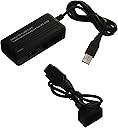
I bought this for use on my Raspberry Pi 3B+. Short Version: It works! 5 Stars Long Version: The product is advertised as working with NES and SNES controllers. The adapter itself has two ports on it, a SNES port, and what is actually a Sega Genesis controller port (technically Atari 2600 as well). It comes with a separate cable that converts the Genesis port to an NES port. You can see all this in the product picture. My NES controller and NES Advantage both work great with the separate cable. I don't have a SNES controller on hand, so I can't test that. However... While not advertised anywhere on the product page or packaging, if you buy this hoping the Genesis port will work on its own for controllers with that plug, you'll be out of luck. I tried an Atari controller, a 3 Button official Sega controller, and a 6 Button 3rd party controller, and none of them worked with the Pi. I can't fault the product for this at all, because it's not advertised, however I'm just putting the information out there so you'll know this product isn't more than it says it is. TL:DR Don't read into the picture and just take this product at face value. It works with NES and SNES, as advertised.
G**Z
Super recomendado.
Un adaptador para control de NES o SNES (Famicom y Super Famicom). Ligero que pareciera frágil pero es lo contrario. Tiene un cable USB de una longitud bastante cómoda. El sistema funciona a la perfección, puedo utilizar el control clásico con el emulador sin ningún problema. Plug and play, no tienen que preocuparse por instalar nada, solito funciona. Excelente producto, vale cada centavo.
G**S
Très bien pour NES et SNES
J'utilise cet adaptateur sur RetroPie avec un Raspberry Pi 3. Alors la photo et le descriptif ont changé depuis mon achat et correspond maintenant réellement à cet objet. Donc ça fonctionne uniquement avec manette NES ou Super NES (et pas les deux en même temps), le câble USB mesure 90cm. Le connecteur SNES est natif sur l'adaptateur, et le connecteur NES est une petite rallonge de 40cm qui se relie au port DB9. Sur le mien, il y a bien écrit MD2 pour megadrive, mais sur l'emballage et la notice c'était corrigé et bien indiqué "non compatible avec manette Megadrive" Je n'ai pas de manette Sega donc je n'ai pas pu testé au cas où. Mais je l'ai acheté pour mes vieilles manettes Nintendo originales, NES ou SNES fonctionnent parfaitement. Et faire jouer les gamins avec le fameux pad NES et ses coins pointus, et leur montrer comment on se défonçait les mains à l'époque, c'est vraiment fun ! Conclusion : adaptateur parfaitement fonctionnel pour manettes originales Nintendo.
Trustpilot
5 days ago
2 months ago