


Desertcart purchases this item on your behalf and handles shipping, customs, and support to Belgium.
🎧 Digitize your past, own your sound future!
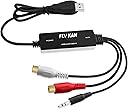
The FLY KAN USB 2.0 Audio Capture Card is a compact, plug-and-play device designed to convert analog audio from vinyl records and cassette tapes into high-quality digital MP3 or WAV files. Compatible with Windows 7 through 10 and Mac OS 10.7 to 10.14, it includes professional-grade Audacity software for seamless recording and editing. Powered solely via USB, it enables easy preservation and sharing of vintage audio without the need for additional hardware.


| ASIN | B019T9KS04 |
| Antenna Location | Audio Conversion, Audio Recording |
| Best Sellers Rank | #699 in Video Converters |
| Brand | Fly Kan |
| Built-In Media | 1x capture card 1x manual |
| Compatible Devices | Laptop, Personal Computer |
| Customer Reviews | 4.3 out of 5 stars 851 Reviews |
| Hardware Interface | USB 2.0 |
| Item Dimensions | 3.54 x 0.59 x 1.18 inches |
| Item Weight | 0.07 kg |
| Manufacturer | FLY KAN |
| Mfr Part Number | AV202 |
| Minimum System Requirements | Compatible with Windows 10, 8.1, 8, 7, Vista, and XP, as well as Mac OS 10.7-10.14 |
| Model Name | FLY KAN USB 2.0 Audio Capture Card |
| Model Number | 8541594591 |
| Number of Items | 1 |
| Operating System | Vista,Mac Os,8 . 1,Mac,Windows 10 |
| Other Special Features of the Product | Professional Audio Capture/Converting Software (Audacity) |
| Platform | Windows, Windows 10 |
| Recommended Uses For Product | Audio Conversion, Audio Recording |
| Special Feature | Professional Audio Capture/Converting Software (Audacity) |
| Unit Count | 1 Count |
D**N
V.TOP is a Quality analog-to-digital Conversion Tool
I have dozens of ancient Cassette Tapes (early 1970s) needed to be digitied. I had bought a used Yamaha KX-R430 Cassette Deck & digitized to play them into the V.TOP USB device, available on Amazon here: [link deleted]. The "Line-Out" RCA pin jacks on the KX-R430 tape deck produced only thin, echo-y output to the V.TOP, which in turn produced a thin, echo-y digital file to Audacity, the free Windows analog-audio-capture and digitizing softare. This is because "line out" from the deck was in need of a pre-amp to contour the output into its full fidelity potential. Luckily, the HeadPhone output jack of the KX-R430 produced rich, full stereo sound. The V.TOP device worked well when connected to the preamped HeadPhone Jack of the Yamaha KX-R430. NOTE: A male 1/4" (KX-R430 HP output) male to a "small" (1/8" V.TOP male input) audio adaptor jack was needed to make the Cassette music flow from the deck to the V.TOP and thence into the USB port of the computer. Such an adaptor is available on Amazon here: [link deleted]. USB output of V.TOP USB device captured, recorded, and copied out as a digital file, which in turn was captured and saved to the laptop hard drive by Audacity. The V.TOP package provides a mini-CD which contains the excellent, and free, Audacity recording app. NOTE: Audacity FAQ says: "You will probably want to both hear the monitored audio and see it on screen while recording. To do this, enable "Software Playthrough" in the Transport > Transport Options menu." This worked perfectly. Now headphones are hooked up to DELL Inspiron 15 laptop speaker output and V.TOP USB device is connected to HeadPhone Jack (front panel) of Yamaha KX-R430. V.TOP draws its power from the USB port of the laptop to which it is connected (see picture). This allows realtime, monitoring & recording by Audacity. The process is 100% manual during Start/Record/Stop of all Tape Deck and Audacity "Transport" controls. If you have a 60 minute cassette tape, it will take 75 minutes to digitize it track by track. Audacity's File --> Export command allows direct saving of stereo tracks as .mp3 or .wav (and other) audio formats to the local hard drive. Track Names are up to the archivist. Once these files are on the local HD they can then be used to burn to a data CD or a thumb drive. If you only want to make .mp3 files of your old time "Mickey Mouse" kids cassettes, then any of the cheap "MP3 Converter" Walkman-style Cassette Players sold on Amazon will probably do. But Beware: These devices are toys, not tools. I bought one and sent it back. The V.TOP is a credible tool for making high fidelity digital stereo files [.mp3 or .wav] to preserve important cassette recordings, PROVIDED you use a quality, stereo cassette tape deck to play them into the V.TOP. V.TOP is Highly Recommended by me. Audacity settings are: Audio Host: MME Recording Device: Microsoft Sound Manager Recording Channels: 2 (Stereo) Recording Playback Device: Speakers/Headphones
S**8
Works Well, Just Need to Adjust Software
Needed this to rip copies of my rare records (and maybe cassettes soon) so I can listen to them wherever I go and not be stuck in my bedroom with the record player. The device itself is fine and very easy to setup and use. The instructions for the hardware process didn't quite match the system screens I saw, which confused me for a minute, but it was okay. The trick is the Audacity software, which I already had installed on my laptop anyway, so I didn't need the included disc. But you really need to take the time to check Audacity settings and fix the volume and everything, or you're going to wind up blaming the device for your issues. The device is great, just be patient and learn to work Audacity a little bit and you should be fine. If you run into some minor issues with recording glitches like I did, check the latency settings and bit rate and all of that stuff. Your issue is the software, not the device. Once I fixed the software to eliminate the one glitch, everything was fine and honestly the rip from vinyl sounds like it is a CD recording, it was that clear and without any surface noise or hardware issues, etc.
S**Y
Memories are for everyone
This product really works. Over the years we have collected a lot of voice recordings of our parents grandparents and our children. Because they’re old a device to play them is not readily available. Luckily I have been able to find devices to play them. Using this product you can connect and get a more accurate, great sounding and actually sounds like the people. The product is quite simple and yet works well. Simply connect the phono plugs to your device and hit play. I think you will enjoy and many old memories will be brought back to life. I really would’ve paid more being able to do this, but it cost a little. If you have old tapes, you need to try. I really think you will be surprised and love the outcome.
D**.
Niche Product but WORKS!!! macOS 10.14 compatible, macOS 10.15 partially compatible
It truly is plug-n-play, even on the latest macOS, 10.15 Catalina (Preference pane shows live signal meter). BUT... Audacity (the digital recording software most people use with it) is slightly incompatible with OS X 10.15. For privacy reasons, macOS 10.15 is now requiring user permission to use any microphone devices, but the current version of Audacity was released pre-10.15 and does not request permission, meaning while OS X 10.15 can see the input levels (System Preferences -> Sound -> Input -> USB PnP device), Audacity 2.3.2 is unable to see/record the audio signal. When I initially used it, even Garage Band didn't request microphone access and couldn't see the audio. Thankfully, QuickTime Player in OS X 10.15 does request permission to access the microphone and allowed me to adjust input levels and record audio, and I brought it into Audacity to process it. Apple's Garage Band does work now (as of November 9 2019). I'm a happy camper, especially now that I can import using either Quicktime Player or Garage Band. I imagine soon Audacity might add the microphone permission function. I reached out to tech support for the product and I heard back a few days later stating they don't recommend macOS 10.15, but that it works fine in macOS 10.14. Luckily it is may not be a problem at all if you can just import straight into Garage Band if it meets all your needs.
G**G
It works fine.
Yes, By coincidence, I already had the Audacity app on my computer, and when I plugged in the Audio Grabber capture device to my computer's USB port, the required drivers also loaded automatically. I have a HP laptop with Windows 10 with all the latest updates. Then I was able to start capturing nearly immediately. I was able to capture and record two 40 year old cassette tapes to mp3 without incident. Frankly, the instructions for the Audacity app are not easy to understand, but I was able to fiddle with the "record" settings on the front panel and it worked. Perhaps eventually I will be able to do more with it. The instructions for the Audacity app are very technical and hard to understand. I already owned a patch cord with 3.5 inch male connectors at each end. I used the included female to female 3.5 inch adapter. I plugged the patch cord into my Sony boombox with cassette deck, and into the Audio Grabber capture device using the included female to female 3.5 inch adapter. I was afraid the signal level from the boombox would be too high, but it was not too high. In fact, I had to set the volume control on the boombox nearly all the way up to get the required record levels. There is probably an attenuator in the included female to female 3.5 inch adapter. With the patch cord plugged into the headphone jack, there was no way to listen during the recordings, however, that I could figure out. So I had to record silently, and then play back in order to test the setup. It worked very well!!! Perhaps in the future I will figure out how to monitor the recording in real time. The device works well. Thank you, Bill
J**.
Easy to Use
This is a great device to convert cassettes to MP3 files. It is completely Plug and Play. In other words, you will not need to add a driver because Windows will do that for you upon plugging it into a USB port. You will know it is connected when you see the blue LED start flashing on the Digital Audio Capture Card. I used this device using Windows 10 on an ASUS laptop and Windows 10 on a Dell (Alienware) laptop, and it work flawlessly on both computers. The audio editing software that comes with the capture card is Audacity and it is on a mini disk. If you do not have a disk player, you can download this free software from the Audacity website. In fact, you will want to download Audacity from the website anyway because the software on the disk is an older version. Both the included disk and the website has a user manual that you can download onto your computer as well. The Audacity software is simple enough to use, and if you need help, use the manual or watch any number of YouTube videos. I also used this device with Adobe Audition audio editing software and it worked fine. Audacity and other audio editing software will recognize this device as “Microphone Array (USB PnP Audio Device)”. I used a cassette deck and connected it using the two RCA phono plugs on the audio capture card. You can use the included headphone plug as well, depending on your device. Remember if you use a headphone jack on a portable cassette player or boom box, the volume on your boom box will affect the input level going to the software recording. RCA phono output jacks are considered “line outputs” and are not adjustable; therefore, I didn’t have to worry about having the volume either too high or too low. I recommend using a cassette player that has line outputs. Each recording is considered a project, which allows you to edit, such as remove silent intros and endings after each recording (song) is finished. In other words, you don’t need to worry about timing the pressing of your cassette deck play button with pressing the software record button: you can clean it up after the song has finished recording. Once you have your project (song) the way you like it, you then export it to the type of file you want such as .wav or .MP3. I have done one cassette so far. I added all the cassette’s MP3 files to a folder, and then I added the folder to iTunes. This Digital Audio Capture Card is well worth the money.
D**M
Might work for others. Not me...
I could not get this to work on my older computer. I did not use my new computer, because I am suspicious of anything that says "turn off your anti-virus software and upload this thing off the internet". Then that suspicious app wouldn't detect sound. For me, it was completely useless. Very disappointed.
A**A
Works at well 44.1kHz, does not work well at 48kHz
Product works as expected when capturing audio at 44.1kHz, but does not work well at 48kHz which is the default for a growing number of audio applications. at 44.1kHz the capture is high quality and perfectly acceptable. at 48Khz the audio is pitch shifted and choppy, as if the device is still capturing at 44.1kHz and thus is producing gaps in the recording where the extra 3900 samples per second should be found. if you need 48kHz capture, avoid. if you only need 44.1kHz capture buy away.
J**.
A good purchase
Performed as advertised. Very happy with delivery and quality.
L**N
User Friendly
So far so good. I am not a tech person and if I can use it I think anyone can. It is user friendly. At 1st it looks overwhelming. But once I check out a few youtube of how it works, and some practice it was smooth sailing from here. I like it, the fact that I don't have to watch it and if I recorded too long (like when the cassette tape is done I had forgotten about it for a lengthy time, it will continue to record until I stop it. But no problem, I can always trim it down. So no babysitting involved while you are recording.
C**L
Works great with a Raspberry Pi
I used this to connect my record player to a Raspberry Pi so I can stream it to my Sonos speakers (no line-in or bluetooth). Works great! Very satisfied with the audio quality and ease of use.
M**R
fonctionne a merveille pour moi
je m'en sert pour enregistré directement de mon mixer, sans avoir a installer quoi que ce soi.
J**T
Excellent
Excellent
Trustpilot
2 weeks ago
3 weeks ago