


Desertcart purchases this item on your behalf and handles shipping, customs, and support to Belgium.
🔄 Effortless switching, maximum productivity—because your workspace deserves the best!
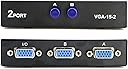
The PASOW 2 in 1 Out 2 Port VGA Switch is a manual push-button device that allows two computers to share one VGA monitor. Supporting resolutions up to 1920x1440, it requires no external power and features a durable, compact design. Perfect for professionals needing quick, reliable switching between devices without compromising display quality.


| ASIN | B0151DFMY4 |
| Actuator Type | Push Button |
| Best Sellers Rank | #306 in Audio & Video Selector Boxes #10,067 in Cables & Accessories |
| Brand | PASOW |
| Brand Name | PASOW |
| Circuit Type | 2-way |
| Color | Black |
| Compatible Devices | Personal Computer |
| Connectivity Protocol | Vga |
| Connector Type | VGA |
| Contact Material | Stainless Steel |
| Contact Type | Normally Open |
| Control Method | Push Button |
| Control Type | manual |
| Controller Type | Push Button |
| Current Rating | 2 Amps |
| Customer Reviews | 4.1 out of 5 stars 956 Reviews |
| International Protection Rating | IP54 |
| Item Weight | 0.01 Ounces |
| Manufacturer | Pasow LLC |
| Material Type | Polycarbonate |
| Model | 8541769690 |
| Mounting Type | Plug-In Mount |
| Number of Items | 1 |
| Number of Positions | 2 |
| Operation Mode | manual |
| Part Number | PAS-2IN1OUT |
| Smart Home Compatibility | Not Smart Home Compatible |
| Specification Met | Ip54, Basic Safety Standards |
| Switch Type | Push Button |
| Terminal | Button |
| UPC | 889957595360 |
| Unit Count | 1 Count |
K**L
Works excellent and price was very good.
Very easy to set up and was just what I needed. Used it to hook a laptop and desktop to the same monitor.
A**1
Cheap price and effective
Works great and doesn't need an external power source. One thing I noticed is my main PC couldn't correctly detect the monitors native resolution correctly and defaulted to a lower one. I just noted what the display was set to on each PC and then manually set it back once the switch was hooked back up. From there I had no problems at all.
C**.
A Simple VGA Switch
The switch connects two computers to one monitor. It helped me to systemically isolate a graphics card problem. It works as advertised. However, it adds to the problem of cable management since the switch must be within the reach of the user.
L**C
Works great!
Perfect for connecting 2 computers to 1 monitor. I bought this after buying a new computer. This item is making it so much easier with setting up my new computer like my old one without completely copying my old hard drive.
D**R
This actually reduced the resolution detected by all computers/displays connected to it.
My display went from a nice crisp picture to blurry and incorrectly sized. I hooked up two different monitors and 3 different computers and the highest resolution seen is 1280 by 720. At least one of the monitors is 1920x1080. This is useless junk if you need a crisp display. The main input is coming from a USB docking station into VGA port A. The output port is going to the monitor. If I remove this switch everything is fine. I was expecting a simple hardware switch, but this is obviously electronic on the inside even though no power is needed.
D**S
Basic VGA Switch easy to deploy and use.
The included cables simplify deploying this VGA video cable switch. Using it is as simple as turning on a light. It's a nice compact unit.
J**N
Well, It Works - Sort of
Well, it works, sort of. Installation was easy, you just connect the wires. It's easy to use, you just push the buttons. What I don't understand is why I should have to adjust the resolution. I would have thought that this was just a "pass through" device that would simply break a connection and open another one. Apparently, I was mistaken. This device does something else to the signal from a give PC. When I plugged in my Dell monitor, my PC no longer recognized it and considered it to be a Generic monitor and at a much lower resolution than that which had been previously displayed. Apparently this device has, in effect, become the monitor and the PC acted accordingly. Plus, the display has become stretched and the icon on the screen are distorted and look funny. This has to have been the device, because when I removed the monitor from the device and reattached it to the PC, everything was back to normal. I can understand about modifying the resolution on each different PC. What I don't understand is why the PC believed the monitor was generic and the display from the device was so stretched and distorted. Oh well, like I said, it works and it's too cheap to bother returning.
J**E
Easy to us
Works perfect ' i got it for my father who is 86 with two PC's
P**V
Feedback
Very good useful item..using it with CCTV and PC monitor.. Good performance. Thank you.
G**D
كويس بس اقرا الوصق للمنتج ضرورى
هو مناسب بس استخدامه لو عايز اعرض نفس الحاجه على كذا شاشه فقط
A**H
المنتج مقبول ويؤدى الغرض
المنتج مناسب
V**I
Is 1924 x 1440 Resolution really supported ?
When I connect to my laptop with screen resolution 1366x 768 to common LED through this device, the resolution will have to be downgraded to 1024 x 768 to see the whole screen. If you set to 1368 x 768, you will loose the visibility of side parts of the screen and characters become faint. But when I connect to the monitor directly to the laptop, it is exactly mirror image of the laptop screen. So whatever promised on the pack “resolution : 1924 x 1440 “ is not really achieved. It works but screen goes out of the monitor with loosing intensity of characters.
S**G
Works as advertized
Did a perfect job for joining two VGA sources to a single VGA monitor. Its now easy to switch and see both the sources one after the other, by manually pressing the switch. A very simple and cost effective solution if you have one display and multiple VGA inputs or the other way round.
Trustpilot
1 month ago
2 weeks ago