Buy anything from 5,000+ international stores. One checkout price. No surprise fees. Join 2M+ shoppers on Desertcart.
Desertcart purchases this item on your behalf and handles shipping, customs, and support to Belgium.
🏠 Elevate your home to genius-level smart living — all at your fingertips!
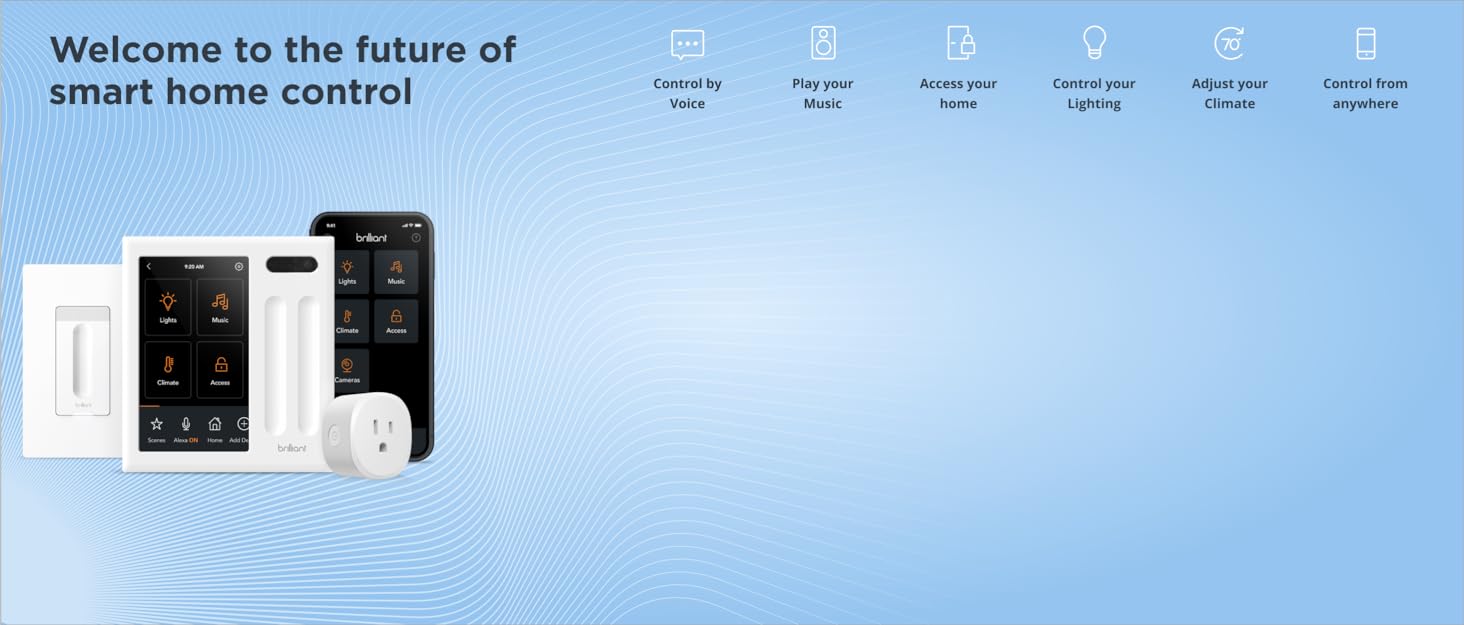
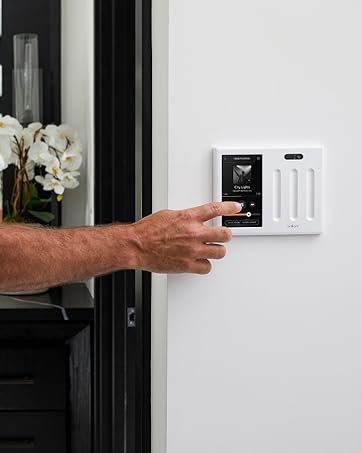
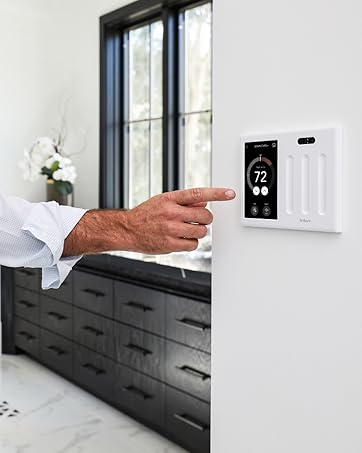
The Brilliant Smart Home Control 2-Switch Panel is a cutting-edge in-wall touchscreen device with built-in Alexa, designed to replace a standard 2-gang light switch. It offers seamless control over lighting, music, smart locks, cameras, and thermostats, integrating with top smart home ecosystems like Ring, Sonos, Hue, Google Nest, Wemo, SmartThings, and Apple HomeKit. Featuring a 5" LCD touchscreen, built-in camera with privacy shutter, and motion sensor, it transforms any home into a connected, voice-activated smart hub with easy installation and robust compatibility.


| ASIN | B07C6LX1NF |
| Actuator Type | Touch |
| Best Sellers Rank | #644,441 in Tools & Home Improvement ( See Top 100 in Tools & Home Improvement ) #529 in Home Automation Hubs & Controllers |
| Brand Name | Brilliant |
| Circuit Type | 1-way |
| Color | White or Black |
| Connectivity Protocol | Wi-Fi |
| Connector Type | Screw Terminals |
| Contact Material | Silarius Typically Uses High-quality Metals Such as Copper Or Brass for Their Switch Contacts. Considering the Given Options, I Predict the Contact Material to Be 'Copper'. |
| Contact Type | Normally Open |
| Control Method | Voice |
| Controller Type | Amazon Alexa, Apple HomeKit, Ring, SmartThings |
| Current Rating | 10 Amps |
| Customer Reviews | 4.1 4.1 out of 5 stars (493) |
| Global Trade Identification Number | 00855591007026 |
| International Protection Rating | IP65 |
| Manufacturer | Brilliant |
| Material Type | jar |
| Model | BHA120US-WH4 |
| Mounting Type | Panel Mount |
| Number of Items | 1 |
| Number of Positions | 2 |
| Operating Voltage | 120 Volts |
| Operation Mode | Manual |
| Specification Met | Smart Lighting Standards and Bulb Compatibility |
| Switch Type | Touch Switch |
| Terminal | Physical |
| UPC | 855591007026 |
| Unit Count | 1 Count |
| Wattage | 1100 watts |
J**I
Brilliant has fantastic new smart home technology!
Recently I made the decision to upgrade my home to be more "smart". After researching the best way to do that, I purchased the Brilliant Smart Home Control 2 switch panel for my living room. The unit arrived quickly and I found installation to be very straightforward. I connected it to Alexa, a smart thermostat and some smart plugs. It is very convenient to have a hard wired switch that can control the lights, etc. but also because it can control other systems around the house via voice or the user friendly touch panel. The video feature is very useful to me, as my teenage daughter is non verbal and has special needs. I can drop in and watch her while I am in my office or in the garage if I need to quickly check on her. Another great feature that helps her is the ability to communicate with the house to control the lights and fan using her alternative communication device (her "talker") by asking Alexa to do that for her. I also really appreciate that the Brilliant unit connects to the Honeywell T9 thermostat I purchased. We are able to control the temperature much better now from the living room without having to get up. I will be looking to connect it to other smart home features (locks, etc.) in the future. I highly recommend the Brilliant Smart Home Control!
C**Z
Super sleek, modern smart home control center with tons of great integrations.
I’ve been loving using this as a way to control my regular lights but also my Hue / LIFX bulbs and August door lock all from a single controller. Using this one device, I can control my regular lights, fan (on/off only), smart bulbs, and thermostat. There are so many cool third party integrations that it would work with many people’s setups. The built-in camera and microphone can be used as an intercom to other Brilliant controllers. The fact that it has a camera made me nervous at first, but you can actually slide a physical piece of plastic in front of the camera to block it if you want. And Alexa is built-in too, so you can control your smart devices by voice if you want. The home screen interface can be configured the way you want with shortcut access to the integrations you care about and I must say, it’s super nice having all of my smart home devices in one place instead of spread out across a bajillion apps. Loving using this. Super sleek and modern way to do things.
A**A
What a wonderful product
I wanted a simple way to control to my smart home, from the wall and not be tethered to my phone to do it (when I come home, I put my phone away). Frustrated, late last year, I purchased an iPad to control the second level of my home - it's not ideal and it must be charged. After a brief Google search, I came across this product - read a couple reviews and thought to myself, "well it seems to be decent, let's try it"... BLOWN AWAY, this product is amazing and does EXACTLY what I need. I knew what I wanted, and it delivered. The setup was simple and easier than the smart light switches in my home to install. Customer support was even amazing (I reached out to them thinking I had a bad unit - but the update process just takes a really long time - pro tip!). This is the tech product of the year for me (I buy a lot of tech gadgets). I'm amazed by its ease of use, functionality, simplicity, thoughtful design and just how beautiful it is. As a result of this purchase, I've purchased six more Sonos speakers to fill my living space. Overall, great product and I'm still amazed at the value of this product.
J**N
Great technology, but very pricey.
This is a great piece of tech. The screen and controls are great. Albeit totally a personal preference, I really like the touch capacitor switch controls. Setting things up takes time but was pretty straightforward. While some reviewers have complained about limited compatibility, I am impressed and fully covered: SONOS, Hue lights, August front door lock, Ring doorbell, TP Link/Kasa switches. My only devices not compatible were the garage door MyQ and Ring Security. The only complaints I have are: the phone App is not a full replica of the wall device. So some of the setup must be done at the wall. And while the camera and Smart Assistant are cool features I don’t find them useful personally: the camera just because of my usage, the assistant because it’s a bit quiet and I prefer the Echo Dot in the same room instead.
D**D
Do not buy this product.
Bought the 2 switch control panel and two dimmer switches and its been an utter disaster. Firstly they want you to use an electrician but the only way for him to view the installation guide is by downloading the app on their phone, registering an account and then installing the devices. The devices are also insanely counter intuitive to anyone with electrician experience. Wired a 4 way switch for one of the panel slides and you dont use any of the 4th red wires at all which was just insane to me. Which means that these dimmer switches rely SOLELY on WIFI and bluetooth. You can already see to the issues this leads. Slow response times to swipes on the dimmers to being completely unresponsive. At one point they just wouldnt work at all to turn on but only to turn off. This is with 1 GB speeds and the fastest wifi possible from Comcast with range extenders. The built in camera to the panel to view whatever room its in would almost never connect on the phone app and if it did it took several minutes effectively leaving this feature pointless. Another issue is the integration with smart bulbs. Im currently using LIFX bulbs which work perfectly fine/dim from the app. The control panel on the other hand will NEVER dim them to their lowest setting no matter what number on the slider you put it on and when you attempt to they will begin to flicker or just outright turn off. Which means that the slider will never allow you to use the full dimming potential of your bulbs. Also you will have to pre-emptively set scenes to change colors as you wont have the option to the that from the panel either. Im currently in the process of switching to Phillips Hue and will update accordingly if it works any better. No professional service offered by the company with certified electricians for the $500 products they sell and the customer support through phone is a number where you leave a message, you will never speak to someone and a call will NEVER be returned. Emails have been responded to by them asking for pictures of the internal electric wiring but again this was working perfectly fine for four days, and two days with the faulty dimmers. This is simply something blew internally in the device. Which brings me to my last part. I would let you all know how the Phillips lightbulbs work with it but unfortunately after FOUR days the entire system just conked out. Power is being received into the control panel portion of the Home Control but its not passing through the system and no longer passes through to my dimmers which are now dead. I spent nearly $650 for a system to short out itself internally within a week. Its an impressive piece of technology if it can be continually updated (which it is and continues to be through new integrations) but its incredibly fragile and a pain in the ass to set up. While this might be the first in the line in this kind of products for the future of Smart Homes and while it may be now, I definitely do not think this will be the top competitor/product. I have to imagine Google Apple and Amazon having something soon on the way. Just wait for that.
T**I
Easy Set up
The install and set up was very easy and the system works very well. I have previously had a bunch of wifi lightbulbs controlled by Alexa but am switching over everything to Apple Homekit. It is interesting that you can actually have BOTH Alexa and Siri activated at the same time, since the hub has Alexa built in, it will control all the lightbulbs I currently have while I am in the process of switching all the light switches to Brilliant and still control the new Brilliant switches with Siri as well. Though you do have to have the separate Apple Homekit hub (iPad, Apple TV or Homekit speaker) to use Siri. I also got one single motion activated switch for the hall bath and one plug and the set up for those was pretty easy as well. I already had an Ikea Symfonisk Sonos speaker and that paired with Brilliant. It is nice to come downstairs in the morning with the kitchen light on, the coffee brewed and the music on. Yes, all of the plugs and switches are more pricey that others, but I have had limited success using others, and these are worked together seamlessly! I cant wait to outfit the rest of the house with Brilliant products. Oh, a few suggestions for Brilliant. If we could get a 2 outlet plug, if you could start connecting with ADT security cameras and doorbells, that would be great.
K**N
Simplifies all your smart home devices into one easy to use control switch panel- BRILLIANT!!
The things l loved about the Brilliant Control panel was that it was so simple to install and set up. The menu is so easy to navigate. It connects to my Ring doorbell so I don’t have to find where I laid my phone down in my home at any given time, connects to my lights where I can use the sensors on the panel to move my lights up and down or I can program them from the menu to turn on/off with motion, works well with all my Sonos using Spotify instead of having echo dots everywhere and my favorite feature is that it works with all my Honeywell thermostats in my home so that I can control the temperature upstairs in my home without having to run from downstairs to change the temperature. Besides the features it looks fantastic in my living room I highly recommend this product!!
S**.
Disappointing
I bought this panel so my kid can see who is at the door without installing an app on a phone. It does work for that. It is missing some basic automation and integrations though, which makes me regret spending so much on it. First off, it's "scene" functionality, which is how you automate things, does not include a basic "timer off" functionality. My old switch allowed me to set it up so that after the lights are turned on, it would set a timer to turn them off after some set timer period. You can't do that with Brilliant. You can only turn off a switch at a certain time of day. It says it works with security systems, but it will not actually detect my Ring security system. I tried multiple times, and I don't think it is actually supported. It will detect the Ring doorbell and cameras, however. I can't turn the screen off entirely. Yes, I want it off except when it is touched or the doorbell rings. Needs more customization. I had trouble setting this device up. It didn't play nicely with my smart bulbs (it reset so they just flashed) and I had to replace my smart bulbs with dumb bulbs to stop the strobe lights every time I turned them on. Since those are in lamps are on a plug wired to a switch now controlled by Brilliant as on/off, I no longer have a way to dim them. I used to be able to ask Alexa to dim my smart bulbs. Speaking of dimming, the sliders aren't great for that, even on dimmable lights. A lot of times it feels "jumpy", like all or nothing. I thought about returning this device but the return window is too short given that I had to schedule an electrician to install it. Overall, I don't think this device is worth the price tag for me. I lost functionality, and I should have used one of the less expensive screened Alexa devices to let my kid see who is at the door and play music.
C**N
Excellent
un peu difficile pour la confection, suggestion de demander à un électricien!
J**E
Works very well
Missing Canadian time zone for weather
J**M
Nice products, pricey but No support, no update, dimmer flicker and nothing new
The product is well-designed but falls short in functionality, security, updates, and support. The last update was in October 2023, and since then, there have been no new releases. I opened a support case two months ago and have yet to receive any response or updates. Additionally, the dimmer flickers without any apparent reason, and there is still no weather integration for Canada. All integrations are based solely on SmartThings. Below is the email I sent to support, which has gone unanswered: Email to Support: I am experiencing an issue with my Brilliant Home with 2 Sliders. The lights flicker at medium/lower voltages. I have tested the device on two different electrical circuits and with two different types of bulbs (pendants with dimmable StanPro G40 E36/ G10 40 bulbs and DALS FGM3-CC Flat Gimbal Recessed). The result is the same in each scenario. These lights work perfectly with the Lutron Smart Caseta Diva dimmer at very low voltages, where the lights are almost off. Is this a limitation of the product or its design? How can I achieve low dimmable lighting without flickering? Even after calibration, the lowest dimming without flickering is almost at full voltage. This is in a brand-new house with a new electrical circuit. I have over 50 gimbal recessed lights with Lutron Smart Caseta Diva dimmers without any issues. I hope this review and my inquiry help improve the product and support services.
K**D
They have send a couple of updates
They have send a couple of updates and now the device is working like it should no problem, no disconnection at all, update from one to four ⭐ stars
A**S
Product does not work
I tried to install it with electrician but product does not work
Trustpilot
3 days ago
5 days ago