Buy anything from 5,000+ international stores. One checkout price. No surprise fees. Join 2M+ shoppers on Desertcart.
Desertcart purchases this item on your behalf and handles shipping, customs, and support to Belgium.
๐ Elevate Your Connectivity Game!
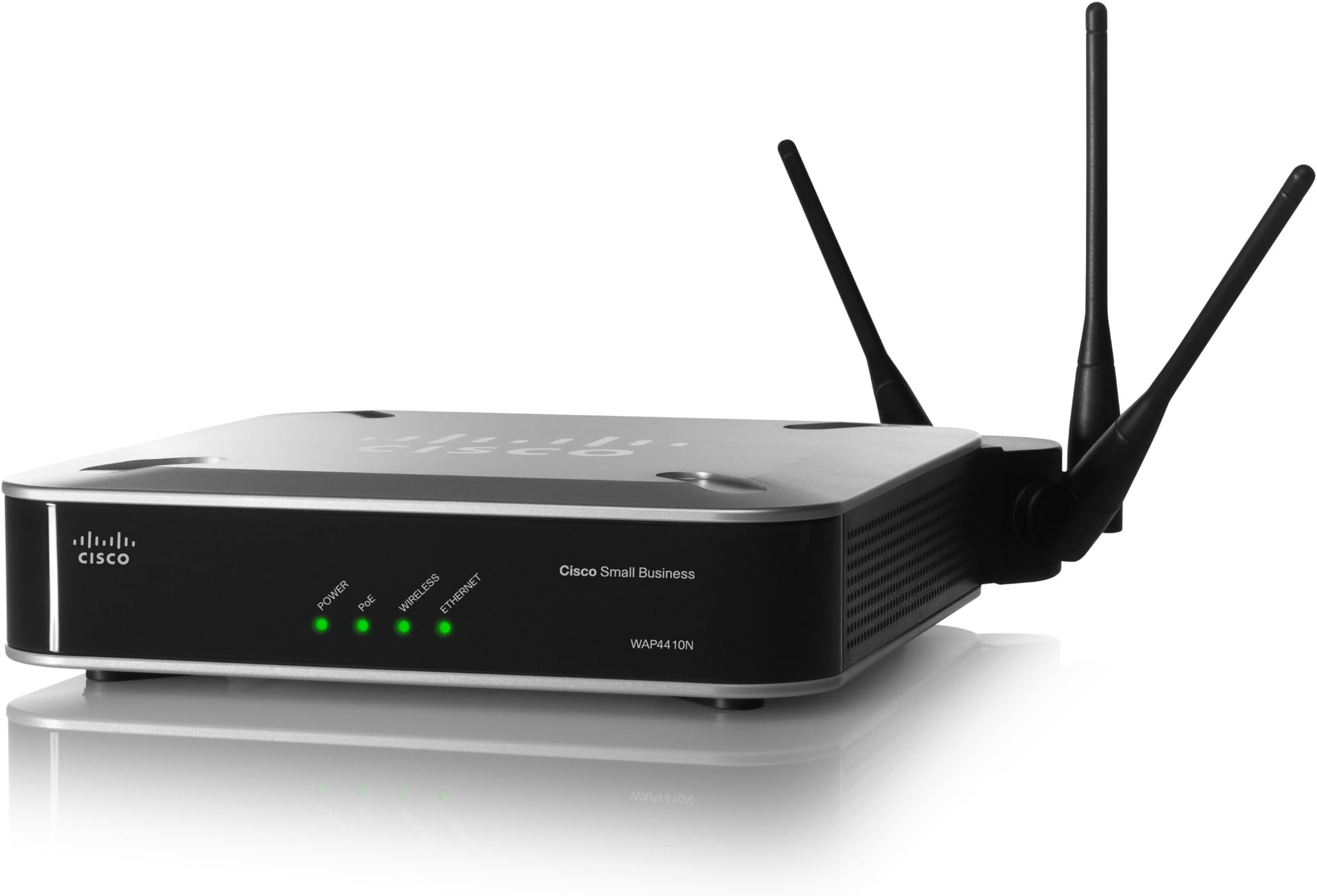
The Cisco WAP4410N Wireless-N Access Point offers robust wireless networking with a data transfer rate of up to 300 Mbps, advanced security features, and easy installation. Its PoE support and compatibility with various devices make it an ideal choice for modern business environments.
| Best Sellers Rank | #544 in Computer Networking Wireless Access Points |
| Customer Reviews | 3.9 out of 5 stars 175 Reviews |
M**.
Great Business-Class Wireless-N Access Point
I recently purchased two of these Cisco WAP4410N WAPs. The goal was to help my brother-in-law cover his large home with good quality wireless. Based on my experience doing previous WAP installations, my guess was that is would take between three and six WAPs to full cover his large house (which has lots of brick and steel) with good quality coverage. I was impressed that by strategically positioning the units I was able to cover the entire house with only two of these WAPs. The coverage consisted of three floors (one was a finished basement). The setup of these units was simple, the firmware is stable, and configuration was straight=forward. Since they were setup they have worked flawlessly and required no further attention. The only thing a bit unusual (for those used to Netgear, Linksys, etc.) is that you have to setup a Cisco account (no charge just register online) to be able to download firmware, etc. This ended being unnecessary because the firmware in the unit was up-to-date. If you're looking for really good WAPs that support Wireless-N and have lots of configuration options (e.g., Mesh, Multiple SSIDs, etc.) I highly recommend this unit. It has a slightly higher price than other (consumer units) you can buy, but it definitely deserves the "business-class" label that Cisco gives it.
G**R
Great for filling in the dead spot on the other side of the house!
Got my Cisco 4410 WAP today and itโs all hooked up. Good stuff. Here was my situation: I have a router from the SP on one side of my house. My office is on the other. By the time I close the door to my office, my devices canโt even see my wireless router on the other side of the house. The Cisco 4410 WAP fixed all that. Works beautifully but only after you understand some things. First, hardwire it into your SP router on one of the cat 5 ports. Within a minute, youโll see the new wireless network from a device. I think the default name was ciscosp, or something like that. Thatโs great โ you can cruise around on the internet and itโs wonderful. But you want to be able to configure the darn thing, of course. Hereโs how: The default IP address for the WAP is 192.168.1.245. But it will go with DHCP (ie dynamic IP address) and if that happens then you wonโt be able to find it. Hereโs what I had to do: hardwire my MBP to the WAP with an ethernet cable. Now I had itโs attention. I went to 192.168.1.245 and could configure. UN/PW is admin/admin. 1) First move: On the Setup/Basic Setup screen: change the Network Setup from DHCP to Static IP Address. And now you change the Local IP Address to 192.168.1.245. Now you know how to find it and it wonโt jump around due to DHCP. Set the subnet mast to 255.255.255.0 and โpoint it atโ your SP router. Ie, set the default gateway to 192.168.1.1 (thatโs usually the address of your SP router). HIT SAVE Change to the right time zone while youโre in the Setup Section. 2) Go to the wireless section. Wireless/Basic Settings: IMPORTANT: In the wireless section, itโs important to do 2 things. First, change the Wireless Channel from the default to option 11 โ 2.462GHz. This will reduce interference. Next, Enter the SSID. USE THE SAME NAME AS YOUR SP ROUTER. So if your WAN comes up on your devices as JonesHouse, then use JonesHouse as your SSID here. You may be tempted to use JonesHouse2. But donโt. Use JonesHouse โ the idea is you want your devices to roam from the WAP to your SP Router seamlessly as you walk around the house. So use the same SSID. That's the whole point. HIT SAVE Wireless/Security: Make sure you have your new SSID at the top, which will only happen if you saved it in the prior step. Now you probably want SPA-Personal here for the security mode. Enter TKIP as the WPA Algorithm Enter your pre-shared Key โ use the same one you use on your SP router! 3) Administration Administration/Management โ hereโs where you change your UN and PW from admin/admin to something else. Next: under Web Access, you want to โEnableโ Wireless Web Access so that you can hit this puppy from your wireless devices as opposed to always having to hardwire into your SP modem. REPEAT โ this is why itโs important to get off the admin/admin UN/PW. SAVE You should be good to go. NOTE: I actually have a specialized VPN router from work in my office thatโs tied to my cat 5 cable drop in my office. So I hook up to that VPN router and it takes me back to a VPN server in RTP from TPA. So โ I bought a $12 ethernet switch from the local staples (D-Link something or other). Hooked the ethernet switch to my cat 5 drop. Then hooked the 4410 WAP to one port and the VPN router to the other. It all works beautifully! I can now hit my SP Router network in full strength from my office! And I can use my vpn router. Hope you find this helpful.
R**E
Good, but not as good as I had hoped
I bought 2 of these to replace old Linksys WAPs in my home network hoping to take advantage of the higher speeds provided by my ISP and increase the coverage throughout my home. The coverage is a little better than I had with my ancient Linksys WAPs, but not at the 5GHz band. Within about 20 feet, I can maintain a stable connection at 5Ghz and see about 25% improvement in upload speed and about 50% improvement in download speed. Outside that distance, I often get dropped connections and must manually switch over to the 2.5 GHz band. At 2.5GHz I get better coverage than I had with my old WAPs, but not any noticeable improvement in upload/download performance. Playing with the antennae doesn't seem to make much difference. The ease of configuration (Full disclosure -- I had some professional help) and the improved security options pushed me from a 3 star grade to 4 stars.
B**G
Wireless "N"ightmare
I had been wanting something to replace my aging but still working Linksys WAP54G Wireless G Access Point for some time. I avoided the WAP4400n because of negative reviews and many problems experienced by users. So when Cisco finally came out with a newer model the WAP4410n, I figured they must have fixed the problems in the WAP4400n. They couldn't possibly release a new model with the same problems as the old one right? Wrong! I purchased two of these from Amazon. The first one arrived and worked perfectly until I decided to upgrade the firmware to the latest version. After that, no connection, no nothing. It just died. A second unit had the same results, another brick. Now, I have upgraded the firmware in my old access point and router on several occasions and never had a problem. It is not rocket science but you must do it correctly or a brick is what you will get. I am a network administrator by profession. I thought I had done everything right but I was beginning to second guess myself. A conversation and some tests by Cisco Tech Support determined that both units were defective and I should return them. Amazon graciously took them back and refunded my money. Looking for an alternative, I did some research and found the TRENDnet TEW-670AP Dual Band Wireless N Access Point. After buying nothing but Linksys products for years, I was reluctant to trust an unknown brand like TRENDnet but after my experience with Cisco, I had nothing to lose. I decided to try TRENDnet and purchased the TEW-670AP. The unit has great specs, 5GHz that the Cisco unit couldn't match and great performance, often connecting at 300Mbps. It also costs less than the Cisco unit. I couldn't be happier. I highly recommend the TRENDnet TEW-670AP. Avoid the Cisco WAP4410n like the plague!
C**N
Great, even for home use
Yes, this is billed as a business-class wireless access point, but it's great at home, too. This is a major step up from the Motorola B/G wireless access point I had been using, for several reasons: 1) Maybe it's the 3-antenna system, but I have great wireless coverage throughout my entire house now. The computer in the furthest corner of the house used to get only 1 or 2 bars (and typically operated only at 10mbps even though it was connected at G speeds) with my old AP, but now every computer in the house sees the full 54mbps throughput 2) My old access point, while it supported 54mbps G network speeds, connected to my switch via a 10mbps ethernet connection! So even well-connected wireless clients felt slow. This new switch connects at gigabit speeds to my gigabit switch, so all wireless traffic is much faster than before 3) It supports ipv6! 4) Great flexibility if you want it - this thing supports multiple SSID's (visible or hidden), VLAN and QoS (which I don't use), PoE (which I don't use), even support for a RADIUS server to help with security if you wish (which I also don't use). If you buy more than one you can use them as repeaters. It's not that much more than your average household-grade wireless access point, but seems well-worth it. My only gripe? You can give the AP a name on your network, and in theory connect to its management console via [...]<name>, but that doesn't work for me. I can connect if I use its IP address, but on my network all clients at home get their IP addresses via DHCP... so figuring out the IP address the first time involved a bit of guesswork. I'm not sure why I can't connect via its name, but that hasn't been a blocker for me - only an annoyance. And my network topology isn't exactly what most people use at home so maybe that's at fault (I use a Windows 2008 Server edge box with all other clients connected through that). I am running firmware version 2.0.1.0 (the latest as of now). It supports N speeds, although the manual admits it's N-draft speeds, but I don't have any N(-final) devices to know if it supports N standard devices or not. I would recommend this product. Update 3/23/10: My wife recently bought home a new Lenovo laptop from work, and it connects at N speeds to this AP with no problems. I'm jealous of her ~130mbps connection! (all of my machines are still 'only' connecting at G speeds). So any doubts that this works at N speeds is now erased in my mind - and only made me happier that I bought this great AP.
J**M
Blew my mind (In a bad way)
Worked wonderfully for a year. As unlikely as it seems all access points began to display erratic behavior this past week. Naturally I thought to myself, 'There is statically no chance that these APs all have failures at the same time without some external factor at play..' So I tore my infrastructure apart until I had narrowed the issue down to the 9 APs (WAP4410N). When attempting to connect to the AP the devices produce an error: 'Wireless Access Point unstable. Disabling Network.' (Samsung Devices). Power Cycling the 9 AP yielded no results. Upon further inspection of the APs, each of them had blinking power LED lights well after being power cycled. I google'd this issue and came upon a similar incident in which Cisco tech support recommended a Hard Factory Reset for the affected APs. So I performed a factory reset and reconfiguration on all of these APs... and it worked! ...At least for a couple hours... then they all went back to being 'unstable' Some other devices were able to connect but either hung at trying to lease an IP address from the server or if they could get an IP the throughput was just crazy bad... Like below dial-up bad. I really cannot fathom how all of these APs suddenly have trouble since there have been no other wireless infrastructure added to my environment. Not even a microwave. Really disillusioned with this 'Cisco' AP at this point. Not sure that I'll purchase others at this price point.
J**W
Has been a good home replacement for consumer quality WAPs
After struggling for years with the poor quality, poor performance, poor life, limited configurability of typical cheap consumer WAPs I decided to try something more robust. I'm using this in a large residence surrounded by several other homes also radiating wireless signals. The other WAP in the home is from the FIOS router upstairs. I've decided to let it choose optimum channel since the neighbors around me are constantly changing their channels and I'm happy to let it keep track of all this noise, tho I'd like to keep the FIOS channel different so need to keep track of it. While this box is overkill feature-wise for my application it's a pleasure to setup and monitor. The performance is clearly better (connection speed, signal strength & transmit speed) and I don't have to constantly reboot it as previous products. It runs cool, it's dependable, it's fast, and I'm now N-ready. I haven't needed to call support so I'm not grading that.
R**I
Best choice when you need wireless to stay up 24x7
I've purchased no fewer than 5 Linksys Wireless Routers in the last 3 or 4 years. After a few months of use, they would stop working about ever 36 to 72 hours. The solution is to unplug them, count to 30, then plug them back in. This is not a useful solution. I then read the fine print in their manuals and they said "Unplug this device at night when you go to bed" (or something similar). Clearing linksys wireless routers are not intended for full time use. So I talked with a friend, and he suggested I install a Switch along with a Wireless Access Point from Cisco (the parent company of Linksys). Their equipment is commercial quality, more expensive, but it works. So I picked up this product along with a Cisco 10/100/1000 8 port switch and connected the switch to the Cable Modem, and the Wireless Access Point (this product) to the switch. Turn them on and they've been running for several months now 24x7 with zero down time. The range of this product is, so far, the best I've seen. The connection is consistent and can handle all 5 of our in-house PCs and numerous hand-held devices without any issues at all. It is expensive, but it works, whereas the Linksys "home wireless routers" tend to get over heated after a few months of use and have to be power-cycled every 2 to 4 days. For me, I prefer to turn it on and leave it on 24x7. Great product.
R**S
Easy and fast
East set up good speed. Add on to your existing network with no expertise
G**L
how good is that
worked perfectly out of the box ..how good is that!!
L**I
Four Stars
Very Happy items
Trustpilot
3 weeks ago
1 month ago