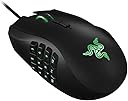
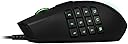
🔥 Dominate your game and workflow with the ultimate MMO mouse! 🖱️
The Razer Naga 2014 is a premium ergonomic MMO gaming mouse featuring a revolutionary 12-button mechanical thumb grid, a versatile multi-directional scroll wheel, and a one-size-fits-all design for maximum comfort. It supports deep customization through Razer Synapse software, including cloud profile syncing and in-game button remapping, making it ideal for both intense gaming and professional multitasking.
| ASIN | B00E8CF268 |
| Additional Features | Ergonomic Design |
| Antenna Location | Gaming |
| Best Sellers Rank | #101,502 in Video Games ( See Top 100 in Video Games ) #2,784 in PC Gaming Mice |
| Brand | Razer |
| Button Quantity | 17 |
| Color | Black |
| Compatible Devices | Personal Computer |
| Connectivity Technology | USB |
| Customer Reviews | 4.2 out of 5 stars 2,136 Reviews |
| Embellishment Feature | LED |
| Enclosure Material | Plastic |
| Finish | Textured |
| Global Trade Identification Number | 00083023999599, 00879862008017 |
| Hand Orientation | Right |
| Hardware Platform | PC |
| Included Components | Mouse |
| Item Dimensions L x W | 4.68"L x 2.95"W |
| Item Weight | 4.8 ounces |
| Manufacturer | Razer Inc. |
| Mfr Part Number | RZ01-01040100-R3U1 |
| Model Name | RZ01-01040100-R3U1 |
| Model Number | RZ01-01040100-R3U1 |
| Mouse Maximum Sensitivity | 8200 dots_per_inch |
| Movement Detection | Laser |
| Movement Detection Technology | Laser |
| Number of Buttons | 17 |
| Operating System | Windows, macOS |
| Power Source | Corded Electric |
| Range | feet |
| Special Feature | Ergonomic Design |
| Style Name | Classic |
| Theme | Gaming |
| UPC | 796594058625 803982982971 224237444455 631058217142 083023999599 014444722671 012301964783 863121563027 077740272639 879862008017 846764221349 851905140618 |
| Unit Count | 1 Count |
S**C
OH MY GOSH MY HAND IS LIKE UUUGGNNHH AAWWWWW YEAAAA
Dude.... Just SHUT YOUR MOUTH and buy it. Please. If you don't, I will smack you with a rainbow trout and stuff you full of paper towels and garbage cans. No, really. ...Seriously though. I have owned the 1st Gen Naga, and OH MY, YES, is this one the PINNACLE of Naganess. I can't even explain how much of an improvement the 2014 version is over the original. It's almost like Razer sent their hardware developers to every pissed-off Naga owner to have their heads submerged in convenient station toilets until they were able to glorify the mouse's design. But, is it really "glorified"? Is it "that" much better than it's predecessor? You may as well ask me if I can tell the difference between a mudskipper covered in poop and a 200lb sailfish with baby-blue eyes....you genius, you. Let me begin here: The Keypad - IS SO FREAKING AMAZING. Every button on the keypad protrudes differently, therefore making it incredibly easy to establish a natural, mental connection/pathway with each of the buttons..and making it that much harder to confuse, and accidentally hit the wrong buttons. I would dare to say that it's design is flawless, if not matchless. The Size - Okay, let me first begin by describing my left hand. It's enormous. My fingers are like undercooked stadium bratwursts covered in hair, sweat, and oatmeal. My right hand is pretty normal though. Between Men's XXL and Small sized gloves, it fits pretty good in a Men's Large...LIKE A GLOVE...</so much pun>.. The mouse feels like it was meant for my size hand, or people with my size hand who prefer a mouse that you don't have to grip much. I can describe the mouse's girth as being "meaty", "pleasantly plump" or even "slightly obese, if you're into that kind of thing". Bottom-line: It feels great in my hand. It's probably the most comfortable mouse for my size hand I've ever used. If you have small hands, you might not like it. Please don't ask me about my left hand in the comments. The Weight - Lighter than it looks, but it's not like manipulating an empty plastic bottle. If I can compare the weight to anything, I think you should have a word with my toilet on the dawn of a Saturday morning after I've had a cup of coffee...okay, maybe not that heavy, but weighty enough that it doesn't fly off your desk. The Lights - AAARE SO GREEN AND PRETTY. You can go to the Razer website, download a program that will help you bind the mouse keys differently and whatever, and also turn off the lights. BUT WHY THE FREAKING CRAP WOULD YOU DO THAT? The Value - I paid about $60 for the mouse because I was intelligent and purchased one of the "used" ones, from the Amazon warehouse, that weren't really used, but the packaging was beaten up. The mouse works brilliantly. Conclusion: Men, if you want to look as unattractive to women as possible, make your online friends tease and ridicule you because of how many buttons your mouse has, play your MMORPG as seamlessly as possible, and get really really super fat, join me and buy this profound piece of design that I, myself, am privileged to own. You won't regret it. Who the heck needs a girlfriend, right?! RIIIIIIIIIIGHT? Women with boyfriends who buy this mouse because of my review, I apologize. Do you like coffee? I have weekends off.
T**1
defective, but Razer replaced
I'm wasn't really sure how many stars to give this since I would have loved it had it worked completely. Unfortunately, it simply refused to track even decently on any surface darker than very light blue. Since I have a particular mouse pad I want to use that is black that won't work for me. I love the mechanical thumb pad. This the whole reason for my purchasing this particular mouse. I have severe Rh arthritis and these keys are so much easier to actuate they cause me considerably less pain than any others I've tried. I bought this as a manufacturer refurb. and after emailing back and forth with Razer and trying many methods to correct the problem they agreed it was defective and issued an RMA for return. Actually this is a known issue for Naga 2014's. Anyhow they acknowledged receipt of my return and said they would send a replacement out in 1-3 days. Unfortunately that was about 2 weeks ago and I haven't heard anything else or received a tracking number. Of course I've messaged them again, so hopefully they will react soon. As I said I love this mouse and with a working model would give it five stars +. Udate 02/08/2016 Received the new mouse and it works great, no problems at all. I know a lot of people have issues with Razer but even with having to return it and wait for a new one I think it was worth it. This mouse just feels like it was made for my hand. I love the mech buttons, I know some people say it feels cheap but I like the light weight of it. I changed rating to five stars. Update 04/29/17 Still working perfectly. I use it at least 5 or 6 hours per day and it still looks new, all buttons are just as responsive, no issues at all. I bought another of the same model for backup because I never want to be without one. I use the side buttons for surfing, keyboard shorts, everything. I would feel handicapped without it. I suppose the software can be a bit annoying with constant updates and it's a bit of a system hog, but I've got power to spare so I don't really care. Could be factor for some though.
B**E
The Razer Naga 2014: Style and performance
I purchased this as an upgrade to my standard wireless mouse. I decided to purchase this mouse after I had used some other Razer products. I have not been disappointed. The mouse tracks extremely well, with smooth operation and an excellent feel. I love the lighting effects on the mouse, subtle but beautiful. I've had people compliment just the lights, they always think it's just colored plastic. I rated this five stars due to the reasons I've listed below. Here are some of the pros: 1.) The design of the mouse allows it to sit comfortably in the hand as you use it, without needing to trail any fingers on the mousepad. 2.) The numeral keys along the side allow for quicker and more precise control of abilities in-game. 3.) The cloth wrapped cord prevents allows for more flexibility over the standard plastic/rubber wrapped cords. 4.) The textured scroll wheel takes very little effort to manipulate, yet is positioned in such a way that it isn't even noticed when not in use. Here are some cons: 1.) The cord is almost twice as long as I need, as a result the excess can become entangled during intense use. 2.) The numeral buttons on the side could use a little more space between them, or and indicator of what button your thumb is on. I have only had this mouse a few weeks, and still have problems telling the difference between the "1" and "4" keys on the fly. 3.) The mouse could use a little more weight, or an option to add weight, as it sometimes feels a little too light. 4.) The mouse feet have taken quite a beating from the Vespula mouse mat that I use. The textured surface has left it's mark on the mouse already. The feet have scratches and wear marks after under a month. (Will update later as to whether the feet hold up or not.) To sum it all up; I love this mouse, when this one dies/breaks I will be purchasing another. The only issues that I have with it are extremely petty, and I would recommend this mouse to anyone who plays games. It doesn't matter if it's an MMO, FPS, or MOBA, this mouse works for them all.
J**N
Love this mouse
When I bought this mouse, I was playing a lot of MMORPG style games. After a few months, I stopped but am still using this mouse. It's very comfortable and has held up extremely well. The side buttons, the whole reason for buying this mouse, work very well. The mechanical buttons are a bit different than the previous generation MMO mouse I used from them. The buttons work very well as long as the application itself supports them. The software that comes with it is fairly lightweight and helps to program the mouse to get it to do what you want. The finish of the mouse is nice and the lights look good, especially in the dark. I didn't find them to be particularly blinding or annoying when playing at night. Now, button placement is my issue with this mouse. The forward and back buttons are pretty much useless. There isn't an easy way to use either of these buttons . If you want to press either of these buttons, you have to pretty much take your index finger off the left click and move it all the way down to press them. The 10-12 buttons are also tough to get to. The buttons don't have any index dots or anything so it can be tough to hit the right buttons if you're trying to do so quickly under stress. Overall, the hot key buttons for 1-9 are excellent. 10-12 are a chore to get to and back/forward are pretty much useless altogether. If you play MMORPG style games, or FPS shooter games where you want to rotate weapons quickly, this is a really nice mouse. For the money, this mouse isn't the most bang for the buck. If you notice it on sale and happen to need a replacement, it's worth picking up.
R**N
Razer Naga 2014, in-depth review sorta, has comparisons too
At first I was gonna go with the Logitech G600 since I've always found them a reliable company, but I've decided to try out the new Razer Naga 2014 since I don't think I would've liked the G600's G-Shift button. Although the mouse with my favorite feel was the Microsoft Intellipoint 3.0, but the DPI was really low and decided that I had to upgrade. I got this and I really loved it, the feel was really good and even though the feel wasn't as good as my previous one, it's for the better since it'll fit more hands in general. I have used the other Razer MMO and Moba mouses, but first time owning one. These are your 2 primary buttons, scroll click button, mouse 4 and 5 below the mouse wheel, 12 side buttons, and 2 from tilting the scroll wheel left or right, so it is a total of 19 buttons. The 12 side buttons will come in handy for Photoshop, Blender, and Dota 2 which I really like. The DPI is 8,200 which is really nice and it feels so much better with this much DPI. The mouse buttons are very responsive and clicky and overall makes you feel like you have more control over the mouse. Overall this is a very nice mouse with tons of control for this mouse. The biggest problem in general with this mouse though, doesn't affect me, but will to some, there's no adjustable side panels. It is rather a one size fits all type of mouse and it does have a great shape. The others are $10 cheaper right now, excluding Epic. Also fyi, if you're a lefty, then you can get a lefty version. I haven't used the Logitech G600, so I can't compare which mouse is better, but it looks like I'd probably prefer the Razer Naga 2014. Still haven't tried the Logitech G600, but tried the 2012 version at a friends place and used my bro's Hex before. tl;dr the first part Pros: -19 buttons total -One size fits most hands -Easy to tell which buttons are which on the side -Synapse allow tons of customization to the mouse's function -8,200 DPI -Congrats Razer Naga 2014, first MMO mouse with a lefty edition ^_^ Cons: -The the other versions are cheaper right now (Excluding Epic) -No wireless (doesn't affect me, but some people likes their wireless) -No adjustable side panels like 2012 and Epic Preferences: -Nice finish imo, not slippery. Finish is matte btw and has a rubber part for your pinky to rest on. -The finish isn't glossy :( But I think it's for the better -the glows are amazing :3 Comparisons to the other popular MMO mouses Naga 2012 (gonna add assumptions on Molten and Epic) vs. Naga 2014 vs. Naga Hex (This one is Moba, but similar enough for a comparison and also, I might add one for Logitech G600 later when I get a chance to use one) Naga 2012: -17 buttons total -Side buttons aren't mechanical, so not as clicky -Adjustable side panels -You're gonna have to use trainers probably to get used to using the side buttons at first, well for some -Glossy side finish, prepare to clean it when all that gunk gets on the side -Max DPI is 5,600 -MOLTEN ONLY (Also applies to the original): Mouse 4 and 5 are located on the left click button, top left corner of it -EPIC ONLY: There's a wireless option Naga 2014: -19 buttons total (The additional 2 buttons are the tilt scroll whell, left and right) -Side buttons are mechanical, more clicky in terms of sound -Side panel can not be adjusted -Side buttons are easier to tell which one they are -Side finish is not glossy, the whole mouse is matte and has a little rubber part for your pinky to rest on, keep in note that when the mouse was glossy it got dirty more easily and I don't like that personally. -Max DPI is 8,200 -No wireless -This mouse is wider than the other one, just fyi. Naga Hex: -11 buttons total (Only 6 side buttons rather than 12) -Side buttons are mechanical, more clicky in terms of sound (Main reason why some got Hex over regular and the fact that Hex was easier to tell than the other versions, the new one shows pretty much no point to use it over the Naga 2014 other than finish and size or feel) -Side panels can't be adjusted. T.T -Side buttons are easy to tell which one they are (Again reason why some people prefered Hex over Regular Naga, but the Naga 2014's side buttons are also really easy to tell) -Whole mouse is glossy and looks REALLY nice imo, but get prepared to clean it often if you get a lot of gunk on it. -Max DPI is 5,600 -No wireless So you can always use this comparison as a reference to which one you would want. And look through the images and think which shape would fit your hands the most, do you actually need the adjustable side panel? Think about the advantages the Naga 2012 had and think if you ACTUALLY need them or not, well the only ones it had as far as I know is it is cheaper and adjustable side panels, along with the glossy side finish. If not, then dip in some extra cash or eat a little bit less lunch and be a little more patient to get more bang with the buck if that's the case. In general 2014 is better in my opinion, but 2012 can work better for you and maybe even Hex would do fine for you. I hope this review helped and again, will try continue updating it as things go on.
N**R
Unacceptable software
I use this on Mac. The required cloud software is unacceptable, for reasons I see people complaining about as far back as 2012. 1. The mouse has no horizontal scrolling without installing their Sypase 2.0 software. Every other mouse I own scrolls in all 4 directions using standard signals. And you cannot use any alternative mouse driver software to do this: only Synapse lets you enable horizontal scrolling.... 2. ...Except it doesn't. By default horizontal scrolling types NumLock and the letter B! (Seriously.) If you use Synapse to assign left/right to actually be Scroll Left and Scroll Right, all you get a single click of scrolling: tilt the wheel and your content moves a millimeter or two and stops. No continuous scrolling. Useless. Their support site says to assign arrow keys instead... but that moves your text cursor or changes your selection! That's not at all the same as scrolling, and they know it because they have a scroll action... it just doesn't work. 3. A hideously ugly, pixelly, non-retina, bright green-and black logo, taller than all the normal icons and an obnxious eye-magnet, sits in the middle of your menu bar 24/7! It cannot be dragged away or disabled by any practical means (it's not in Login Items). It cannot be repositioned, even. And it does nothing! It's just a shortcut to the Synapse app in Applications. 4. By default this spyware is online all the time. (You can turn that off using "Offline Mode", but the icon remains.) 5. The Synapse software isn't even really needed to assign functions to the buttons. Other than scrolling, they work like a normal 5-button mouse, plus number keys--so just assign those keys using your game. There is NO VALID reason for them to disable normal OS-standard horizontal scrolling, and NO VALID reason to have a useless logo in your menu bar all the time. Add other horror stories of system crashes, audio conflicts with other apps, etc., and I get the feeling this app does WAY more than it needs to, and is not well-made. Who wants to hack a some rube-goldberg mouse driver into their system that has effects on everything from network to audio? Too bad--it's at least comfortable to hold, and has many buttons (although you can't customize them without the awful software installed). TIP: Look in Utilities to find the Uninstaller. Better yet: don't install, and just don't expect to use all the functions of this pricey plastic mouse.
C**O
Quick Review
It's a high quality mouse with lots of buttons. I'm pleased with it. After several years of enjoying my original Razer Naga, and many millions of abusive clicks later...I finally wore out out the left click button. I had become quite addicted to my Naga! So I picked up one of these 2014 models to replace it. The quality of mouse is excellent...so if it fits your hand and mouse style well...the device itself should not disappoint. The Naga is typical of nicer gaming mice in that it has the usual shielded/braided USB cord with gold plated contacts. It can work straight out of the box with no added software (the buttons and scroll wheel will be a standard 1-5 and the side key-pad acts like the 1-0, -, and = sign on the top row), but to get the most you'll want to go to the Razer Web Site, download, and install Razer's Synapse software. Synapse does require you to register the device and set up a simple account on Razer's servers. It provides the tools needed to customize the tracking of the mouse, and it also allows universal assigning of the various buttons and wheels on the mouse. You also get tools for building timed or untimed macros, and quite a few interesting options to tie multiple Razer devices together in a more seamless fashion (I.E. binding a key-map change on a Razer keyboard to a button on the mouse, or vice verse). Synapse also provides optional custom add-ons with extra abilities and in game UIs for some popular MMO games (like World of War Craft). Synapse also provides optional online cloud storage for your configuration profiles, which can come in quite handy if if want to use the mouse on different computers, or have lots of users sharing a machine (they can each set up their own cloud management space so the mouse is tailored to each user of your PC simply by logging into Synapse under their account). While some don't like the registering an account, and cloud aspects of Synapse I personally find it offers far more pros than cons. First, I always register my devices anyway, as that's generally step one to getting good warranty coverage with ANY product. Next, it is NOT bloated spyware that thrashes and shares personal info, or that gets in the way...the purpose is simple...to check for the latest updates, and to offer more abilities and functions to the end user. Once registered the software can easily be forced to stay offline with one click, so it is zero problem to opt out of auto updates, cloud storage, or to use the software without being connected to the internet. Finally, it offers quite a few features that to me, are a very welcome addition, such as the optional online cloud storage (on a family PC, it really removes alot of headaches for me...we can all have our own profiles and as sysop, I don't have to worry about losing them if the system crashes or has to be updated. If a friend uses my rig...all s/he has to do is login to his/her Razer account and presto...they have their favorite configs for ALL the Razer gear I have attached). Compared with the original Naga... It lights green instead of blue. I like the finish better than the original Naga. The 2014 has a more textured feel. I like the side buttons better than the original...these are more mechanical and have a bit of a click to them. The tracking sensor technology is much improved and far more configurable than the old Naga (and it was already quite good). The new scroll wheel adds some rocker switches (left right scroll...programmable to whatever you want of course, or even disabled if desired), and there is a change of position for buttons 4 & 5 to the center of the mouse. The scroll wheel is also positioned further back in a way that is better for index finger use as a wheel, but less comfortable (for me) as a third button for the middle finger. These are pretty radical changes from the previous Naga, of which I think I'll get used to in time. Really it depends on the game I'll be playing...in some cases I like the new version far better, and in others I wish I had my old Naga back. For the most part, I think this new Naga design will better fit daily use, as well as 'most' games I've thrown at it. As an MMO mouse...yep, for me, the new 2014 layout is better. I do have a couple of games (console ports like Batman and Assassin's Creed) where I'd rather have that third button (under the scroll wheel) better positioned for middle finger presses like the old Naga. In this respect, I guess it's just a trade off...the new design offers far more, but for a few games it'd be nice if the scroll wheel was further back like the old Naga (games where you'd like to have a mouse button under the tip of the middle finger). On the position of the scroll wheel...it's really good, don't get me wrong. If I had not grown so used to the old Naga, I'd never have noticed! I probably would have played games a bit differently to begin with...and put those functions elsewhere on the mouse and just learned the game that way. To try to clarify with words the difference...on the 2014, the wheel is further back towards the palm of the hand...the position is prime to flick the wheel with the tip of the index finger, while in the original Naga, it was further forward on the mouse, away from the palm, and directly under the tip of the middle finger. This means that on the 2014, when your hand is positioned in a way that you can reach all the side-keys, the ring finger rests most comfortably in a comfort groove at the side of the mouse, and the wheel falls under the second knuckle of the middle finger if you want to shift it over to use the scroll wheel (In a few console port games like Batman Arkham City, I used to keep the ring finger on the #2 right mouse button, and the middle finger on the scroll wheel for three across clicking). In short...the 2014 model's wheel is set up to be used by the index finger, where on the old Naga, it was more suited to switch between either index or middle finger use. Of course you can still use the middle button with the middle finger...but for me, it'll take some training to get used to it being under that knuckle instead of the finger tip. For me at least...this mouse discourages using all three fingers (index, middle, and ring) to click across the top of the mouse. On the bright side of this however...I've found that I get less wrist stress if I follow the design contours of the mouse and keep the ring finger out of the clicking equation, and there were only like two games in my collection where I initially 'learned to play the game' by relying on scroll wheel clicking anyway. Buttons 4 and 5... On both the original and the 2014 version, I find these buttons almost unusable for rapid use. On the original they are extensions of the left mouse button 1...way up on the front edge of the mouse. On the 2014, they are just under the scroll wheel, and are set too far back to use without pretty much taking your hand off the mouse (or really hooking the heck out of a finger). They are quite nice to have for assigning things like key map changes, resolution changes, heck, you could even put your audio volume controls on them...but don't expect to get much 'fast action' use out of these two buttons. Hand placement... For me, the Naga 2014 does better with a higher hand position. I find I can't be as lazy wristed as I could with the original Naga (resting the palm flat on the table) and still reach all the side thumb keys. There is a fix though...I highly recommend a good wrist pad with some height under it so you can get to the thumb buttons faster, and with less stress. Just tune up the resolution so you don't have to move the mouse much... Summary: If you're looking for a high quality gaming mouse with a ton of buttons, the Naga 2014 has it in spades. Will it fit you? It is alot of buttons...so if you've never used this type of mouse before...it'll take some muscle training, and some trial and error to get what you're actually paying for in this mouse (lots of buttons). To me, it's well worth it...I really like both of the Naga designs I've used (Original and 2014 models).
W**L
Little disappointed. But not bad. Just not for me.
I was really excited about getting this mouse. I had this idea of how it would work in my head. But turned out that the majority of my fears were real about it. More so than the hope it would work the way I wanted it to. So lets point them out: It is a very sturdy feeling mouse. I liked that. The buttons felt reliable to the touch. It felt comfortable for my hand to rest on and very "right" when I placed my hand onto it. But, the only thing that people buy this mouse for; the buttons. It was my biggest hope and my biggest fear. I put off buy this mouse for so long simply because my fear was stronger than my hope. They buttons (1-12) just aren't good quality. But that's a strange way of putting it so let me explain a bit. Where to begin? I guess it's not any one thing that is the issue, it's the combination of all of the issues that make it one big one. First the buttons are to small. Not really an issue by itself to be completely honest. But then they are so close together. Which also not that big an issue by itself. But then there are so many of them. Again, issues, big, it is not. THEN the buttons have no physical way of distinguishing them apart. That's also not an issues by itself. Non of them are issues by itself assuming all the other issues were fine. But when you combine then, you have this large pad area of a bunch of buttons that is hard to tell which is which. It takes some getting used to for sure, but if you're like myself and used to a certain type or style of mouse, this is going to give you some headaches I think. Lets break down how the buttons feel in real time. So in a PvE, questing, non-pvp environment; the mouse is fine. the issue honestly becomes when you want to PvP. This is because controlling player movement with the mouse and still using precise timing on abilities is no easy task. Aside from getting your thumb lost on all the flat smooth button surfaces, moving it around and clicking at the same time can be a bit of a challenge. It's not crazy but someone who's really into PvP can appreciate the precise mouse movements that you make. example you say? Well I'll bind an AOE placement spell to one of the buttons. I press it as I'm moving my mouse in position to left click and "cast" it there, right? Well doing that can sometimes feel clunky when I'm trying to pull it off very quickly. But that's just one example. Quickly I would like to point out that the 2 buttons on the top of the mouse (mouse 4, 5 buttons) worthless, imo. I can't find a reason to use them. I actually rebound mouse 4, 5 to the side buttons. I don't like that. In a relaxed non-rushed play of a game, it's fine. But in PvP, they're just so awkwardly placed to use effectively on common abilities. (save for maybe longer CD's) Another thing; I thought the 12 buttons were considered mouse buttons. They are not. They have to be bound to existing keys. Honestly, that was a pretty big disappointment. I'm not really sure if it was advertised like that I didn't look to much into it. I just automatically assumed they were independent buttons. They come automatically assigned to your keyboards 1-9, 0, -, =. (12 keys). You can change them to your number pad and then keybind spells to your number pad in-game. But they don't work if num-lock is on.. so that's kind of annoying. Really, you'll just end up remapping your mouse buttons to random open keys on your keyboard. and that brings me to: there are just way to many buttons. I don't think too many people would use the mouse buttons and keep them as default 1-9, etc. As a gamer who appreciates keybindings and macros, I'm sure you realize that I could turn those 12 keys into over 24 keybinds by modifying it with shift +, Alt +, or even Ctrl +. And I often do that regularly. So really, 12 buttons is just pointless I think. It's just too big a cluster of buttons for your thumb to get lost on. 6 or 9 would have been better since it would at least be a smaller cluster and easier to manage by feel. But that all comes down to design and no one wants to read about a strangers design preferences here. Now, I rip into the buttons functions pretty hard, I realize that. But it's all based off of PvP. Quick, fast, intense, etc. If I'm raiding, doing a dungeon, questing, etc. It's kind of nice having the extra key bindings. I don't need to worry about pressing that exact keybind/macro within .5 seconds otherwise my [example: shadow word death wont break me out of polymorph]. I suppose it's possible to become that proficient with the mouse, But I just don't feel like seeing how long it will take me. So I'm planning on getting the Moba mouse instead. 6 buttons is all I need, and I can turn those big, easy to find, feel, use buttons into 6, 12, 18, + extra keybindings with modifiers. Only advice I can give before you buy this mouse is to find a friend who has one, and try it out. It is definitely a product you should "try before you buy". Still good for what it offers, just requires the user to be able to take advantage.
D**L
Excelente.
Todo es tal cual se describe en la publicación. Muy cómodo y extremadamente configurable. Ocupas descargar el software original desde la web de Razer y mantenerlo abierto todo el tiempo, el cual te permite configurar los botones, de no hacer esto, los botones tan solo son un teclado numérico en tu pulgar. Altamente recomendado.
A**V
Five Stars
Best For Dota 2
L**N
Great mouse!
WOW. Switching from a boring generic mouse to the Razer Naga changed how I play games. I paired this with the Goliathus control mouse pad and the duo couldn't be better. The mouse has extremely quick response time and is a pleasure to use. Fits my hand perfectly, and the buttons are very very useful for MMOs. I cannot recommend this mouse enough! I was hesitant at first because of the price, but trust me, it's worth every single penny. An amazing mouse, and after you own it, you'll never want to go back to any other company mice but Razer's because they truly know what a gamer needs. 10/10 All my friends have it and told me to get it, and I'm in the middle of ranting and raving about this mouse to all my friends that don't yet have it. Thanks Razer~
F**A
Me encanta y lo uso para todo
Su gran cantidad de botones programables lo hacen el mouse idóneo para juegos como World of Warcraft principalmente. Donde tienes que manejar muchísimas habilidades y no te basta con el teclado. Es de lo mejor que he utilizado en mi experiencia de juego. Uno pensaría que es difícil de usar con tantos botones, pero la verdad es que uno se acostumbra y resulta de lo mas cómodo y útil. Para los que quieren comprar un buen mouse para gaming esta es su mejor opción. Ademas de utilizarlo en gaming, también lo utilizo para realizar acciones cuando no estoy jugando, como cambiar de canción, pausar o subir y bajar el volumen. Todo esto gracias a la aplicación Razer Synapse que te permite configurar cada botón del mouse como se te de la gana. En general recomiendo amplia mente este mouse.
A**R
Four Stars
Good mouse, but it was possible to buy cheaper.
Trustpilot
2 weeks ago
1 month ago