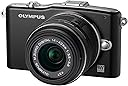
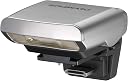
๐ท Own the moment with speed, clarity, and style!
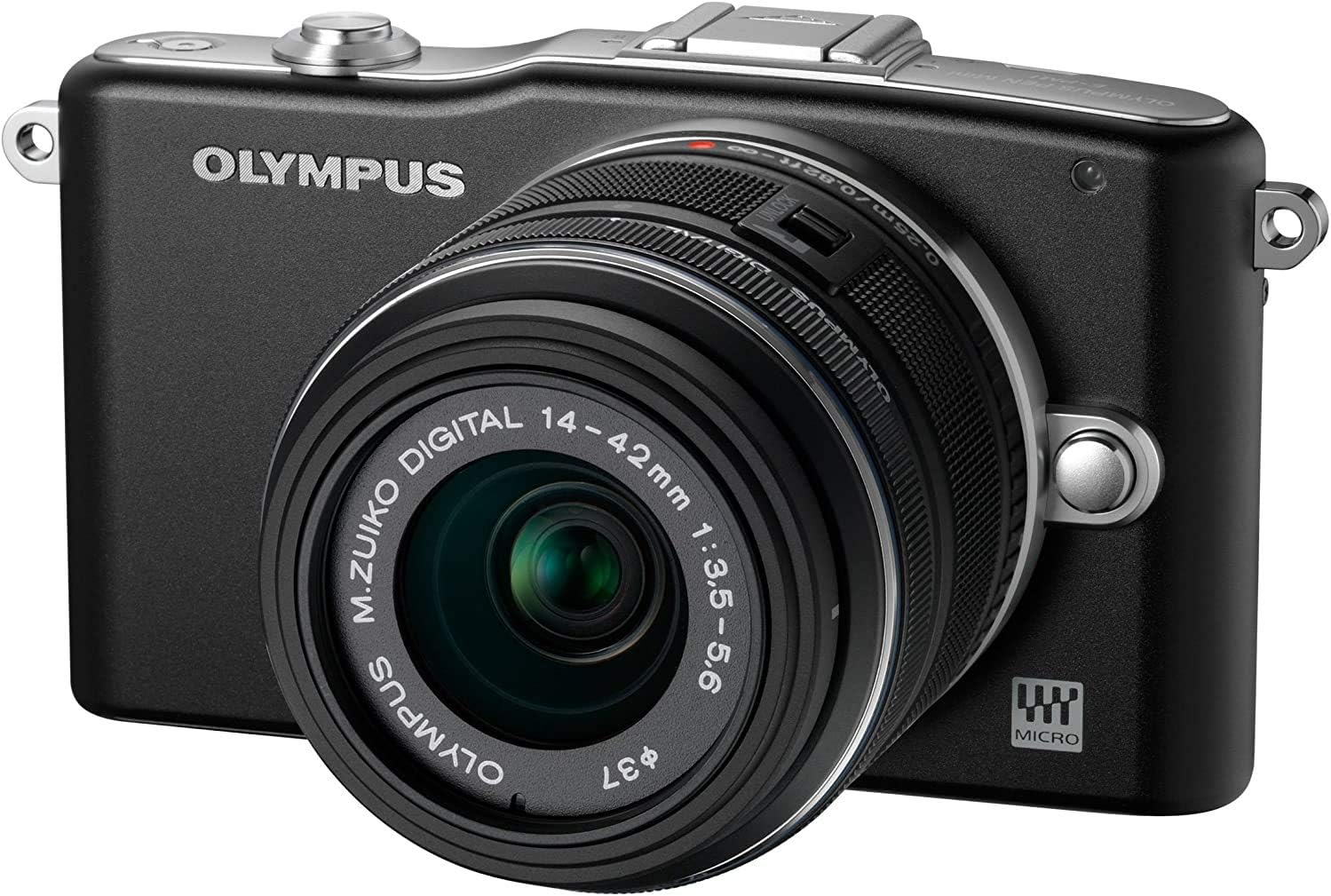
The OM SYSTEM OLYMPUS PEN E-PM1 is a sleek mirrorless camera featuring a 12.3MP Four Thirds CMOS sensor, ultra-fast 60ms shutter response, and a 3-inch LCD. It supports full HD 1080p video recording with high-quality stereo sound, advanced autofocus with face and eye detection, and a versatile 14-42mm lens. Lightweight and portable, itโs designed for professionals and enthusiasts who demand speed, precision, and stunning image quality in a compact form.
| ASIN | B005JRIJWA |
| Age Range Description | Kid |
| Aperture modes | F2.8-F4.9 |
| Are Batteries Included | Yes |
| Aspect Ratio | 4:3 |
| Auto Focus Technology | Continuous, Contrast Detection, Face Detection, Live View, Multi-area, Selective single-point, Single, Tracking |
| Autofocus | Yes |
| Autofocus Points | 35 |
| Best Sellers Rank | #765,619 in Electronics ( See Top 100 in Electronics ) #3,164 in Mirrorless Cameras |
| Bit Depth | 8 Bit |
| Brand | Olympus |
| Built-In Media | Camera Body & Battery & Charger |
| Camera Flash | Built-In |
| Camera Lens | 14-42mm |
| Color | Black |
| Compatible Devices | [Devices with HDMI, USB, and SD/SDHC/SDXC card slots] |
| Compatible Flash Memory Type | SDHC, SDXC |
| Compatible Mountings | Micro Four Thirds |
| Connectivity Technology | HDMI, USB |
| Continuous Shooting | 5.5 |
| Customer Reviews | 4.4 out of 5 stars 64 Reviews |
| Digital Scene Transition | False |
| Digital-Still | Yes |
| Display Fixture Type | Fixed |
| Display Maximum Resolution | 460,000 |
| Display Resolution Maximum | 460,000 |
| Display Type | LCD |
| Effective Still Resolution | 12.3 MP |
| Expanded ISO Maximum | 25600 |
| Exposure Control | shutter priority |
| File Format | AVI |
| Flash Memory Bus Interface Type | [Multiple] |
| Flash Memory Type | SD/SDHC/SDXC |
| Flash Modes | Fill Flash |
| Flash Sync Speed | 1/160_sec |
| Focal Length Description | 42 millimeters |
| Focus Features | Contrast Detection |
| Focus Mode | Automatic AF (AF-A) |
| Focus Type | automatic with manual |
| Form Factor | Mirrorless |
| Generation | 1 |
| Global Trade Identification Number | 00050332180642 |
| HDMI Type | Type C Mini HDMI |
| Hardware Interface | SDHC, SDXC |
| Has Color Screen | Yes |
| Image Capture Type | Stills & Video |
| Image Stabilization | Sensor-shift |
| Image stabilization | Sensor-shift |
| Item Weight | 0.58 Pounds |
| JPEG Quality Level | Normal |
| Lens Type | Standard Zoom |
| Manufacturer | Olympus |
| Manufacturer Part Number | V206011BU000 |
| Maximum Aperture | 3.5 Millimeters |
| Maximum Focal Length | 42 Millimeters |
| Maximum Image Size | 12.3 MP |
| Maximum Shutter Speed | 1/4000 Seconds |
| Metering Methods | Multi, Center-weighted, Spot |
| Minimum Focal Length | 14 Millimeters |
| Minimum Shutter Speed | 60 seconds |
| Model Name | PEN E-PM1 |
| Model Number | V206011BU000 |
| Model Series | PEN |
| Movie Mode | Yes |
| Number of Diaphragm Blades | 7 |
| Optical Zoom | 3 x |
| Photo Sensor Resolution | 12 MP |
| Photo Sensor Size | Four Thirds |
| Photo Sensor Technology | CMOS |
| Real Angle Of View | 74 Degrees |
| Recording Capacity | 29 Minutes |
| Remote Included | No |
| Screen Size | 3 Inches |
| Sensor Type | CMOS |
| Shooting Modes | Macro, Night Portrait, Panorama |
| Skill Level | Professional |
| Special Feature | Lightweight |
| Specific Uses For Product | Photography |
| Supported File Format | AVI |
| Supported Image Format | JPEG |
| Total Still Resolution | 12 MP |
| Total USB 2.0 Ports | 1 |
| Total USB Ports | 1 |
| Total Video Out Ports | 1 |
| UPC | 050332180642 |
| Unit Count | 1.0 Count |
| Video Capture Format | AVI, MJPEG |
| Video Output | HDMI |
| Video Resolution | FHD 1080p |
| Viewfinder | Electronic |
| Warranty Description | limited 1 year parts and labor |
| White Balance Settings | Auto |
| Wireless Technology | Yes |
| Write Speed | 5.5 fps |
| Zoom | Optical Zoom |
R**A
Cool shooting in a small package
I am really enjoying this camera. The auto focus and shutter response are very fast, color is excellent, and with a little tweaking and getting used to the sparse buttons and wheels, most of the settings you'll use a lot are within quick reach. Its small size is a giant asset, making it very easy to take with you anywhere. To compliment this, it only takes about two seconds from cold/off to be on and ready to shoot. I have larger than average hands (without a lens I can almost hide the body itself in my hand), and while I wish there was some sort of snap-on grip out there, I don't feel klutzy shooting with it. The one downside is performance in low light, especially at the higher ISOs -- anything over 1000 and you can pretty much expect some noise. Also, the auto focus speed suffers dramatically, even when it fires a red LED as a sort of flashlight to find something to focus on. I haven't had occasion to play with the detachable flash much as of yet, but at first blush it works about like any point-and-shoot flash. I know you can adjust it via the camera's setup menus but I haven't toyed with that yet. I've taken a couple short videos at 1080p and it performs alright, although that feels more like an afterthought. There aren't many options there and the little built-in mic is better than a cell phone and not as good as a low-end camcorder, particularly if there is any wind or background noise. All in all, it's great for a small camera to carry with you and take great stills under most circumstances. The 4/3 form factor is gaining popularity and there are a LOT of lenses and accessories for this camera, so for the price, you might be able to do better but I can't see how. If I could, I would probably rate it 4.5 stars for the low light performance and vanilla video shooting, but the value overall is so high I can easily rounding it up.
D**T
Great camera, great value, but slightly crippled user experience
I purchased my E-PM1 as an "upgrade" from my 2-year old Olympus E-P1, which of course is a more high end camera in some respects, but was simply getting a bit old and felt slow to me. I put "upgrade" in quotation marks because the E-PM1 isn't really meant as an upgrade from the E-P1 because the two cameras target separate customer audiences. But -- and I hope my review will be able to demonstrate this -- it certainly is possible to take this upgrade path if you've used the E-P1, as long as you're aware of what you're gaining and losing during the upgrade. Because of this, I'll focus this review on the differences (good and bad) between the old E-P1 and this new E-PM1: E-PM1 advantages: * Much faster focus algorithms - even with the same lenses, the PM1 focuses noticeably faster. With the new lenses, it's faster than any non-dSLR camera I've ever used. * Extremely lightweight and small - I think I managed to shave off another 100 grams of total weight in my camera bag with this upgrade! * Much improved kit zoom in terms of size and focus speed/noise. Although the lens mount is in plastic, it doesn't seem like there will be any problems with worn out mount connections. * Slightly, slightly better high ISO performance, though this is only confirmed by reading professional reviews. * Up to 5 fps burst mode - really impressive. * Nicer menu interface (though menu layout is mostly unchanged). * Comes with a useful snap-on flash that I've really missed on the E-P1 at e.g. very dim party nights. Now I just have to remember to bring it along with the camera. :) E-PM1 disadvantages: * I definitely preferred the retro design of the E-P1, but I was happy to give it up in favor of a much more portable package. * There is absolutely no grip on the E-PM1, making it a bit hard to hold. You can essentially forget about holding the camera with just one hand. * For some reason, Olympus leaves out a basic orientation sensor in their simpler models, which means that if you take photos in portrait mode, you have to manually rotate the photos on your computer. Not a big deal, but I can't understand why they would take out such a basic feature -- there's not a single mobile camera phone out there that doesn't include it, so it can hardly be a size (or cost) issue. * I really miss at least *one* more programmable Fn button, or at least the freedom to assign *any* feature to the one that exists (the Rec button). For some reason, Olympus decided to omit certain essential features that you can assign, which means that some combinations of direct button access aren't possible. * The video mode is crippled in the sense that it's no longer possible to re-focus while recording by e.g half pressing the shutter (or assigning the AEL/AFL lock button to focus). It's possible to program the AEL/AFL function (which can be assigned to the Rec button) to re-focus while in Manual mode when taking photos, but for some reason Olympus forgot to inherit that feature when switching to video mode. So, the only way to re-focus while recording a video is to give the control over entirely to the camera's hunting focus algorithms by switching over to continuous focus. This is a shame, really, and it makes the video feature much less useful to me. * The screen, while higher resolution than on the E-P1, actually ends up being a disappointing experience because of its aspect ratio. This is a widescreen (16:9), while the E-P1 had a lower resolution 4:3 screen. Because both screens are labeled as 3" sized, the widescreen actually ends up being a lot smaller if you still shoot your photos using the sensor-native 4:3 aspect ratio. (This is the same thing that happened a decade ago when you compared an old 28" TV with the, then, new 28" widescreen TVs -- the latter ended up being a much smaller screen in most practical purposes.) If would be nice if Olympus gave you the option of only seeing 16:9 cropped version of the view when framing a photo, while still actually recording the full frame (this is admittedly possible if you shoot in RAW, which I never do). Overall, by selling my old E-P1 and buying the new E-PM1, I ended up spending an additional ~220 USD, which, all in all, feels like a pretty cheap upgrade. The E-PM1 is better than the old E-P1 in many important respects (to me) such as overall size/weight, autofocus speed, and flash -- but it's admittedly a step back in some others. As an interim upgrade until the "next big thing" comes out, it feels like a good choice to me in the end. But if you own an E-P1/E-P2 and plan to hold on to your next camera upgrade for a long time, I would suggest you wait until sometime like a future E-P4 is announced, which may be a far more significant upgrade with (supposedly) a much improved sensor.
M**Y
My first micro four thirds camera
Update (4/27/2012) ============== Note about Olympus service. It turns out that my camera had an issue with taking picture at fast shutter speed (1/4000s). I called the service and sent it in. It was fixed by week's end, and was shipped it out by 2nd Day Air. It was all for free as my camera is still under warranty. I did not get a refurbished unit; I got mine back. When I tested my 'fixed' camera, I found everything was working as expected and no more problems at high shutter speed. Big kudos for Olympus service! Update (2/6/2012) ============== One key feature I forgot to mention is the in-body image stablization (IBIS). Olympus has the IBIS whereas Panasonic only supports the IS built into the lens. There are PROs and CONs of IBIS. However this comes in handy in many cases, and I prefer camera having IBIS where some lenses do not come with IS built-in (OIS). Some of my lenses do not have OIS, and if I do not use IBIS on Olympus, images would not be as sharp. On the other hand, people say that IBIS is not ideal for the video recording. I have not noticed much, but I can see how. On the other hand, Olympus will announce E-M5 (OM-D family) this week. This one will support 5 axis IS (still an IBIS) which is expected to be much better than the IBIS that current models have. Some on the DPREVIEW forum say that this one will be better than OIS... we'll have to wait for some product review for the verdict. Important Update (11/21/2011) ===================== Firmware version 1.1 is now available from Olympus. It was surprising from a company that is going through a financial trouble :) The firmware version 1.1 is supposed to address an issue with EyeFi (Wifi SD + memory) card. Although I do not use the EyeFi card, I thought I will give it a try and updated my camera with some worries as one reviewer on DPREVIEW.com reported that camera became 'brick' after the update. I used 'Olympus Digital Camera Updater' software that came with my camera. I used my Mac Mini to update the firmware. Everything took less than 2 minutes, and I got large "OK" sign on the LCD display. Upon recycling the power, the camera reported firmware version 1.1 correctly. I took about 50 shots after the update, and so far so good. My original review ============ This is my fourth camera purchase this year... yet this is the best one. My other three cameras were point-and-shoot cameras that gave me some good photos but in-door shots with high iso gave me very grainy images. Nikon P300 is pretty good with F1.8; however image sensor was little too small and that results in lower image quality in some occasion. I also have Canon T1i which takes photos with really good image quality; however I run into the portability issue. I'm not as big of a photo enthusiast (I know... I just love buying new camera) and I do not feel comfortable carrying my Canon T1i everywhere. It is simply too bulky. My definition of 'perfect' camera is one that I can take most everywhere and take photos with good image quality in every situation. I did a lot of research for the 'perfect' camera, and I quickly came down to the following selections: 1) Sony NEX family - Sony NEX 3, 5, C3, 5N, and 7. ------------------------------------------------------------- These are wonderful camera. Small, and versatile, and especially with APS-C size image sensor, image quality (IQ) rivals regular dSLRs. However the limitations are the fact that they use Sony proprietary lenses and there are limited number of NEX lenses. 2) Samsung N100/N200 ------------------------------------------------------------- These are similar to Sony NEX. I haven't seen them in person; however these should deliver similar IQ with the APS-C size sensors. However they do have the same issue of using Samsung proprietary lens mount + format. 3) Nikon 1, Pentax Q, and Fujifilm X100 ------------------------------------------------------------- Ok, Fujifilm X100 has APS-C size sensor; however it has a single fixed lens on the camera. Good lens, but you cannot replace lens. Nikon and Pentax recently announced their new compact system cameras, however their system uses smaller size sensor. Pentax uses even smaller and Nikon uses sensor about 1/2 of Micro Four Thirds. I like Nikon but I felt the lens collection + size sensor was disappointment at this time. 4) Then there are Micro Four Thirds cameras... these include Olympus e-P1,P2,P3, e-PL1,PL2,PL3, and e-PM1 and Panasonic GF1, GF2, and GF3, and other G series cameras. ------------------------------------------------------------- Micro Four Thirds cameras can use any lenses that adhere to the Micro Four Thirds standards. Therefore there are more lens selections available at the time of my research than any other compact system cameras. My decision was more of my budget and my future direction... I want to build my lens library first; however I wanted to get best value for my budget. In my opinion, Olympus e-PM1 was the best choice. My selection of Olympus E-PM1 was for its compact size and versatility of the camera. yes, it may not have all physical control buttons. That was problem when I was looking at the camera; however it's not as bad as I thought. You can get to the settings quickly and you actually have control of most of settings that you can think of... And you can easily set your focus area, if you don't want the camera to choose for you :) Based on my research Olympus E-PM1 has pretty much the same hardware as more expensive and little bigger E-PL3. This means that it now has new dual core image processor (TruePic VI) and very fast auto-focus system. This all means that this Olympus E-PM1 is very responsive and good performer in everyday use. It's been about a week and I took almost 900 photos with single battery charge(battery life is good). I now have Panasonic 20mm F1.7 pancake lens on the camera and that one is really good for photo taking. (I won't recommend it for video.. due to noise issue). With my F/1.7 lens, I haven't really had need for a flash on the camera. In fact, I have not even tried it yet. Camera takes good IQ and very fast auto focus. I love how i can control so many settings on the camera. I don't think I had this much fun with my Canon T1i. NOTE: For Mac users out there, this ACHVD format on 1080i video would be little problem as there are no native support for the format yet. Pros for Olympus E-PM1 -------------------------------------------------------------- - Compact size (smaller than other micro four thirds) - Good Image Quality (comparable to dSLRs) - Fast auto focus speed - large number of available lenses (micro four thirds) - Available Hot Shoe; you can use external flash Cons for Olympus E-PM1 -------------------------------------------------------------- - no built-in flash (having something is better than nothing) - not pocketable, unless you are talking about your winter jacket - Limited availability of button control; it's ok but for some this would be strong 'con" - Video format (ACHVD MTS format is not for computer... Mac software not as widely available) - Built-in image stabilization may not work perfectly for the video; it works well for still images. - (UPDATE 11/15/2011) It may be my camera, however I cannot use shutter speed 1/3200 or 1/4000s. Images get too dark at the bottom of picture. However I rarely need these shutter speed; therefore I do not see this is a show stopper. * Image Sensor size discussion -------------------------------------------------------------- Here are some measure of image sensors used on various digital cameras today: Typical point-and-shoot, sensor=1/2.33", sensor size=~28.5mm^2, crop factor=5.62 Advanced point-and-shoot, sensor=1/1.6", sensor size=~48.6mm^2, crop factor=4.3 micro-four-thirds, sensor=MFT, sensor size=~225mm^2, crop factor=2 Canon dSLR, sensor=APS-C, sensor size=~329mm^2, crop factor=1.6 Other dSLR (Nikon,Sony), sensor=APS-C, sensor size=~369mm^2, crop factor=1.5 Olympus E-PM1 has micro four thirds format sensor, i.e. it has surface area of 225mm^2 which is significantly larger than typical point-and-shoot camera. Olympus E-PM1 has more than 4.6x bigger image sensor to pick up more lights than advanced point-and-shoot camera. * Comparison between Point-and-Shoot and Olympus E-PM1 ------------------------------------------------------------------ Olympus E-PM1, as a micro four thirds camera, has significantly bigger MOS sensor and you can go to ISO1600 and still have good image quality. I posted an example of image that was taken with ISO1600 with F11. This still has fairly good image quality even with high ISO. Of course, the image quality would be less accurate in dimly lit condition. However Olympus E-PM1 still has much better image quality than other point-and-shoot camera. I compared picture taken with Olympus E-PM1 and Nikon P300, and Olympus wins hands down. * Olympus E-PM1 User Interface ----------------------------------------------------------------- As noted above, Olympus E-PM1 does not have as many manual control buttons. You don't even have 'mode' button. P/A/S/M has to be selected via menu button. Although this may be problem for some users, many users will find it adequate. There are even customizable buttons that you can assign "video record" button as "DOF preview". Other controls, such as changing ISO, aperture value, shutter speed, are fairly simple. Olympus E-PM1 gives you so much control over camera settings. * RAW image format (Updated 11/15/2011) -------------------------------------------------------------------- Olympus E-PM1 has good RAW image setting (.ORF format). Included Olympus Viewer 2 software can be used to develop RAW images into JPG format images. I am happy to report that the following software support E-PM1 ORF format: - Adobe Element 9 with the latest update (ACR 6.5 and later) - Aperture 3.2.1 Summary --------------------------------------------------------------------- Olympus E-PM1 is a solid camera with good functionalities. It is small enough to be almost pocketable yet provides many advanced functionalities that rivals entry level dSLRs. As a micro four thirds camera, there are good set of lenses from multiple manufacturers, and Olympus has built very responsive camera with good image quality (IQ) sensor with this E-PM1. This camera should appeal to those of you looking to move up to more advanced camera from their point-and-shoot camera or someone with dSRLs looking for a smaller, competent camera. I do admit that this camera is not 'perfect' camera; however this camera is one of the best value for a compact system camera today.
F**T
Great CSC for a fair price
I am very happy with my E-PM1. The 14-42 mm lens is a good compromise to maintain a portable size of the camera, while still being able to take all kinds of shots - there is no doubt that a strong tele lens (which can of course be purchased seperately later on) would be a valuable addition, though. The camera features a nice sequential shot mode (two speeds) and many photo effect modes (including drama mode, diorama and others). The only mode that disappointed me really, was the panorama mode, which requires you to stitch multiple images together yourself using computer software - I've owned cell phones that perfectly stitched two to three shots together for a nice panorama as you took them, so I was surprised the camera doesn't do that. I am still giving this camera 5 stars and believe it deserves them!
D**L
Easy to use, after you read the instructions a couple times
Easy to use as a beginner right out the box. Set everything to Auto and you can take good pictures of still life and non action portraits. With a little reading, you can take some really good Action/Sports shots. With alot of reading, you can take GREAT shots. When you want to play around with all the filters, it is a breeze to scroll thru them all. I tend to use a tripod and take a pic, then scroll to the next filter and do it over and over until I have done them all. And I will do this for everything from Portrait to Landscape to Kids playing... Taking notes along the way keeping track of the amount of waiting after I press the button until I hear the click of the picture. It is usually pretty fast, but in my last outing to the Rally in 100 Acres Wood, I somehow went from Sports (8 frames per second) to Landscape/portrait without knowing it and ended up with a 2 second wait and a blurry picture of dirt and gravel and no car. It took all of 2 seconds to fix that back to Sports for the next car and I didn't have any trouble with it the rest of the day. Battery life is great. But there is not an auto shut off or at least I haven't found it yet. Took 533 pictures, then left it on for 2 hours while we waited for the last rally stage to start. Battery was blinking when I took it out the case and still got 16 - 6 second 1080p movies of cars rocketing by with the night shot filter on. The date issue: Every time I charge the battery, I have to go to setup and put the date and time in. Not sure about this. Changing lenses is easy, just don't loose the back cap. The camera didn't come with a cover so you have to always have a lens on to protect the inner workings.
P**L
Nice photos, easy to use, very nice form factor
Just got this delivered on Monday, and have been shooting randomly since. Today (Friday) was the first day I took it on location to my son's school and shot a bunch of pictures with it, both indoors and outdoors. My general conclusion is that this is a nice little camera, takes good pics even without messing around too much with the settings. If you really want to fine-tune your pictures then you'll need to invest a bit of time to tweak the settings just the way you want it to get the result you are looking for. In my case, I've been trying to get a shallower depth of field in many of my pics but I gave up a lot on capturing the moment (I'd be too busy messing around with the on screen menu and miss the key moment worth capturing). I think it's about getting used to the camera and how it behaves. I have to unlearn my habits of using my old Nikon workhorse of a D70 and adjust myself to this cam. The form factor is wonderful, very compact. More specific info to come, but right now I'm generally very pleased with it since I now have a very very portable camera that I know I will be using more to capture important moments.
K**S
Fantastic cam to go anywhere with
Bought this because the price was down to an incredibly affordable level, and I couldn't resist but to get one just so I could try it out and was thinking of returning if I was going to end up not liking it. Turned out quite the opposite, I like it, a lot ! At first, reviews all over the web mentioned something about the indepth menu system where you can do a ton of settings even to the extend that some cannot be found on an APSC DSLR, but I couldn't find it. I was looking around and found that not only did I have to update it with the latest firmware (from 1.0 to 1.4), I also had to enable that indepth menu. Once I did it, the whole thing became very capable all of the sudden, I was able to use the SCP or Super Control Panel to do many settings on one panel on the LCD screen, an extremely handy feature that was not turned on by default. The quality of the pictures, JPGs are a bit too soft and muddy, even when I turned off all noise reduction and noise filter, especially in the darker and shadowy areas on a picture, there are a lot of loss of details. The magic is to shoot RAW, but only RAW. You can view it on Windows 7 and beyond PCs by downloading and installing the Microsoft Camera Codec Pack, then use the Windows Photo Gallery viewer to view the ORF files (which is Olympus's RAW format). Once you view your photos shot in RAW(ORF), you'd be amazed in how beautiful the photos are, there are zero to very low loss of details in dark areas, and things just look absolutely stunningly beautiful, and are so good that the result rivals the much costlier DSLRs ( I have a Canon T4i and a Nikon D5100 and a D90). I am absolutely in love with this camera, and have ordered a case for it but still haven't received yet. At this price point, the camera gives me amazing results (in RAW), I don't care much about not having a viewfinder, but even that I could buy as an add-on later if I really want one. I just take this Oly out wherever I go these days, in my jacket's pocket ! You just can't beat the portability of this camera with an M4/3 sensor inside that goes everywhere with you at this price !
8**I
Not easy to use software
I purchased this camera so I could use other olympus lenses that i have, it came with a small flash attachment that actually makes the subjects darker than with out useing it in Auto mode. The software downloading of pictures is not a one step process as with Cannon or Nike, you have to go through 4 steps to download images and then you have to make sure they are in your picture file before you delete the camera pictures--which you have to do one at a time. Not easy to use and picture quality is very poor in the auto modr, have not tried the manual but I should not have to do that. When you plug the camera into the computer it should automatically start the programe to download and you should just have to select OK, not so with this software--even with the latest upgrades. Buy a Cannon , they are easier to use and take way better picture.
R**R
Fairly good image quality with not so easy controls
This camera gives decent images. But quality comes at a cost. The camera has hardly any dedicated buttons. Almost every thing is menu driven. And the menu is not too smart either. It takes some time to get used to the menu. There are no buttons for iso setting or white balance. One can get those controls by reassigning some buttons for new functions, but you will lose the original function of those buttons. It is light and mercifully has only 12 megapixels. That will not clog your hard disk with large files. As a general purpose camera this is a good camera. But if you are into sports and action photography look for something else. It is light in weight and I prefer light weight cameras. If you are happy to put a camera in one setting and go on shooting, this camera will be OK for you. That is because changing from one setting to another takes some time, going through the menu. I guess they cut corners with the buttons to save on cost. For the price, it is a good buy.
Trustpilot
2 weeks ago
2 days ago